Choose a controller for the device that runs your co-op puzzle games, then check each game’s controller support and local-player limit. An Xbox controller suits an Xbox or supported Windows PC setup, DualSense is the direct choice for PS5, and Switch players can choose between a full-size Pro Controller and a Joy-Con arrangement that their game supports. Connection options and features vary by device and game, so they should not replace those checks.
Who is choosing a controller?
Mixed-platform flatmates
If the shared setup includes Xbox and Windows PC, look for official support on both devices. For PC play, check the intended game’s controller support separately; Steam, for example, lets shoppers filter games by supported controller type.
PS5 couch co-op players
When several flatmates regularly play on one PS5, check the game’s local-player limit as well as the number of controllers available. PlayStation says a PS5 can use up to four controllers at once.
Nintendo Switch group players
A full-size Pro Controller gives an individual player a conventional layout, while Joy-Con can be arranged in different ways for supported games. Check the game’s required layout before planning to give each person one Joy-Con.
What matters when buying?
Start with the device hosting the game and the number of people joining it. Those choices determine which controller layouts and connection details are worth comparing.
Xbox or Windows PC
Choose when: The flat plays on Xbox or a supported Windows PC and wants an Xbox controller format across those devices.
Bear in mind: PC game support still varies; Microsoft says most Xbox Accessories app features on Windows do not work over Bluetooth.
PS5
Choose when: The shared console is a PS5 and each local player needs a DualSense controller.
Bear in mind: DualSense can connect to supported computers and mobile devices, but its feedback features do not carry over to every game or connection.
Nintendo Switch
Choose when: The flat plays on Switch: consider a Pro Controller for each player wanting a full-size layout, or Joy-Con for a game that supports the intended arrangement.
Bear in mind: According to Nintendo, connecting Bluetooth audio limits the Switch to two wireless controllers.
| Concern |
What to check |
Who it matters to |
| Device and game compatibility |
Match the controller to the host device; check the puzzle game’s controller-support information. |
If our flat uses more than one platform, I need a controller that works with the device hosting the game, not just one that can connect to a computer. Roughly 36% of consumers would put device and game compatibility first. |
| Player capacity |
Check the game’s local-player limit and the host device’s controller limit under the connection setup you will use. |
When several of us join the same session, I need enough active controller inputs for everyone. Around 29% of consumers would make player capacity their primary concern. |
| Sharing and charging |
Check how the controller charges and whether moving it between devices requires pairing again. |
If different flatmates take turns using the equipment, I want controllers ready to hand over without delaying the game. Approximately 21% of consumers would prioritise sharing and charging. |
| Device and feature flexibility |
Check supported devices and whether desired features work with the intended game and connection method. |
When I also want to use a controller away from its main console, I care which functions remain available on that device. Roughly 14% of consumers would place that flexibility first. |
Buying pitfalls
-
Assuming PC connectivity means game compatibility
A controller can connect to a PC without being supported by every co-op puzzle game. Steam’s Controller-Friendly filters distinguish games by supported controller type.
Check each intended game’s store page for controller support and local-player capacity before adding controllers.
-
Leaving Bluetooth audio connected for a larger Switch session
Nintendo says a Switch with Bluetooth audio connected can use no more than two wireless controllers, even if the planned game has more players.
Disconnect Bluetooth audio before connecting a third wireless controller, or arrange audio another way.
-
Choosing DualSense for PC feedback features alone
PlayStation says DualSense haptic feedback on PC requires USB and a supported game. Adaptive triggers also depend on game support.
Check the game and intended connection first; treat those features as conditional rather than a reason to assume every PC game will use them.
-
Assuming similar controller listings describe the same variant
A similar name or colour does not establish which model or accessories you will receive.
Check the complete model, platform version and included accessories on the product page before choosing a variant.
Controller brands to consider
Xbox
Microsoft’s Xbox Wireless Controller is a native Xbox option with stated support for Windows PC, iOS and Android.
- Microsoft lists Xbox Wireless and Bluetooth connections for use across supported devices.
- For Windows configuration, Microsoft says most Xbox Accessories app features are unavailable over Bluetooth; a USB cable or Xbox Wireless Adapter may be needed.
PlayStation
DualSense is the direct PS5 controller route and can connect to supported PCs, Macs and mobile devices by USB-C or Bluetooth.
- PlayStation says up to four controllers can be used simultaneously on PS5.
- PlayStation says haptic feedback on PC needs USB and game support; it is unavailable on Mac and mobile devices. Adaptive triggers also require game support.
Nintendo
Switch players can consider a full-size Pro Controller for an individual player or a Joy-Con arrangement supported by their game.
- Nintendo lists USB-C charging for the Pro Controller and says a Switch can pair up to eight wireless controllers in most circumstances.
- The usable controller count depends on the setup; Nintendo limits wireless controllers to two while Bluetooth audio is connected.
Joybuy controller choices
These controllers cover Switch shared-play arrangements, a PS5 or supported PC setup, Xbox or Windows PC play, and a PC or Switch connection option. Choose by the device and game your flat actually uses; a product’s connection options do not establish support for every co-op game.
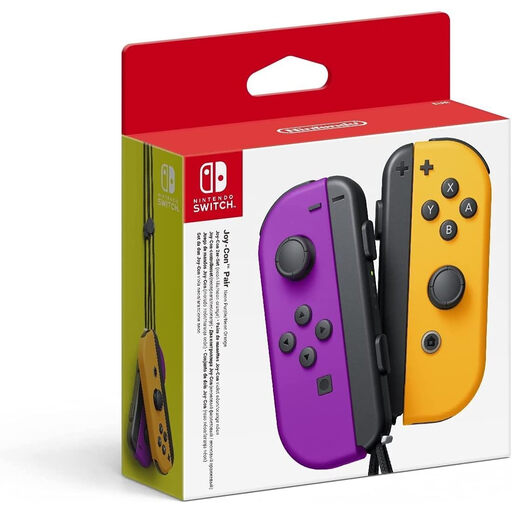 Image unavailable
Nintendo Joy-Con Pair – Neon Purple/Neon Orange
For Switch sessions where the game supports the intended Joy-Con layout, the two controllers can be used separately or attached to the console.
The listing states up to 20 hours of battery life. A Joy-Con Grip for combining the pair into a conventional gamepad is sold separately.
View on Joybuy
 Image unavailable
Sony DualSense Wireless Controller – HYPERPOP Remix Green
For a PS5 shared setup, or a supported PC game, check the game’s controller support and local-player limit before adding it.
The listing names PS5, PC, Mac and mobile compatibility, with USB-C and Bluetooth connections. PlayStation says PC haptics require USB and a supported game; adaptive triggers also depend on game support.
View on Joybuy
 Image unavailable
Lexip SteelPlay Twin Pads Controllers
For Switch play where the chosen game supports separate controllers, this detachable pair offers another shared-play arrangement.
The description lists Bluetooth, rechargeable batteries and up to 8 hours of playtime. Confirm the game’s supported controller layout before planning one controller per player.
View on Joybuy
 Image unavailable
Microsoft Elite Wireless Controller Series 2 – Xbox One/Xbox Series X/S/PC
For an Xbox or Windows PC setup, check the intended game’s controller support and local-player count before choosing this controller.
The listing describes USB-C, Bluetooth and Xbox Wireless connections, three onboard profiles and a rechargeable battery with up to 40 hours of stated playtime. Microsoft says most Xbox Accessories app features on Windows are unavailable over Bluetooth.
View on Joybuy
 Image unavailable
Machenike G3 V2 Tri-mode Controller – White
For a PC or Switch setup, confirm that the intended co-op game accepts this controller and supports the planned number of players.
The supplied pairing instructions name PC and Switch, with Bluetooth, 2.4G wireless and wired USB-C modes.
View on Joybuy
Common questions
How many controllers can we use for local co-op?
The limit depends on the device, connection conditions and game. PlayStation says a PS5 can use up to four controllers at once; Nintendo says a Switch can pair up to eight wireless controllers in most circumstances, although Bluetooth audio reduces its wireless-controller limit to two. Check the game’s own local-player maximum as well.
Can we use Bluetooth headphones during a larger Switch session?
Not if the session needs more than two wireless controllers while Bluetooth audio is connected. Nintendo sets that two-controller limit for this condition, so disconnect Bluetooth audio before connecting a third wireless controller.
Will a DualSense work with PC puzzle games?
A DualSense can connect to a supported Windows PC by USB-C or Bluetooth, but you still need to check the particular game’s controller support. PlayStation says PC haptic feedback requires USB and a supported game, while adaptive triggers also depend on game support.


