Developers with a small desk and few sockets
You want a keyboard that leaves room for your other equipment without needing a dedicated wall adapter. Check that you can charge it from an available computer USB port.


For browser-extension work at a desk with limited plug sockets, start with a rechargeable wireless keyboard that can charge from a USB port you already have available. Then choose between a smaller footprint, configurable shortcuts and a larger supported layout: compact boards can change how you reach coding keys, while full-size ergonomic designs need more desk space.
You want a keyboard that leaves room for your other equipment without needing a dedicated wall adapter. Check that you can charge it from an available computer USB port.
You move between an editor, browser developer tools and a terminal. Remapping or macros may matter more to you than getting the smallest possible keyboard.
You spend long sessions at the keyboard and would consider a split layout and wrist support, provided the larger board fits your desk.
Check how the keyboard charges before choosing its size or shortcut features: wireless operation alone does not tell you whether your available ports and cables will suit it.
| Concern | What to check | Who this matters to |
|---|---|---|
| Using no extra wall socket | Confirm that the model is rechargeable and that its charging cable fits a free, powered computer USB port. Check whether a wireless receiver would use another port. | I need the keyboard to work without reserving another mains socket, but can connect it for charging when necessary. Around 29% of consumers put avoiding an extra socket first. |
| Saving desk space | Compare the exact layout and dimensions with your available space; identify navigation, function or numeric keys reached through layers rather than dedicated keys. | If my mouse and work materials already crowd the desk, a smaller board matters more than a full set of physical keys. Desk space is the primary concern for around 29% of consumers. |
| Configuring coding shortcuts | Check remapping or macro support for the exact model and whether configuration needs a cable and compatible browser. | I repeat commands across coding tools and want to assign selected actions to convenient keys. Around 24% of consumers prioritise configurable shortcuts. |
| Typing setup for long sessions | Consider the keyboard shape, wrist support and tilt options, then check whether the whole board fits your desk. | During extended typing, I would give up some desk space for a layout and support features I find comfortable. Around 18% of consumers make their typing setup the main concern. |
A rechargeable keyboard still needs charging. Keychron says configuring supported keyboards through Launcher requires a cable.
Check the charging connector, supplied cable and spare USB ports before buying; if you want to configure keys, check the software connection requirements too.
A smaller layout can change how you reach navigation, function and numeric actions used in an editor or browser developer tools. UK-ISO and US layouts can also place familiar symbols differently.
Inspect images of the exact variant and work through your most-used shortcuts before deciding whether its key layout suits you.
Logitech describes the ERGO K860 as a split keyboard with wrist support, but its design features do not establish how an individual will feel using it.
Check the board’s size and physical layout against your desk and typing preferences. For persistent pain or injury, seek appropriate professional advice rather than relying on a product claim.
A product-detail page may remain accessible when that particular keyboard cannot be purchased; the Joybuy page for Apple’s British-English Magic Keyboard displayed an unavailable notice.
Confirm the current model, layout and availability on the product-detail page when you are ready to order.
Its referenced keyboards cover two different desk priorities: the compact MX Keys Mini and the full-size, split ERGO K860.
The K3 Max is a compact 75% option; the Q3 Max is a larger 80% tenkeyless option. Check the exact UK-ISO variant when comparing them.
Apple offers a British-English Magic Keyboard for a Mac-based setup.
These keyboards offer compact wireless layouts or a full-size UK-layout option for a socket-limited desk. Compare their key layouts and charging arrangements against your own ports and coding shortcuts; the US-layout models require particular attention if you expect UK key labels.
 No image available
Consider this UK-model keyboard if a compact board appeals to you but you want to check how readily your usual navigation and function-key shortcuts are reached.
Its name identifies a 75% wireless layout. Confirm the charging connection and any key-configuration features you need before buying.
 No image available
Consider this model if you want a compact board and plan to configure keys for repeated development commands, provided a US layout suits your typing.
The name specifies VIA compatibility, an 8000 mAh battery and hot-swappable switches. Check the exact US key placement and the charging routine that would suit your desk.
 No image available
Its compact format may suit a crowded desk if you are comfortable working with a US QWERTY layout.
The name identifies a 75% board with wired, Bluetooth and 2.4G modes. Check the charging connector and whether the exact model supports any key remapping your workflow requires.
 No image available
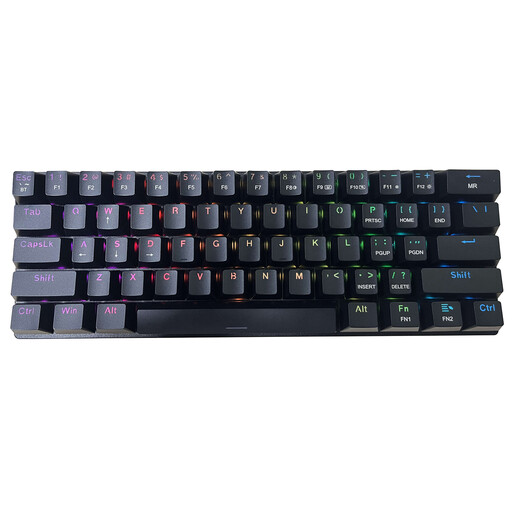
A 60% board is worth considering when desk area is especially tight, but check how you would enter your most-used function and navigation shortcuts.
The name specifies 61 keys, a rechargeable wireless design and a US QWERTY layout. Check that its key layers and symbol positions work for your development setup.
 No image available
Consider this UK-model Bluetooth keyboard if you would rather check a larger layout than adjust to the keys on a 60% or 75% board.
Measure the available desk area and confirm its charging connector and any shortcut-configuration features that matter to you.
Yes, if it is rechargeable and you can charge it through a suitable powered computer USB port instead of a dedicated wall adapter. Apple says its Magic Keyboard can charge through a USB-C port on a Mac; check the cable and available port for whichever model you choose.
A British-English or UK-ISO variant is worth checking if familiar key labels and symbol placement matter to your typing and shortcuts. Apple offers a British-English Magic Keyboard and Keychron identifies UK-ISO variants, but you should select the exact layout shown for the product you order.
You can on a model that supports the required remapping or macro feature. Keychron says its Launcher can configure supported keyboards, but its instructions call for a cable and a compatible browser; confirm support for the exact model before buying.
GOV.UK guidance says private individuals importing electrical products are not liable to comply with WEEE producer obligations. When the keyboard reaches the end of its useful life, check suitable electrical-equipment reuse or collection options.