Window-side code readers
If you regularly read dense code, terminals and documentation beside a bright window, screen reflections and stated brightness deserve attention before extra processing capacity.


Choose a laptop by checking the exact display's stated SDR brightness and reflection treatment before paying for processor capacity your coding workflow may not need. Apple specifies up to 1,000 nits SDR brightness for current MacBook Pro displays, while a cited Lenovo ThinkPad X1 Carbon configuration combines a 500-nit IPS display with anti-glare treatment; neither specification guarantees a clear view at every window angle. Make sure the operating system, development tools and peripherals suit your work before settling on a screen.
If you regularly read dense code, terminals and documentation beside a bright window, screen reflections and stated brightness deserve attention before extra processing capacity.
If your work depends on a particular operating system, enterprise toolchain, virtual machine, container workflow or peripheral, a brighter screen cannot make an incompatible laptop suitable.
If the laptop moves between a window-side desk and other work locations, weigh the display against the configuration, connections and carrying burden you will live with elsewhere.
Confirm the software and operating system your work requires, then compare the exact screen options available on suitable laptops. Check the display at your intended window position where possible, rather than treating a brightness figure as a promise that reflections will disappear.
| Concern | What to check | Who this matters to |
|---|---|---|
| Readable code in window light | Compare the exact panel's stated SDR brightness and surface finish. Do not substitute an HDR peak figure for an SDR rating. | When reflections obscure dense code at the usual desk position, a legible screen takes priority over extra processing capacity; around 42% of consumers put window-side legibility first. |
| Development-stack compatibility | Check required tools, operating system, processor architecture and any container, virtual-machine or peripheral requirements. | If an editor, employer system or test environment requires a particular platform, the display cannot make an incompatible machine work; roughly 33% of consumers prioritise development-stack compatibility. |
| Workspace and portability | Check the selected configuration's memory, storage, connections, keyboard layout and package contents against your desk and travel needs. | A laptop that moves between workspaces also needs a manageable carrying setup and the right connections; about 25% of consumers make workspace practicality their primary concern. |
ASUS specifies 400 nits for the cited Zenbook S 14 WUXGA OLED option and separately lists a 500-nit HDR peak. Apple describes its MacBook Pro figure as SDR brightness for content in bright light. Those figures do not describe identical conditions.
Compare the exact panel's stated SDR figure and surface treatment before using an HDR peak number to judge window-side work.
Lenovo ThinkPad X1 Carbon and ASUS Zenbook S 14 screen options vary by configuration. A laptop-family name alone does not identify the panel or its finish.
Match the seller's exact configuration or part number to its display, memory, storage and connections before choosing.
The cited Joybuy listing for a MacBook Pro 14-inch M5 with 16GB memory and 1TB storage specifies a laptop and USB-C charging cable, but no power adapter. Package contents should be checked for the particular listing being considered.
Confirm whether your selected laptop includes an adapter and whether one you already own is compatible.
For that cited MacBook Pro listing, a compatible adapter would be needed separately if you do not already have one.
Microsoft states that Windows 10 support ended on 14 October 2025. An older laptop's operating system and hardware also need to suit your current development tools.
Check the supplied Windows version, Windows 11 eligibility and support for your required applications and processor architecture before choosing a legacy device.
These display examples apply to the stated product families and configurations, not to every laptop from each brand.
For a macOS coding workflow, Apple's current 14-inch and 16-inch MacBook Pro specifications describe Liquid Retina XDR displays with up to 1,000 nits SDR brightness for content in bright light.
A cited UK ThinkPad X1 Carbon Gen 13 Aura Edition configuration offers a Windows-oriented route with a 14-inch, 500-nit IPS display and anti-glare treatment.
The Zenbook S 14 (UX5406) offers a Windows OLED option that ASUS describes as anti-glare and low-reflection.
These laptops include Windows models and MacBook Pro configurations for consumers considering macOS. Choose among them by the exact display and configuration you will receive, as well as the software your coding workflow requires.
 Image unavailable
Consider this 14-inch model if your required development tools support Snapdragon X. Check the exact panel's brightness and finish against your window position before choosing it for a bright desk.
Named configuration: Snapdragon X processor, 16GB RAM and 512GB SSD.
 Image unavailable
This 15.6-inch Windows-oriented choice is worth assessing for a desk-based coding setup if its connections and software compatibility meet your needs. Check its display at the intended window angle rather than judging bright-light readability from the model name.
Named configuration: AMD Ryzen 7 170, 16GB RAM, 1TB SSD, GeForce RTX 5050 and a 144Hz FHD display.
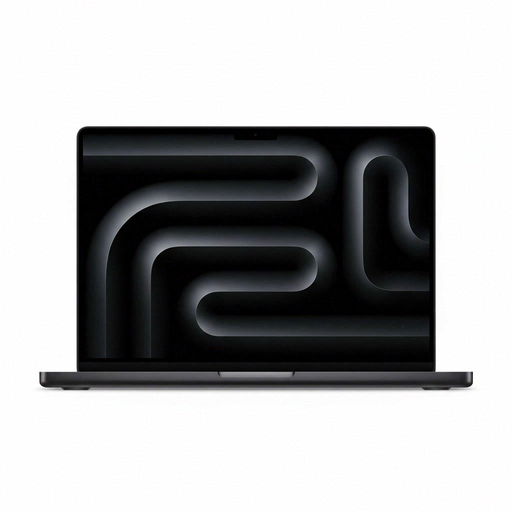 Image unavailable
Consider this MacBook Pro for window-side coding if macOS supports your development stack. Apple specifies up to 1,000 nits SDR brightness for current MacBook Pro displays in bright light; confirm the display specification and surface of this exact configuration.
Named configuration: M5 Pro with a 15-core CPU and 16-core GPU, 24GB memory and 2TB storage.
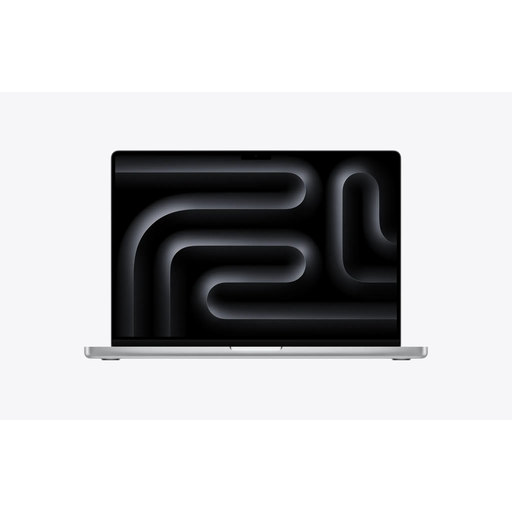 Image unavailable
This larger MacBook Pro is a macOS option to consider if its size suits your workspace and your tools run on macOS. Apple's current 16-inch MacBook Pro specifications state up to 1,000 nits SDR brightness in bright light; confirm the exact display surface and memory configuration before choosing.
Named configuration: M5 Max with an 18-core CPU, 32-core GPU and 2TB storage.
 Image unavailable
Assess this model against the applications you need to install: its named Windows 11 Home in S Mode configuration may require a different setup for your development workflow. Check the exact panel's brightness for your window position and whether 8GB memory and 128GB storage suit your projects.
Named configuration: AMD Ryzen 3 7320U, Full HD display, 8GB RAM and 128GB SSD.
Compare stated SDR brightness first for everyday code editing. Apple specifies up to 1,000 nits for SDR content in bright light on current MacBook Pro displays, while ASUS lists 400 nits and a separate 500-nit HDR peak for the cited Zenbook S 14 WUXGA OLED option; the figures describe different conditions.
An anti-glare or low-reflection specification does not guarantee readability at every window angle. The cited Lenovo ThinkPad X1 Carbon configuration has an anti-glare display, and ASUS lists a low-reflection Zenbook S 14 option, but you should also consider where direct reflections fall and whether you can reposition or shade the screen.
Check its route to a supported Windows installation before choosing it. Microsoft states that Windows 10 support ended on 14 October 2025; confirm the device's Windows 11 eligibility and whether your development tools support its operating system and processor architecture. Windows 11 installation minimums are not coding-workload recommendations.
A cooling-off period generally applies to eligible distance purchases from a UK business. Citizens Advice describes a 14-day period for goods bought without seeing them in person, subject to exceptions; check when it starts and the applicable return arrangements for your order. Remedies for faulty or misdescribed goods are separate from change-of-mind returns.