What matters when choosing a college laptop
Check the course’s named applications and assessment setup first; then weigh the specific machine’s condition, everyday portability and any individual equipment needs.
| Concern |
What to check when buying |
Who this matters to |
| Course compatibility |
Ask for the named software, supported operating systems, assessment method and any graphics or peripheral requirements. Compare them with the exact laptop configuration. |
If my course depends on particular applications or assessment tools, I need to know they will run before comparing hardware. Around 36% of consumers put course and assessment compatibility first. |
| Condition and ongoing use |
For a refurbished unit, check its exact configuration, battery information, included charger, condition, warranty and supported operating system. |
I want a refurbished device to remain suitable for my study, so I would check the condition and software support of the specific unit rather than relying on its model name. Around 29% of consumers put affordability and refurbishment risk first. |
| Daily portability |
Consider the listed weight, screen and keyboard comfort, charging access, webcam, microphone and the ports needed at home or college. |
I carry my study work between locations and want a workable balance between comfort and carrying convenience. Around 21% of consumers put a mobile study routine first. |
| Accessibility and peripherals |
Check that required assistive software, connected equipment and course files work with the proposed device and operating system. |
If I rely on assistive technology or a particular peripheral, I need the complete setup to work for my course tasks. Around 14% of consumers put accessibility or connected-equipment needs first. |
Joybuy laptops for college study
These Joybuy laptop options provide different listed configurations to compare with your course requirements and study routine.
 No image available
Lenovo IdeaPad Slim 3 15.3-inch WUXGA Laptop (83K7009MUK)
Compare this Windows configuration with your course’s required applications and hardware before choosing it for study across locations.
AMD Ryzen 5 7535HS, 24GB DDR5 RAM, 512GB PCIe SSD and Windows 11 Home. The listing specifies a 15.3-inch WUXGA display; the product description gives a weight of 1.59kg and lists Wi-Fi 6 and an HD webcam.
View on Joybuy
 No image available
Lenovo IdeaPad 1 15-inch Full HD Laptop
Check that Windows 11 Home in S Mode and the listed configuration suit your course software and file requirements.
AMD Ryzen 3 7320U, 8GB RAM, 128GB SSD and a 15.6-inch Full HD display. The product description gives a weight of 1.58kg and lists Wi-Fi 6, USB-C and a camera privacy shutter.
View on Joybuy
 No image available
ASUS Vivobook 15 X1504VA
Compare the storage and memory with your course’s actual software and local-file needs; the listed configuration alone does not establish suitability for a particular application.
Intel Core 5 120U, 24GB DDR5 RAM and a 1TB SSD. The product description lists a 15.6-inch Full HD IPS display, a weight of 1.70kg, Wi-Fi 6, HDMI and an integrated webcam.
View on Joybuy
 No image available
Acer Aspire Lite AL15-36P-C29Z 15.6-inch Full HD Laptop
Check that the Windows 11 Home configuration and listed storage suit your course applications and the files you need to keep locally.
Intel N150, 8GB DDR4 RAM and a 128GB SSD. The product description gives a weight of 1.53kg and lists an HD webcam, HDMI, USB-C and USB-A ports.
View on Joybuy
 No image available
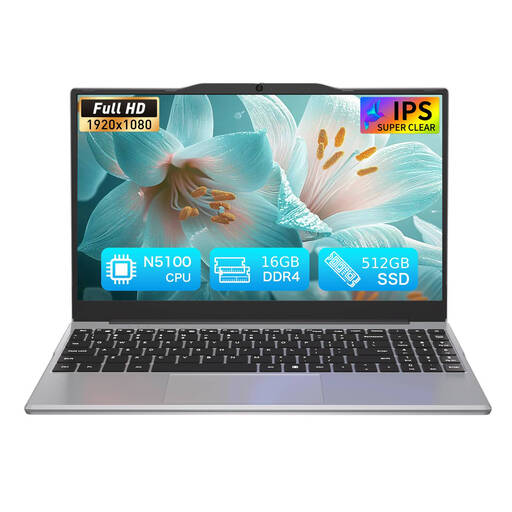
Auusda T141J Laptop, 14.1-inch
Check the N5100 configuration against the specific applications and assessments required by your course before choosing it as your main study device.
The listing specifies an N5100 processor, 16GB DDR4 RAM, a 512GB SSD and a 14.1-inch 1920 × 1080 display. The product description gives an approximate weight of 1.214kg and lists Wi-Fi 5 and Bluetooth 5.0.
View on Joybuy
College laptop FAQs
What specification does my course require?
Ask your course or college for the named applications, supported operating systems, assessment requirements and any hardware or peripheral guidance. UWE Bristol and Loughborough University advise checking course software needs; requirements from another institution are not a substitute for your own course guidance.
How should I check a refurbished laptop’s battery and software support?
Ask the seller for information about the particular unit’s battery, condition and included charger, then check its operating system and supported upgrade path. Microsoft’s PC Health Check can assess Windows 11 eligibility and provide battery-capacity information on eligible devices; a new-model battery claim does not establish the condition of a used laptop.
Will adding a keyboard make a tablet suitable for all college assessments?
No; a keyboard does not provide an unavailable application or make an unsupported assessment platform work. The University of Law advises that tablets are not fully supported for all its digital assessment activities, so ask your own college to confirm the required applications, assessment platform and input method.
What should I check if I need assistive technology?
Discuss adjustments, software and equipment compatibility with your education provider before buying. The National Careers Service describes possible specialist equipment, while Disabled Students’ Allowance information applies to eligible higher-education study and not every further-education course.
What rights apply if an online laptop purchase is faulty or I change my mind?
Faulty or misdescribed goods and change-of-mind returns involve different rights. UK consumer-rights guidance distinguishes statutory remedies from online cancellation: for covered online purchases, a customer who changes their mind must notify the seller within 14 days of receiving the item and then has another 14 days to return it. Check the terms that apply to the seller and transaction; a commercial warranty does not replace statutory rights.


