What should you check before buying?
For college or university study, settle the operating-system question with your course first, then choose specifications for the work you will actually do. Refurbished condition is a separate decision: it does not replace the software check.
Windows laptop
Consider it when: your department requires Windows applications or has not confirmed that its specialist software runs elsewhere.
Trade-off: choose hardware for the named workload rather than assuming every Windows laptop can handle demanding local projects.
Mac laptop
Consider it when: your programme confirms that its required applications work on the Mac configuration you intend to buy.
Trade-off: some engineering applications identified by Loughborough University and the University of Bath require Windows or will not work on Apple devices.
Chromebook
Consider it when: your institution confirms that browser-based tools cover your coursework and that ChromeOS fits its support arrangements.
Trade-off: UWE Bristol cautions that many specialist applications cannot be installed on a Chromebook.
| Concern |
What to check |
Who this matters to |
| Course-software compatibility |
Get the application names and operating-system requirements from your department; check the exact laptop configuration against them. |
If essential course software will not run, other specifications cannot make the laptop suitable. Around 33% of consumers put compatibility first. |
| Everyday portability and reliability |
Consider carrying weight and screen comfort, then check the connections, battery rating and warranty for your study routine. |
When work mainly involves documents, research and online sessions, carrying comfort and dependable day-to-day use take priority; around 27% of consumers make that their main concern. |
| Intensive local workloads |
Match RAM, SSD capacity and any graphics requirement to your course applications. UWE Bristol gives 16 GB RAM and a 512 GB SSD as an example for intensive work, not a universal minimum. |
For video, rendering or engineering projects, I need the specified software to run on my own device. Roughly 20% of consumers prioritise that local capability. |
| Refurbished condition and support |
Check the exact model, battery and technical-test information, included charger, condition grade, warranty and returns terms. |
If I choose refurbished, I want the course-ready specification without overlooking wear or support terms; around 20% of consumers make that assurance their primary concern. |
Laptop options on Joybuy
These Windows and Mac laptop options cover routine coursework, a graphics-equipped Windows configuration and a convertible design. Check each exact model against your course software before deciding; a refurbished route or Chromebook may require a different search.
 No image available
ASUS Vivobook 15 X1504VA, 24 GB RAM, 1 TB SSD
Consider this configuration for coursework that needs the stated memory and local storage, after checking your course applications. The title specifies an Intel Core 5 120U processor and a 15.6-inch screen. Check study-use battery runtime separately; the listed standby figure is not a working-time figure.
View on Joybuy
 No image available
Lenovo LOQ Essential 15ARP11, RTX 5050, 16 GB RAM, 1 TB SSD
Consider its stated dedicated graphics configuration if your course calls for local graphics hardware, but confirm the required applications and GPU specifications first. The title also lists an AMD Ryzen 7 170 processor and a 15.6-inch Full HD, 144 Hz screen; check whether its carrying weight suits your routine.
View on Joybuy
 No image available
HP OmniBook X Flip 16-as0004na, 16-inch touchscreen, 16 GB RAM
The two-in-one design is worth considering if you want to switch between laptop and tablet positions while studying. Its title lists an Intel Core Ultra 5 226V processor, a 512 GB SSD and Windows 11 Home. Confirm software compatibility, carrying weight, battery runtime and warranty terms for your needs.
View on Joybuy
 No image available
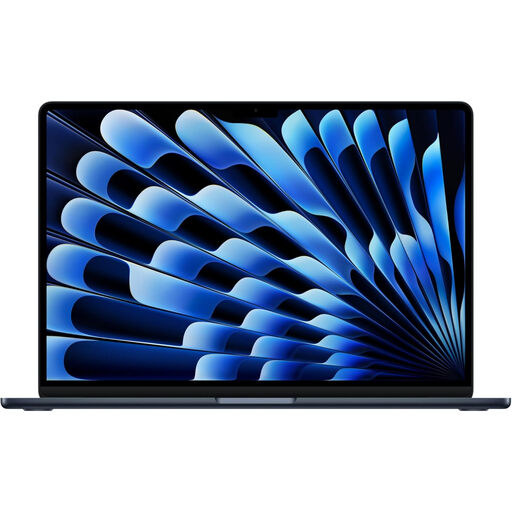
Apple 13-inch MacBook Air (2026), M5, 24 GB, 1 TB SSD, Midnight
Consider this MacBook Air only once your department confirms that its required software works with your intended Mac configuration. The title specifies an M5 chip with a 10-core CPU and 10-core GPU. Check the weight and battery runtime for this exact variant if you will carry it regularly.
View on Joybuy
 No image available
Acer Aspire Go 15 AG15-71P, 8 GB RAM, 256 GB SSD
Consider this stated configuration for routine coursework if it meets your applications’ requirements. Its title lists an Intel Core i5-13420H processor, a 15.6-inch Full HD screen and Windows 11 Home. Confirm RAM upgradeability for the exact configuration before relying on a future upgrade.
View on Joybuy
Common questions
Should I choose an operating system before I know my course software?
No: get the named application requirements first. UWE Bristol says course software determines the device type and cautions that some specialist applications cannot be installed on Chromebooks.
Can I use a MacBook for an engineering course?
A MacBook is suitable only if the department confirms compatibility with its required applications. Loughborough University identifies NX as software that will not work on Apple devices, while the University of Bath identifies Windows-only applications in its mechanical-engineering guidance.
Can a Chromebook be my only study laptop?
It can be your only device if your programme confirms that all required tools work with ChromeOS and that its support arrangements cover your work. UWE Bristol warns that many specialist applications cannot be installed on Chromebooks, so browser access alone is not enough to establish suitability.
What matters most when choosing a refurbished Windows laptop?
Check that the exact model meets your course requirements, then review its condition, battery checks, included accessories, warranty and returns terms. Check Windows 11 eligibility too: Microsoft says a PC that fails its requirements may be unable to install Windows 11.
Does a warranty replace my rights if a refurbished laptop is faulty?
No. For goods supplied under a consumer contract, the Consumer Rights Act 2015 requires satisfactory quality; a seller or manufacturer warranty is separate. Keep the advert and condition description so you can identify what was promised about the particular refurbished laptop.


