What matters when choosing?
Settle software compatibility first, then compare the hardware and access arrangements needed for your classes.
Windows laptop
Consider it when: your course requires Windows software or has not confirmed another operating system.
Still check: Windows alone does not establish that a laptop meets the course’s hardware or peripheral requirements.
Mac laptop
Consider it when: your provider confirms that its required applications, assessments and peripherals work with macOS.
Still check: specialist applications may have operating-system restrictions, even where a course accepts Macs for general work.
Chromebook
Consider it when: your provider confirms that all compulsory work can be completed using supported ChromeOS tools.
Still check: Loughborough University IT Services cautions against Chromebooks because of functionality limitations; an online coursework portal does not establish that specialist applications will work.
| Priority | What to check | Your needs |
|---|
| Software compatibility |
Get the names of compulsory applications and assessment tools. Confirm the supported operating system and whether any required virtual-desktop access covers the tasks you must complete. |
I need to finish compulsory work on my own device, not just open course websites. UWE Bristol’s Windows guidance and Loughborough University’s Chromebook caution show why my provider’s software list matters. |
| Remote lessons |
Check the webcam, microphone, audio and keyboard you will use, as well as your home internet connection. Ask whether assessments need additional equipment. |
For live classes and assignments at home, I need a complete working setup. Yeovil College expects a device for remote Microsoft Teams lessons, ideally with a webcam. |
| Course workload |
Compare processor, RAM, storage, graphics and ports with your course’s requirements, especially for compulsory specialist modules. Check the exact configuration of the laptop you intend to buy. |
A general coursework specification may not cover my most demanding module; I want to match the device to the work I actually have to submit. |
| Use between locations |
Consider the laptop’s stated weight, keyboard and screen alongside the battery information. If you will work away from a socket, check working runtime rather than treating standby time as lesson time. |
I will carry the laptop between home and college and need to use it comfortably for written work in both places. |
| Access and support |
Ask your provider about loan duration, eligibility and whether a loaned device meets course requirements. In England, check the applicable 16 to 19 bursary arrangements if you may be eligible. |
Before buying, I want to know whether suitable equipment or help with essential study costs is available. GOV.UK describes bursary support for eligible 16 to 19 students at publicly funded schools or colleges in England; local arrangements determine what I can access. |
Platform and brand references
These references concern operating-system choices in institutional guidance, not the suitability or availability of every device from each brand.
Microsoft
Windows is the starting point to investigate when required software has not been confirmed for another operating system. UWE Bristol describes a Windows laptop as the most compatible choice for its university and specialist software.
- Relevant to courses that specify Windows applications.
- The Windows label does not establish that a particular laptop meets the course’s hardware requirements.
Apple
A Mac can be considered when a course confirms macOS support. The University of Bristol recommends Windows or macOS laptops for the majority of its students, a position that does not replace another provider’s course rules.
- An option where compulsory software and peripherals are confirmed to work with macOS.
- Check specialist applications individually rather than assuming that acceptance for general coursework covers them.
Google
ChromeOS is a conditional choice for a course that confirms support for all required work. Loughborough University IT Services cautions against Chromebooks because of functionality limitations.
- Worth considering after the provider confirms its coursework and assessment tools work on ChromeOS.
- Do not assume access to a course website means every specialist application is supported.
Joybuy laptop options
These models include Windows laptops for checking against your course requirements and a Chromebook to consider only if your provider confirms ChromeOS support. Compare each exact configuration with the software and equipment you need.
 No image available
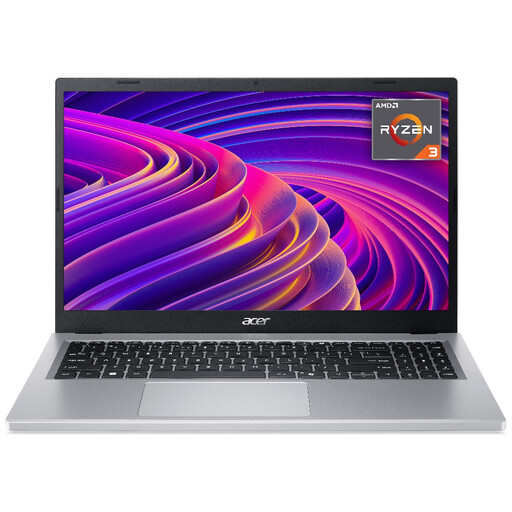
Acer Aspire Go 15 AG15-21P, Ryzen 3 7320U, 8GB RAM, 256GB SSD
For assignments and remote lessons, check that this configuration supports your course software and the microphone setup you need. The title specifies a 15.6-inch Full HD display; confirm the exact shipped configuration before buying.
View on Joybuy
 No image available
ASUS Vivobook 15 X1504VA, Core 5 120U, 24GB RAM, 1TB SSD
The stated memory and storage may be relevant if your course calls for substantial local capacity; confirm its named applications will work before choosing it. The title specifies a 15.6-inch screen. If you study away from mains power, check working battery runtime rather than relying on a standby figure.
View on Joybuy
 No image available
Acer Aspire Go 15 AG15-71P, Core i5-13420H, 8GB RAM, 256GB SSD
This Windows 11 Home configuration has a 15.6-inch Full HD screen. Check its 8GB RAM and 256GB SSD against compulsory course software, particularly if a module sets higher requirements; confirm the camera and audio setup needed for remote classes.
View on Joybuy
 No image available
Acer Chromebook Plus 514 CB514-5H, Core i3-1315U, 8GB RAM, 256GB SSD
Consider this 14-inch WUXGA Chromebook only after your provider confirms that required coursework, assessments and applications work on ChromeOS. Its stated memory and storage do not resolve operating-system compatibility.
View on Joybuy
 No image available
ASUS Vivobook 14 X1407QA-LY003W, Snapdragon X, 16GB RAM, 512GB SSD
For a portable study laptop, compare this model’s Snapdragon X configuration with the exact applications and peripherals your course requires; do not assume that every required Windows application will work on it. Check working battery runtime if you need to study away from a socket.
View on Joybuy
Common questions
Do I need a Windows laptop for college?
Not for every course. UWE Bristol describes Windows as the most compatible choice for its university and specialist software, but your own provider must confirm its named applications, assessment tools and peripherals before you choose an operating system.
When should I avoid using a Chromebook as my main study device?
Do not rely on one until your provider confirms that all compulsory work is supported on ChromeOS. Loughborough University IT Services cautions against Chromebooks because of functionality limitations, so check installed applications and assessments as well as browser-based coursework.
What do I need for remote lessons?
Check your provider’s requirements for a webcam, microphone and audio, and make sure you have a keyboard suitable for assignments and an internet connection where you will study. Yeovil College expects a device for remote Microsoft Teams lessons, ideally with a webcam.
Are 8GB RAM and a 128GB SSD enough for college?
They may meet some general coursework requirements, but the figures alone cannot establish suitability for your course. Compare the exact laptop with the published requirements for your compulsory applications and most demanding module before buying.
Should I ask about bursary or laptop-loan support before buying?
Yes, if access to a suitable device is a concern. GOV.UK says England’s 16 to 19 Bursary Fund can help eligible students at publicly funded schools or colleges with education-related costs; ask your provider separately about eligibility, equipment loans and the device available.


