What matters when choosing?
Check the course’s named applications and device rules before comparing formats. Then consider where you study, how you work and what equipment or support you can already use.
Laptop
Choose when: regular written assignments or required computer applications make a physical keyboard and the specified operating system important.
Bear in mind: a general student laptop specification may still fall short of a specialist course requirement; check the department’s guidance.
Tablet with keyboard
Choose when: the course accepts a tablet and your work centres on reading, notes, online platforms and assignments you can complete on it.
Bear in mind: confirm that the required applications and document tasks work on the tablet; a keyboard does not resolve software incompatibility.
Desktop computer
Choose when: the course permits study from a fixed location and does not require you to bring a device to lessons.
Bear in mind: it cannot travel between study locations. Ask whether specialist college workstations already cover tasks you cannot do on your portable device.
| Concern | What to check | Who this matters to |
|---|
| Everyday coursework and portability |
Check keyboard comfort and the camera and audio needed for online sessions; consider carrying the device between study locations. |
If I write assignments at college and home, I need a device I can carry without giving up comfortable typing. Around 36% of consumers put everyday coursework and portability first. |
| Specialist software |
Ask for the named applications and required operating system, memory and storage; check whether college PCs provide access. |
My course uses particular applications, so I need to establish what will run before choosing a device. Software and course-workload requirements come first for around 29% of consumers. |
| Notes and accessible input |
Confirm that the course accepts your preferred device and that required keyboards, styluses or assistive peripherals work with it. |
I rely on a particular way of taking notes or entering text, and the device must fit that method as well as the course. Around 21% of consumers primarily weigh note-taking and accessible input. |
| Existing devices and support |
Compare your current device with course requirements and ask about loans, college computers and supplied software. |
If my current device can do the work, I would rather check what the college provides before replacing it. For around 14% of consumers, existing equipment and support arrangements are the primary concern. |
Laptops for college study on Joybuy
These laptops are options to compare if your course calls for a portable computer. Match the required applications and study tasks to the exact model before choosing; a laptop listing alone cannot establish course compatibility.
 No image available
ASUS Vivobook 15 X1504VA, Core 5 120U, 24 GB, 1 TB SSD
Consider this laptop for regular written coursework if your course accepts the model and its required applications run on it.
The product name specifies a 15.6-inch display, Intel Core 5 120U, 24 GB memory and a 1 TB SSD. Check battery duration against your time away from charging.
Joybuy
 No image available
Lenovo IdeaPad Slim 3 83K7009MUK, Ryzen 5 7535HS, 24 GB, 512 GB SSD
Consider this laptop for work across study locations, subject to your course’s software requirements.
The product name specifies a 15.3-inch WUXGA display, 24 GB DDR5 memory, a 512 GB PCIe SSD and Windows 11 Home. If you join remote lessons, confirm the microphone provision; check battery duration for your day.
Joybuy
 No image available
HP OmniBook X Flip 16-as0004na, Core Ultra 5 226V, 16 GB, 512 GB SSD
Consider this convertible laptop if you want to compare a touchscreen format with conventional typing and your course accepts its software setup.
The product name specifies a 16-inch touchscreen, a 2-in-1 design, 16 GB memory, a 512 GB SSD and Windows 11 Home. Check its carrying weight, battery duration and microphone provision against your needs.
Joybuy
 No image available
ASUS Vivobook 14 X1407QA-LY003W, Snapdragon X, 16 GB, 512 GB SSD
Consider this laptop for portable study after confirming that your course’s named applications work with its Snapdragon X platform.
The product name specifies 16 GB memory and a 512 GB SSD. If you need to work away from charging, check battery duration for the way you study.
Joybuy
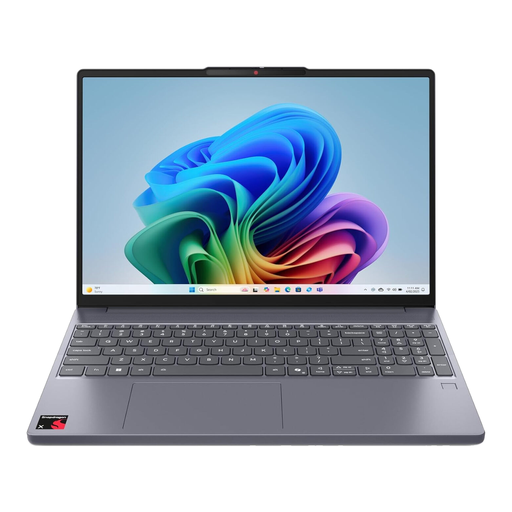 No image available
Lenovo IdeaPad Slim 3 15Q8X10 83N30029UK, Snapdragon, 16 GB, 256 GB SSD
Consider this laptop for everyday study only after checking your course applications against its Snapdragon-based platform, particularly if you need specialist software.
The product name specifies a 15.3-inch display, 16 GB memory and a 256 GB SSD. Confirm microphone provision and battery duration if remote sessions or long days away from charging matter to you.
Joybuy
Common questions
Do I have to buy a new laptop for college?
Not necessarily: an existing device may be enough if it meets your course’s requirements. Compare it with the current specification and ask the college about loans, available computers and other support before replacing it.
Can a tablet replace a laptop for college work?
A tablet with a physical keyboard can replace a laptop for some coursework if your course accepts it and every required application and task works on it. Cirencester College describes courses with different device needs, while the University of Warwick recognises tablet-and-keyboard use in some circumstances; ask your course team about your own requirements.
What if my course has not published a device specification?
Ask the department for its application and operating-system requirements before treating general student guidance as a shopping list. The University of York and the University of Plymouth both caution that specialist courses may need equipment beyond general guidance.
What do I need for remote lessons and tutorials?
Check that your device can handle the course’s online platform and that you have a working camera, microphone and suitable keyboard for the activities involved. Also check whether your home connection meets the college’s requirements, particularly if other people use it at the same time.
What if a disability affects the device I need?
Discuss your individual equipment and access needs with the college’s disability or learning-support team before choosing a device. GOV.UK states that education providers have duties concerning reasonable adjustments for disabled students; Disabled Students’ Allowance may help eligible higher-education students living in England with disability-related study costs, subject to its eligibility rules.


