What matters when choosing?
Start with what the collision test requires you to see—fine static detail or movement—then check the complete two-screen connection and desk layout.
| Concern |
Buying checks |
Who this matters to |
| Detailed side-by-side inspection |
Check both monitors’ native resolution and intended operating-system scaling. Confirm the computer can drive the pair at the required display mode. |
I need small interface elements, logs or captured frames to remain legible beside the collision scene without changing how I view them between screens. Around 36% of consumers would put this detailed-inspection need first. |
| Motion in dynamic events |
Check the application’s target frame rate and whether the computer, cable and monitor input support the chosen resolution and refresh rate together. |
When I am judging movement or impact timing, I would give refresh rate priority only if the test can output enough frames to use it. Roughly 36% of consumers would prioritise motion review over maximum static detail. |
| Connections and workstation fit |
Check two-display output and monitor placement. For daisy chaining, confirm the host connection and the first monitor’s compatible output; HDMI alone will not form the chain. |
I want both screens to connect as planned and sit comfortably on my desk, especially if my laptop also needs charging and peripherals. About 28% of consumers would make connection and workstation fit their primary concern. |
Joybuy monitors for detailed two-screen work
These individual 27-inch 4K monitors are options to assess for a matched, detailed-view setup. Some also list higher-refresh display modes; check whether your software and computer can use the intended mode on two screens, and obtain a second monitor separately if you need a pair.
 No image available
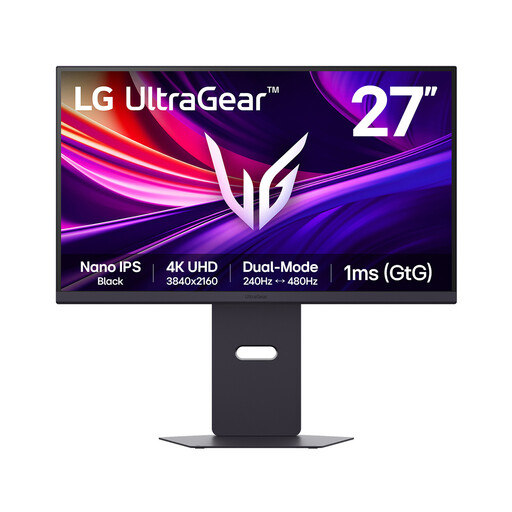
LG UltraGear G8 27G850A 27-inch 4K Nano IPS monitor
Consider this model if you want detailed views with a dual-mode refresh option, subject to what your test software and computer can drive.
The listed features include 4K UHD, 240 Hz and 480 Hz dual-mode figures, DisplayPort 2.1 and HDMI 2.1. Confirm the resolution associated with each refresh mode before choosing one for testing.
This listing is for one monitor; a matching two-screen setup requires another unit.
View on Joybuy
 No image available
LG UltraGear 27G810A-B 27-inch 4K IPS monitor
Consider this model for a 4K workspace if you also want to investigate a faster mode for motion review.
Its name lists a dual mode with a maximum of 360 Hz; check the resolution available at that rate and whether the computer can drive the mode you need.
This listing is for one monitor, so a matched pair requires a second unit.
View on Joybuy
 No image available
MSI MAG 275UPD E14 27-inch 4K UHD monitor
This model offers a stated choice between detailed UHD viewing and a faster, lower-resolution mode for motion-focused work.
The name specifies UHD at 144 Hz and FHD at 288 Hz. The FHD mode does not retain UHD detail, so choose the mode against the test’s actual viewing and frame-rate requirements.
This listing is for one monitor rather than a pair.
View on Joybuy
 No image available
BenQ MA270UP 27-inch 4K Nano Glossy IPS USB-C monitor
Consider this model for detailed views if USB-C connection and stand height adjustment fit the planned workstation.
Its name identifies it as a Mac monitor; check the intended computer’s video connection and any Mac-specific functions you expect to use. Confirm the refresh mode required by the collision test separately.
This listing is for one monitor, not a matched pair.
View on Joybuy
 No image available
LG UHD 27UP650K 27-inch 4K IPS monitor, white
This 4K model is worth considering when static detail matters and a 60 Hz display meets the test’s motion requirements.
Its name lists HDMI and DisplayPort inputs, built-in speakers and 95% DCI-P3 coverage. Check that the computer can connect to two displays at the intended mode.
This listing is for one white monitor; a matched pair requires another unit.
View on Joybuy
Frequently asked questions
Can I daisy chain two monitors from one laptop USB-C port?
Only if the laptop port and the monitor connection path support it. Dell says daisy chaining requires a suitable DisplayPort, USB-C DisplayPort Alt Mode or Thunderbolt path and compatible monitor output; HDMI and USB-C ports without the required video capability will not form a daisy chain.
Should both collision-testing monitors be identical?
A matching pair is a sensible choice when you regularly compare views across both screens, because the same size, native resolution and scaling make the workspace more consistent. You still need to confirm that the computer can drive both at the planned mode; matching monitors alone does not establish compatibility.
When does a two-monitor work setup need a DSE assessment?
For UK employers, the Health and Safety Executive says a workstation assessment is required when workers use display screen equipment daily as part of normal work for continuous periods of an hour or more. The assessment concerns the workstation, work and individual requirements, not a requirement to buy a particular monitor model.
How should I position two monitors for regular work?
Arrange the main working area so you can view it without repeatedly twisting, then adjust both screens to suit the desk and your viewing position. The Health and Safety Executive advises placing the top of a screen around eye level and the screen about an arm’s length away; stand adjustment or suitable arms can help when arranging two displays.


