What matters when choosing
Decide whether interface detail, refresh rate in other games or screen placement is your primary need, then check the exact monitor against your desk and gaming device.
Compact QHD
Choose when: You want more pixels for dense maps and menus at roughly 24 inches; Dell Technologies specifies the 23.8-inch P2425DE at 2560 x 1440 and 100Hz.
Trade-off: Its listed refresh ceiling is lower than the 144Hz and 180Hz models considered here, and its stand still needs room on the desk.
High-refresh Full HD
Choose when: Faster games make refresh rate a higher priority; LG Electronics UK specifies its 23.8-inch 24GS65F-B at 1920 x 1080 and 180Hz.
Trade-off: Full HD has fewer pixels than QHD at the same screen size, while this LG model's listed stand adjustment is tilt.
Adjustable Full HD
Choose when: Screen position and USB-C connectivity matter on a shared desk; BenQ UK specifies the 23.8-inch GW2490TC with a 144Hz Full HD panel and a height-adjustable stand.
Trade-off: It does not offer QHD resolution, and its listed 241.6mm depth with stand must fit your usable desk surface unless you mount it another way.
| Concern |
What to check |
Who this matters to |
| Detail on a compact screen |
Compare 2560 x 1440 QHD with 1920 x 1080 Full HD at 23.8 inches. Check your device's output and whether text scaling suits your viewing distance. |
If I spend most of my time reading maps, resource figures and build menus, I want more pixels without a larger panel; around 42% of consumers put interface detail first. |
| Motion in other games |
Check the refresh rate available through your intended connection and device. Treat response-time figures and refresh rate as separate specifications. |
When my game library also includes faster titles, I may give up QHD detail to prioritise refresh rate; around 33% of consumers place mixed-genre motion first. |
| Desk fit and screen position |
Measure usable width and depth, including space for controls and cables. Compare the complete stand footprint and, if needed, mounting compatibility. |
If I move between gaming and other desk tasks, I need a screen I can position without crowding the workspace; around 25% of consumers make desk fit and adjustment their primary concern. |
Joybuy products to consider
These choices span a curved Full HD gaming monitor and two ProArt displays for readers weighing refresh, interface detail and desk placement. Check the exact stand footprint and the modes supported by your gaming device before choosing.
 No image available
KOORUI MG24A12FV2 24-inch curved Full HD gaming monitor
Consider this model if refresh rate matters across a mixed game library. Its listed features include a 180Hz VA panel, 1500R curve, Adaptive Sync, two HDMI connections, DisplayPort, tilt adjustment and VESA compatibility. Decide whether a curved Full HD screen suits your maps and menus, and measure the complete base footprint.
View on Joybuy
 No image available
ASUS ProArt PA24ACRV IPS QHD monitor
Consider this QHD model when map and menu detail takes priority. If you also play faster games, check the refresh rate available for the exact model and your device; measure the complete stand footprint against your usable desk space.
View on Joybuy
 No image available
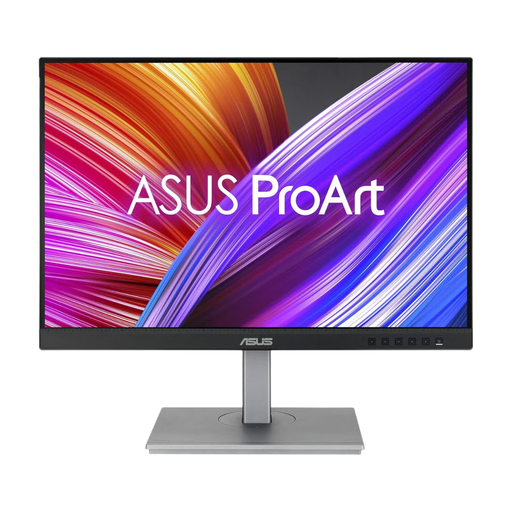
ASUS ProArt PA248CNV IPS WUXGA monitor
Consider this WUXGA model if a shared-desk setup is your main concern. Compare its stand position and footprint with your workspace, and confirm that your intended connection supports the resolution and refresh mode you want for gaming.
View on Joybuy
Questions about compact monitors
Should I choose QHD or Full HD for colony management games?
Choose QHD at roughly 24 inches if fitting more pixels onto a compact screen is your priority; choose Full HD if you give greater weight to high refresh rates in other games. Dell Technologies lists the 23.8-inch P2425DE at 2560 x 1440 and 100Hz, while LG Electronics UK lists the similarly sized 24GS65F-B at 1920 x 1080 and 180Hz. Check your device's supported output and whether your preferred text scaling is comfortable.
What should I measure before buying for a small desk?
Measure usable width and depth, leaving room for your keyboard, mouse movement and cables, then compare those measurements with the monitor's dimensions including its stand. BenQ UK, for example, lists the GW2490TC at 241.6mm deep with its stand and specifies 100 x 100mm VESA mounting if you are considering a compatible alternative mount.
Does workplace display-screen guidance dictate which gaming monitor I need?
Choose a monitor for private gaming by its fit and intended use, not by treating workplace guidance as a model specification. The Health and Safety Executive discusses display-screen use and workstation conditions in a work context; if the same desk is also used for work, consider the whole workstation rather than relying on a monitor label.
How should I get rid of an old monitor?
Check your local council's electrical-waste options or a retailer's take-back arrangements for the route available to you. GOV.UK describes equipment that depends on electricity to function as electrical and electronic equipment; collection arrangements depend on your location and the service you use.


