
24/7 Customer Support

Free returns

Same-day & Next-day Delivery

Quality Guaranteed

Unlock Your Welcome Offers: FREE Delivery | Up to 80% OFF | Free 30-day JoyPlus trial
Download the APP
A colour multifunction printer can print, scan and copy from one desktop device, making it useful for homework, invoices, forms, photographs and home-office paperwork. However, choosing by headline print speed or resolution alone can lead to higher running costs, awkward paper handling or a printer that is too large for your workspace.
This guide explains the specifications that matter, the common buying traps to avoid and which types of users may suit selected models available from Joybuy.
Printer packaging may quote draft speeds that are considerably higher than standard ISO figures. Draft mode can prioritise speed over print density and quality, while real-world output varies with page coverage, document complexity and connection method.
For fair comparisons, check the ISO pages-per-minute rating. For example, the Epson Expression Home XP-3200 is rated at up to 10 pages per minute in black and 5 pages per minute in colour. That is more useful for planning everyday printing than a much higher maximum draft figure.
A low-cost printer can become expensive if it uses small cartridges that require frequent replacement. Before buying, check:
An EcoTank printer or MegaTank printer generally requires a higher initial outlay than a basic cartridge model, but refillable bottles can be more suitable for regular, high-volume printing. Actual yield depends on coverage, print settings and the type of documents produced.
A wireless colour printer may support Wi-Fi, Wi-Fi Direct, mobile apps or cloud printing, but these features are not identical. Check compatibility with your home router, operating system and mobile devices. Ethernet can also be important for a small office where a stable wired connection is preferred.
For most households and home offices, an all-in-one printer with a flatbed scanner covers routine requirements. A flatbed is useful for single sheets, identity documents, receipts and photographs. If you regularly scan or copy multi-page paperwork, look for an automatic document feeder (ADF).
A printer scanner copier with an ADF can process a stack of pages without placing each sheet manually on the glass. The Canon MAXIFY GX6150 and Epson EcoTank ET-5150 include ADFs designed for multi-page workflows.
An A4 printer is usually the practical choice for letters, schoolwork, reports and standard office documents. Check the input tray capacity and supported media sizes, particularly if you print envelopes or photographs.
An A3 printer is more appropriate for posters, plans, promotional materials and larger spreadsheets. A3 models are physically larger, so measure the desk, allow space for paper access and consider their weight before ordering.
An automatic duplex printer turns pages itself for double-sided documents. This can reduce paper use and make longer reports more convenient. Check whether duplex applies to the paper size you plan to use; some models support automatic duplex only for A4 plain paper.
A 100-sheet tray may be adequate for occasional home printing, while a 250-sheet or larger capacity reduces interruptions in a busy home office or small business. Tray capacity figures can refer to different paper types, so treat them as a planning guide rather than a guaranteed workload.
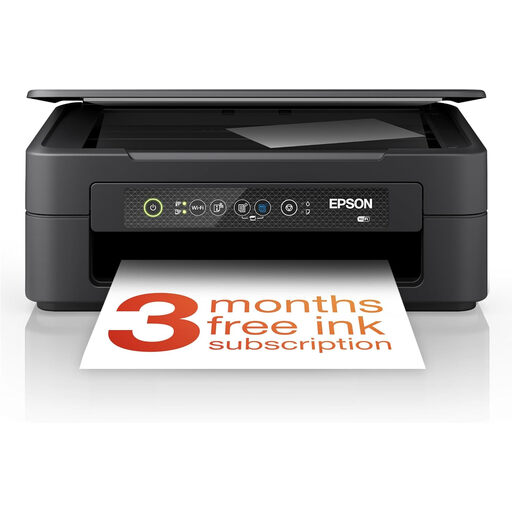
Why This Fits Their Persona: Its compact A4 design suits students, renters and households with light personal printing needs. Wi-Fi and mobile printing support everyday use from phones, tablets and laptops.
Individual ink cartridges mean the relevant colour can be replaced separately. Its stated speeds of up to 8 ppm black and 4 ppm colour also set realistic expectations for light use.
Print, copy and scan functions; 150-sheet input capacity; support for photo paper and card stock.

Why This Fits Their Persona: Families, remote professionals and users who value a straightforward interface may appreciate the OLED display, QR setup and mobile printing options.
Its 14 ipm black and 9 ipm colour ratings provide a clearer productivity reference than draft-mode figures. Ethernet, USB and dual-band Wi-Fi offer connection flexibility.
Automatic duplex printing; 100-sheet input and output capacity; print, copy and scan in one unit.

Why This Fits Their Persona: Home-office workers and small businesses printing regularly may benefit from refillable tanks, a 250-sheet tray and a 35-page ADF.
The refillable ink system addresses frequent cartridge replacement, while automatic duplex printing helps limit paper consumption on compatible A4 media.
Wi-Fi, Wi-Fi Direct and Ethernet; stated included-ink yields of up to 13,300 black and 5,200 colour pages.

Why This Fits Their Persona: Offices, freelancers and creative users requiring A3 documents may prefer its larger media support and multi-page handling.
It provides A3 support rather than leaving larger documents to an external print service. The 50-page ADF and automatic duplex printing support repetitive office tasks.
Prints up to 31 ppm black and 22 ppm colour; USB, Ethernet, Wi-Fi, NFC and mobile-printing support.
We have compiled a complete, real-time list of products that fully satisfy these strict selection criteria and UK safety regulations.
Yes, provided its speed, paper capacity and ink system match your workload. A compact cartridge inkjet multifunction printer may suit occasional documents, while a tank-based model can be more practical for frequent printing. Ethernet and an ADF are useful additions for a busy home office.
It can reduce paper usage because the printer prints on both sides of compatible sheets automatically. It does not reduce ink consumption in the same way, so compare both paper use and replacement ink costs when estimating total running costs.