Choose the PC against the requirements of the cargo-ship simulator you intend to play, then check whether the complete setup will fit and connect in your cockpit. SWE Systems lists 32 GB RAM and an RTX 4070 with 12 GB graphics memory or an RX 7800 XT for Professional Ship Simulator’s recommended tier; that is a target for that game, not every maritime simulator. A smaller computer may save desk space, but its ventilation, graphics-card clearance and upgrade options need checking for the exact configuration.
Who this setup suits
Players with a compact cockpit
If the PC must sit in a restricted desk or cockpit space, compare its external dimensions and ventilation needs with the space available. Acer and CyberPowerPC UK show compact desktop ranges with discrete graphics, but the case and component limits vary by configuration.
Players targeting a demanding maritime simulator
Start with the named game rather than a generic ship-simulator specification. For Professional Ship Simulator, SWE Systems lists 32 GB RAM and an RTX 4070 with 12 GB graphics memory or an RX 7800 XT at its recommended tier.
Players planning a controller-led bridge
Confirm both game support and the PC connections needed for your controls. Steam lists full controller support for Seafarer: The Ship Sim; that listing does not establish support in other maritime simulators.
What to check before choosing
Identify the game and intended display setup first. Then measure the cockpit and account for the controls and other devices you plan to connect.
| Concern |
What to check |
Who this matters to |
| Performance for the chosen game |
Compare the game’s published CPU, RAM, GPU and graphics-memory requirements with the exact PC configuration. Check the intended resolution and graphics settings separately. |
I want hardware chosen for the simulator I will actually play, rather than assuming every ship game makes the same demands. Around 36% of consumers put exact-game performance first. |
| Cockpit fit and cooling |
Measure the available space and ventilation clearance; check chassis dimensions, airflow and graphics-card clearance for the selected build. |
My cockpit has little room for a tower, but I still need somewhere for the PC to draw in and exhaust air. Roughly 29% of consumers prioritise fit and ventilation. |
| Controls and capacity |
Confirm game support for the intended controller, count the required PC ports and display outputs, and compare RAM and storage with the planned software. |
I want the helm controls, displays and installed games to work together without running out of connections or storage. Around 21% of consumers make cockpit usability and capacity their primary concern. |
| Purchase assurance |
Check the exact components, seller, warranty and return terms. Confirm which product-marking rules apply to the delivery market. |
I need to know which configuration will arrive and whom to contact if there is a problem. Roughly 14% of consumers put purchase and support clarity first. |
Buying pitfalls
-
Treating every ship simulator as one hardware category
Game requirements differ. SWE Systems lists 32 GB RAM and an RTX 4070 with 12 GB graphics memory or an RX 7800 XT for Professional Ship Simulator’s recommended tier; those specifications should not be applied automatically to another title.
Name the simulator and your intended display resolution and graphics settings before comparing PCs. Use that game’s published requirements as the starting point.
-
Choosing a small case without measuring the space
A compact exterior does not establish that a particular graphics card fits or that the installed components have sufficient ventilation in a confined cockpit. CyberPowerPC UK gives a graphics-card length limit for one Fractal Ridge configuration, not for all small cases.
Measure the cockpit and check the selected case’s dimensions, ventilation clearance, component fit and maintenance access.
-
Assuming 16 GB RAM meets every recommended tier
Costco UK lists an AWD-IT compact configuration with 16 GB RAM, while SWE Systems recommends 32 GB for Professional Ship Simulator. The smaller capacity should not be described as meeting that game’s recommended memory tier.
If that is your target game, consider a 32 GB configuration or confirm the specific PC’s supported memory upgrade options before choosing a 16 GB model.
-
Applying Great Britain marking guidance to Northern Ireland
UK government product-marking guidance distinguishes the processes for Great Britain and Northern Ireland. A conclusion drawn for a PC supplied in England, Scotland or Wales should not automatically be carried over to Northern Ireland.
For delivery to Northern Ireland, confirm the applicable marking and seller documentation for that market.
Relevant brands to consider
These examples show configurations and case questions worth comparing; a brand name alone does not establish whether a particular PC meets your game’s requirements or fits your cockpit.
Acer
Acer describes its Nitro 20 desktop family as a 17.3-litre design for smaller spaces, with configurations offered up to Intel Core Ultra 7 and GeForce RTX 5060 graphics.
- The Nitro 20 family gives space-constrained buyers a specific chassis size to compare with their cockpit measurements.
- The family’s “up to” components do not describe every configuration. Check the exact CPU, GPU, memory, storage and ports of the model offered.
CyberPowerPC UK
CyberPowerPC UK offers small-form-factor desktop configurations with discrete graphics. Its mini-PC range covers different cases and component combinations.
- Its Fractal Ridge example specifies a 12.6-litre case and support for graphics cards up to 335 mm long, providing concrete case limits to inspect.
- Those dimensions and limits belong to that case example. Confirm cooling, graphics-card clearance and included components for the build you select.
Chillblast
Chillblast lists a compact-oriented Cryo Core Portable RTX 5060 configuration with a Ryzen 5 9600X, 32 GB DDR5 memory and a 2 TB SSD.
- The stated memory and storage capacities make this configuration straightforward to compare with a game’s published requirements.
- A compact design and an RTX 5060 model name do not establish that it meets another game’s recommended graphics tier. Check the exact game and the case’s ventilation needs.
AWD-IT
A Costco UK listing describes an AWD-IT compact desktop configuration with a Ryzen 5 5500, RTX 5060, 16 GB DDR4 memory and a 1 TB NVMe SSD.
- The stated components provide a defined configuration to check against a selected simulator and the seller’s support terms.
- Its listed 16 GB RAM is below the 32 GB recommended by SWE Systems for Professional Ship Simulator. Check upgrade options if that game is the target.
Joybuy product choices
These laptops and desktop towers offer different ways to arrange a cargo-ship cockpit. Check the exact simulator’s requirements before choosing between them, and measure the space and ventilation clearance for any tower or laptop you plan to place there.
 No image available
MSI Stealth 18 AI Studio A1VGG-001UK, 18-inch
Consider this laptop if you want the display and PC in one unit for the cockpit; confirm that its dimensions, connections and ventilation suit your layout.
- Intel Core Ultra 9; NVIDIA GeForce RTX 4070; 32 GB RAM; 2 TB SSD.
- Compare the laptop graphics configuration with the requirements of your chosen game rather than assuming its RTX 4070 name establishes equivalence to Professional Ship Simulator’s published 12 GB RTX 4070 reference.
View on Joybuy
 No image available
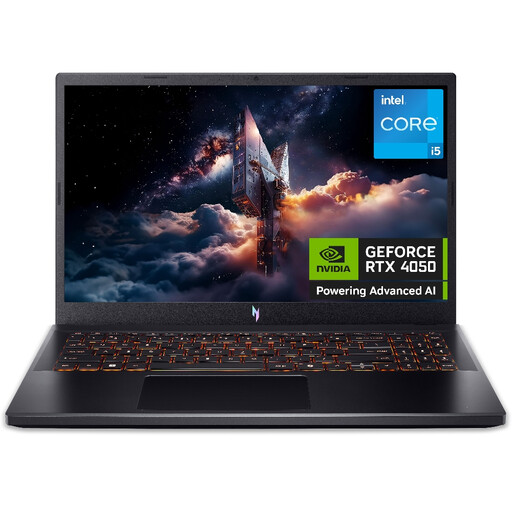
Acer Nitro V 15 ANV15-52, 15.6-inch
This laptop is an option to assess where a desktop tower would take up too much cockpit space; check its connections and ventilation in the intended position.
- Intel Core i5-13420H; NVIDIA RTX 4050; 16 GB RAM; 512 GB SSD; Full HD display (1920 × 1080).
- Its 16 GB RAM is below SWE Systems’ 32 GB recommended memory tier for Professional Ship Simulator. Confirm the display refresh rate for the exact configuration if it matters to you.
View on Joybuy
 No image available
CyberPowerPC JOYB1013 gaming desktop
Consider this desktop if you have space for a separate tower and want to compare its listed components with a demanding simulator’s requirements.
- AMD Ryzen 7 9800X3D; NVIDIA GeForce RTX 5080 with 16 GB graphics memory; 32 GB DDR5; 2 TB NVMe SSD; Windows 11 Home.
- Measure the tower location and leave room for ventilation. Confirm the display and control connections needed for your cockpit.
View on Joybuy
 No image available
CyberPowerPC JOYB1010 gaming desktop
This is another separate-tower option to compare with the chosen game’s requirements, provided the cockpit has room for the case and its ventilation.
- Intel Core Ultra 7 265KF; NVIDIA GeForce RTX 5070 with 12 GB graphics memory; 32 GB DDR5; 1 TB NVMe SSD; Windows 11 Home.
- Check the exact tower dimensions and the display and control connections before planning a multi-device cockpit around it.
View on Joybuy
 No image available
Stormforce Defiance Ryzen 7 5700X gaming desktop
Consider this tower if you can accommodate a separate PC and want to check its stated memory and storage against your simulator and other software.
- AMD Ryzen 7 5700X; RTX 5070; 32 GB RAM; 2 TB SSD; Windows 11.
- Confirm its physical dimensions, ventilation clearance, graphics-memory capacity and required ports for your cockpit before choosing it.
View on Joybuy
Common questions
How much RAM should I choose for a cargo-ship simulator PC?
Choose RAM against the exact game’s published requirements. SWE Systems lists 16 GB as the minimum and 32 GB as the recommended capacity for Professional Ship Simulator; its 32 GB recommendation is specific to that title, not a requirement for every ship simulator.
Can I use a controller in a compact ship-simulator cockpit?
Yes for a game that supports your intended controller, provided you also have the necessary PC connection. Steam lists full controller support for Seafarer: The Ship Sim, but check other games individually rather than assuming they offer the same support.
Will a compact PC case provide enough cooling?
A compact case alone cannot establish adequate cooling for a particular build or cockpit position. Check the selected CPU and GPU configuration, case airflow, graphics-card clearance and space around the vents; CyberPowerPC UK’s published case limits illustrate why those checks must be model-specific.
Does a desktop PC need UKCA rather than CE marking?
Not necessarily for Great Britain: Department for Business and Trade guidance says CE marking continues to be recognised alongside or instead of UKCA marking for products covered by the applicable recognition rules. That guidance concerns England, Scotland and Wales; check the applicable process separately for a PC supplied in Northern Ireland. Marking does not indicate whether the PC meets a simulator’s requirements.


