What to check before buying
Start with the clear space on your desk, then check connections and key feel against the devices and surroundings you use for lesson preparation.
| Concern | What to check | Who this matters to |
|---|
| Desk space |
Compare the keyboard’s width and depth with the clear desk area. Decide whether you need a separate numeric keypad for regular number entry. |
If lesson sheets and a mouse need to remain within reach, I want the keyboard to take up less of the desk. Around 36% of consumers put usable desk space first. |
| Device connections |
Check each device’s operating system and Bluetooth or USB connections, plus the exact model’s switching options. |
When I prepare resources across school and home devices, changing computers without repeated pairing matters most. Roughly 29% of consumers prioritise device switching. |
| Key sound and feel |
Check the specified key or switch type; try its spacing and feel if possible. Do not assume a mechanical switch will be quiet. |
In a room shared with pupils, colleagues or family, I want typing that feels familiar without being unnecessarily disruptive. About 21% of consumers make quiet, familiar typing their primary concern. |
| Longer sessions |
Assess keyboard and mouse placement together. For prolonged laptop work, consider a separate keyboard and mouse so the screen can be raised. |
If I prepare documents for long stretches, I need a workstation arrangement I can use comfortably, not just a narrow keyboard. Around 14% of consumers put extended-session setup first. |
Joybuy keyboards for small desks
These compact-format keyboards offer different wired and wireless options for a lesson-planning desk. Check the dimensions, key layout and connections of the model you choose against your own workspace and devices.
 No image available
Rapoo E9050L 75% wireless keyboard, US QWERTY, White
Consider this for a small desk where you also switch between devices. Its title specifies Bluetooth 5.0/4.0, 2.4 GHz wireless and support for four devices. The stated layout is US QWERTY, so check that its key placement suits your work.
View on Joybuy
 No image available
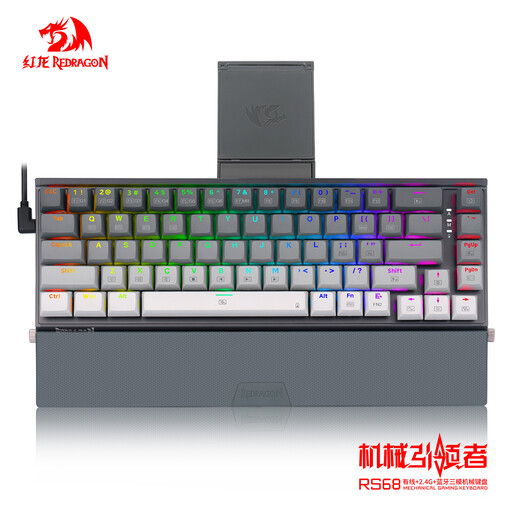
RS68 The Third Mock Examination mechanical keyboard, Deep Space Gray
Consider this if you prefer a mechanical keyboard and want wired or wireless connection options. The title identifies Bluetooth and a detachable wrist rest. Check its dimensions, key layout and switch sound before choosing it for a small, shared desk.
View on Joybuy
 No image available
MACHENIKE KG87 80% mechanical keyboard, US QWERTY, Latte Switch-Pink
Consider this 80% layout if you want a compact mechanical keyboard with multiple connection modes. Its title specifies a US QWERTY layout and Latte Switch-Pink variant. Check its measured width against your desk and assess the switch sound for shared-room use.
View on Joybuy
 No image available
Razer Huntsman V3 Pro Mini 60% Analog Optical Keyboard
The 60% format is worth considering where keyboard space is especially limited, provided you are comfortable with its key arrangement. This model is presented as an esports keyboard; check its key layout and typing sound for lesson-resource work.
View on Joybuy
 No image available
AULA WIN60HE 60% wired keyboard, Black/Graywood Magnetic Switch
Consider this wired 60% model if a compact key arrangement suits your desk and you do not need wireless switching. Its title identifies a hot-swappable magnetic switch variant. Check the measured dimensions, key layout and typing sound before using it in a shared workspace.
View on Joybuy
Questions about compact keyboards
Should I choose a compact or full-size keyboard for a small desk?
Choose compact if room for your mouse and lesson materials matters more than a permanently attached numeric keypad. If you enter marks or other figures often, consider whether a separate keypad you can position when needed would suit your work.
Do I need Bluetooth, a USB receiver or both?
Bluetooth can meet your needs if every intended device supports it reliably. A dual-wireless model offers a receiver option, but check the exact model’s operating-system support and whether your computer has a compatible, available USB port.
Will a compact keyboard resolve wrist or posture discomfort?
A compact keyboard alone will not resolve a poorly arranged workstation. Health and Safety Executive guidance addresses keyboard, mouse and screen position together; if symptoms persist or worsen, seek medical advice rather than relying on a keyboard change.
When does an employer need to assess a display screen workstation?
In the UK, the Health and Safety Executive says employers must assess the workstation of a worker who uses display screen equipment daily as part of normal work for continuous periods of an hour or more. Occasional personal use is not the same situation.
What should I do with an old wireless keyboard?
Check your local council’s electrical recycling arrangements rather than putting a battery-powered keyboard in general household waste. Local collection routes vary; retailer take-back may also be worth checking when replacing it.


