For digital meal planning on a crowded desk, start with a compact keyboard that works with the device you use; quiet keys matter more if you share the room. A keyboard that switches between devices is useful if you edit menus and shopping lists on both a computer and a phone or tablet, while a larger keyboard-and-mouse set makes more sense at a fixed desk. Check the exact UK layout, connection and device compatibility before choosing either route.
Who is this for?
Meal planners with little desk space
If your laptop or tablet shares a desk with books and study materials, a keyboard you can move aside after planning meals is a sensible starting point. Check its actual dimensions rather than relying on a description such as compact.
Students who edit lists on several devices
If you draft a weekly menu on a computer but update your shopping list on a tablet or phone, look for switching between your compatible devices. Logitech says its Pebble Keys 2 K380s can switch among three paired devices; that feature only helps if the devices you use are supported.
Fixed-desk spreadsheet users
If you regularly work through grocery budgets and study tasks at one desk, a larger keyboard with a mouse may be worth the space it takes. Logitech lists its MK370 Combo with a mouse and a 441 mm-wide keyboard.
What matters when choosing?
Decide where you will type and which device you will use before comparing layouts and connections. A small footprint is less useful if the keyboard cannot connect to your meal-planning device.
| Concern |
What to check |
Who this matters to |
| Desk space and key noise |
Compare the keyboard’s dimensions with your clear desk area, and check whether quiet keys are described for the exact model. |
If my desk must also hold study materials, I need a keyboard I can put away easily; in a shared room, typing noise matters too. Around 42% of consumers put desk space or noise first. |
| Planning across devices |
Check compatibility with each device and operating system, plus how pairing and switching work. |
When my shopping list moves between a laptop and a phone or tablet, I want to edit it without repeatedly pairing the keyboard. Around 33% of consumers prioritise cross-device use. |
| Fixed-desk work |
Allow room for the keyboard and mouse, and check the connection your computer requires. |
If I manage meal budgets in a spreadsheet at one desk, a mouse and a roomier layout may matter more than easy storage. Around 25% of consumers put that fixed-desk setup first. |
Buying pitfalls
-
Assuming QWERTY means a UK layout
Key shapes and symbol placement can differ between regional QWERTY variants, which may be awkward when entering quantities or account details.
Check that the exact variant says British English, English UK or UK QWERTY. Logitech, for example, identifies an English UK QWERTY version of its MK370 Combo.
-
Choosing Bluetooth before checking compatibility
Bluetooth alone does not establish that a keyboard works with your device and operating-system version. Apple specifies software requirements for its Magic Keyboard (USB-C), while Microsoft’s setup guidance for the Designer Compact Keyboard requires a supported Windows PC with Bluetooth 4.0 or later.
Check your device model, operating system and available connection before ordering. If a keyboard uses a USB receiver, confirm that your computer has the required port.
-
Treating spill-resistant as waterproof
Logitech describes the MK370 keyboard as spill-resistant, not waterproof. That distinction matters if your study desk is also near drinks or meal preparation.
Keep the keyboard on a dry surface away from active food preparation, and follow the manufacturer’s care instructions after an accidental spill.
-
Matching products by a similar name alone
Keyboards in the same family can differ by layout, connection or included accessories. Those differences can change whether a listing suits your desk and device.
Match the full model and regional variant to the manufacturer’s specifications, then check the connection method and what comes in the box.
Brands to consider
These brands offer different keyboard routes for the meal-planning scenarios above; the relevant model and variant matter more than the brand name alone.
Logitech
Its Pebble Keys 2 K380s addresses compact, multi-device typing, while the MK370 Combo is a larger keyboard-and-mouse option for a regular desk.
- Logitech says the Pebble Keys 2 K380s has quiet keys, switches among three devices and supports Windows, macOS, iPadOS, iOS and Android.
- Logitech lists the MK370 keyboard at 441 mm wide; measure your available desk area before choosing the combo.
Apple
The Magic Keyboard (USB-C) is a compact, rechargeable option for an Apple device that meets Apple’s compatibility requirements.
- Apple lists Bluetooth, USB-C charging and a 27.89 cm width for the Magic Keyboard (USB-C).
- Check your exact device and operating-system version against Apple’s compatibility list; do not assume the keyboard suits a non-Apple setup.
Microsoft
The Designer Compact Keyboard is a slim Bluetooth option to investigate if you plan meals on a supported Windows computer.
- Microsoft says the Designer Compact Keyboard can pair with up to three devices.
- Microsoft’s setup guidance requires a Windows 10 or Windows 11 PC with Bluetooth 4.0 or later; check compatibility separately for other devices.
Joybuy keyboard choices
These keyboards cover compact desk setups, wireless typing and a keyboard-and-mouse set for a regular desk. Choose by the device and space you actually have; a UK layout or wireless connection alone does not establish quiet typing or compatibility with every phone and tablet.
 No image available
ASUS ROG Strix Scope II 96 Wireless Keyboard, UK Layout
Consider this UK-layout wireless keyboard if your meal-planning setup needs to share a desk with study materials.
Before relying on it across devices or in a shared room, confirm compatibility with your exact device and whether its typing sound suits the space.
View on Joybuy
 No image available
HyperX Alloy Rise 75 Wireless Keyboard, UK
The 75 model is worth a look if you want a wireless keyboard for a desk used for both meal planning and study.
Check its physical dimensions and exact UK key arrangement against your space and preferences. If you share a room, check its typing sound before choosing it.
View on Joybuy
 No image available
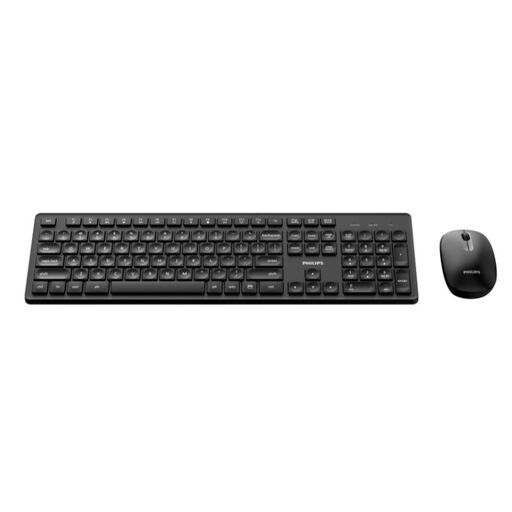
Philips 3000 Series SPT6318B/05 Wireless Keyboard and Mouse, UK English
This keyboard-and-mouse set suits a regular desk where you also work through grocery lists or budgets with a mouse.
It is the UK English version. Check desk fit and computer compatibility, including whether you have a suitable USB-A connection for its receiver.
View on Joybuy
 No image available
Hyper® HyperSpace Next Bluetooth Wireless Keyboard, UK, White
Consider this Bluetooth option if you edit meal plans on compatible devices and have room for a full-size keyboard.
Its UK variant is identified in the name. Check its dimensions, device compatibility and typing sound if your desk is crowded or your room is shared.
View on Joybuy
 No image available
ASUS ROG Falchion Ace HFX 65 Analog Keyboard, UK Layout
This UK-layout keyboard is a route for meal planning at a computer if a wired connection suits your setup.
It is not a Bluetooth multi-device option. Confirm your computer’s port and operating-system support, and check typing sound if you share a room.
View on Joybuy
Common questions
Do I need a UK keyboard layout to plan meals?
You do not need one for meal planning itself, but a UK layout may make familiar symbol placement easier when you enter quantities, account details or budgets. Check for British English, English UK or UK QWERTY on the exact variant; QWERTY alone does not identify the regional layout.
How do I connect a Bluetooth keyboard to my device?
Put the keyboard into pairing mode, then select it in your computer, tablet or phone’s Bluetooth settings and confirm any pairing prompt. Logitech’s Bluetooth setup guidance follows this sequence, but check your keyboard’s instructions for its particular pairing control and supported devices.
Can I use a keyboard in university accommodation?
Check your own accommodation rules before using electrical equipment in your room, especially if you also plan to use extra powered devices or extension leads. The University of Kent advises residents to inspect electrical equipment for visible damage; its guidance does not determine the rules for every hall.


