Small-desk tide-table plotters
You need room for a mouse and chart materials alongside the keyboard, without losing easy access to the keys used in your plotting work.


Start with the space available for your mouse and chart materials, then consider how often you enter tide times and heights. A compact keyboard can free up desk space, while frequent number entry may justify a separate keypad; for longer sessions, assess the whole workstation rather than relying on keyboard shape alone. Check the exact key layout and connection requirements before buying.
You need room for a mouse and chart materials alongside the keyboard, without losing easy access to the keys used in your plotting work.
You repeatedly enter or correct times and heights, so the convenience of a number pad matters—but so does the desk space it occupies.
You spend extended periods checking tables and need to consider keyboard height, mouse position and available support as well as footprint. The Health and Safety Executive advises assessing posture across the workstation.
For tide-table work on a small desk, decide how much space the keyboard can occupy, then weigh number entry, working position and connection needs. A separate keypad is worth considering when figures are entered frequently but the desk also needs to be cleared for chart work.
| Concern | What to check | Who this matters to |
|---|---|---|
| Desk and mouse space | Measure the usable desk area with your mouse and chart materials in place; inspect the exact layout for keys you use in spreadsheets. | I need enough room to move the mouse without shifting my charts each time I type. Around 36% of consumers put desk and mouse space first. |
| Number entry | Decide whether the main number row is sufficient or a separate or integrated keypad would suit repeated entry. | When I am entering columns of tide times and heights, easy access to number keys matters more than the smallest footprint. Roughly 29% of consumers prioritise number entry. |
| Long-session comfort | Allow for keyboard depth and support features, then check height and placement alongside the mouse and screen. | If I spend a long session checking figures, I need a working position I can maintain comfortably. Around 21% of consumers put long-session comfort first. |
| Quiet use and compatibility | Check the stated key design, supported devices and operating systems, and whether your setup requires Bluetooth, a receiver or a cable. | I share a workspace or move between devices, so noise and a workable connection matter most to me. About 14% of consumers prioritise these needs. |
A smaller layout can leave more room for charts but make repeated numerical entry less convenient. A separate keypad can be moved aside when it is not needed.
Think about how often you enter figures in a normal session before choosing between the main number row and a detachable keypad.
A separate keypad also needs somewhere to be stored and may require batteries, a cable or a receiver.
Compact layouts can move navigation and function keys, while UK and US layouts can differ in key shape and symbol positions.
Inspect the layout image and specification for the exact variant you intend to buy, especially if you use symbols or keyboard shortcuts when plotting.
A shaped keyboard cannot compensate for an awkward keyboard height, distant mouse or poorly positioned screen. The Health and Safety Executive advises keeping the screen and keyboard central and the keyboard just below elbow height.
Check how a keyboard and mouse fit together on your desk before deciding whether a shaped model or palm rest suits your position.
Keycap mounts and hinges vary between keyboard designs, so a cap made for another model may not fit.
Follow the instructions for your exact model and check replacement compatibility. Logitech advises powering off or unplugging a keyboard before attempting keycap removal.
Its cited keyboard range includes space-saving, shaped and multi-device options for different desk priorities.
The K3 Max is relevant if you want a compact mechanical layout with configurable keys.
The PERIDUO-606A illustrates a compact split keyboard paired with a separate numeric keypad.
These keyboards offer different ways to balance a small plotting desk with numerical entry. Most are compact layouts; the HP model is worth considering if you want a split keyboard, provided its footprint and keypad arrangement suit your desk.
 No image available
Consider this 78-key layout where desk space is tight and you can work with its stated QWERTY US key arrangement.
The title lists 2.4 GHz and Bluetooth 5.0/4.0 connections. Check the exact key placement if you enter tide figures frequently or need UK symbol positions.
 No image available
The split layout and padded wrist rest are features to consider for longer sessions, but check how the keyboard fits with your mouse and screen position.
If number entry is a priority, confirm the keypad arrangement and what comes with this exact listing. Measure the available desk space and check its key layout before buying.
 No image available
This 60% layout is an option when mouse and chart space take priority and a wired keyboard suits your computer.
Inspect the exact key and symbol layout, including how you would enter numbers, before choosing it for tide-table work.
 No image available
The 60% layout is relevant if freeing desk space matters more than retaining a larger key arrangement.
Check the exact layout for UK symbols and the keys used in your plotting workflow; confirm that its connection method suits your desk setup.
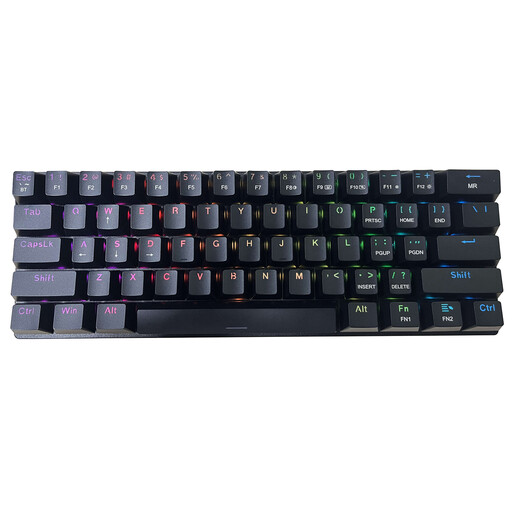 No image available
This 60% layout may suit a desk where space for the mouse matters more than a dedicated numeric keypad; check how you would handle repeated figure entry.
The title specifies a QWERTY US layout and blue switches. Confirm the key positions you need for UK use and whether the switch type suits your workspace.
Choose a compact layout if mouse and chart space are the main constraint and number entry is occasional. If you repeatedly enter columns of times or heights, consider a separate keypad that you can move aside when plotting.
Inspect the exact variant’s layout image and key legends, particularly its symbol and navigation keys. A product family may have different layouts: Keychron lists a UK-ISO K3 Max variant, while Perixx lists English (UK) as an option for the PERIDUO-606A set.
No. The Health and Safety Executive advises considering the whole workstation, including keyboard height, central screen and keyboard placement, and mouse position. Check that a shaped keyboard and any palm rest fit the space and your working position.
The Health and Safety Executive does not prescribe a particular keyboard model. It says employers must assess workstations for workers who use display screen equipment daily as part of their normal work for a continuous hour or more, and address risks identified by that assessment.