Occasional itinerary printers
If you print a few A4 confirmations, tickets or day plans before a trip, usable desk space and a straightforward connection may matter more than features for handling large batches.


Start by measuring where the printer will sit and the extra room needed to load paper, then choose a connection method that works with the device holding your itinerary. A basic A4 wireless all-in-one suits occasional pages; automatic duplex matters more for regular multi-page packs, while an automatic document feeder is useful if you also scan or copy batches of physical documents.
If you print a few A4 confirmations, tickets or day plans before a trip, usable desk space and a straightforward connection may matter more than features for handling large batches.
If your plans live on a phone or tablet, check whether the printer supports your device and whether you need a direct connection without a wireless network.
If you print longer itinerary packs or scan and copy several physical travel documents, automatic duplex printing or a document feeder may save repeated handling.
Check the space needed to use the printer, not just to store it; then prioritise the connection and paper-handling features that match your travel paperwork.
| Concern | What to check | Who this matters to |
|---|---|---|
| Desk space | Compare the exact model’s dimensions with your desk, allowing room to load A4 paper and open the scanner lid. | When my desk is crowded, I need to use the printer without moving it each time I load paper. Around 36% of consumers would put usable desk space first. |
| Phone printing | Confirm support for your phone and any required app; check for Wi-Fi Direct if you need a connection without a router. | If I update plans on my phone, I want to print them using a connection available where the printer sits. For around 29% of consumers, phone access would be the primary need. |
| Two-sided pages | Check whether A4 duplex printing is automatic or requires you to turn the sheets yourself. | For regular multi-page itineraries, I would rather not reinsert every sheet to print its reverse. Automatic duplex would come first for around 21% of consumers. |
| Scanning and copying | Consider an automatic document feeder if you regularly handle batches of physical pages. | If I also scan or copy several travel documents, feeding each page separately takes attention. Around 14% of consumers would prioritise batch document handling. |
Canon UK Store gives the PIXMA TS3750i’s approximate 435 × 327 × 145 mm dimensions with its trays retracted. Its rear paper feed needs access when you load sheets.
Measure the intended position with room for the paper feed, scanner lid and cables before comparing it with the exact model’s dimensions.
Canon specifies manual duplex for the PIXMA TS3750i but automatic A4 duplex for the TS4150i. That distinction changes how often you must handle sheets in a longer itinerary pack.
Check the duplex method and supported paper size if you expect to print on both sides regularly.
An automatic document feeder helps with batches of physical pages to scan or copy; it does not change how a digital itinerary file is printed.
Prioritise a feeder if batch scanning or copying is part of your routine. Otherwise, focus on desk fit, connectivity and your duplex needs.
Canon’s PIXMA TS3750i and TS4150i illustrate different A4 all-in-one choices for itinerary printing.
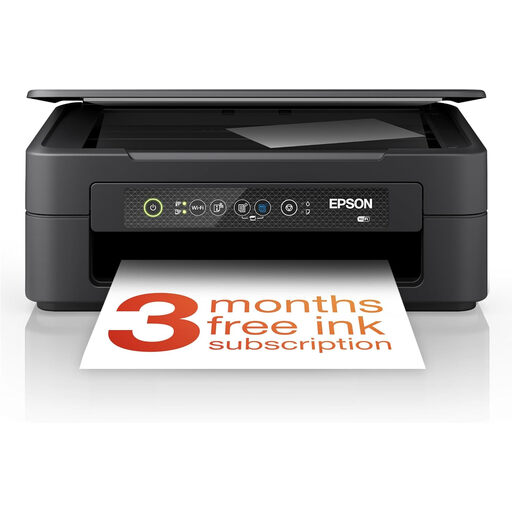
Epson’s Expression Home XP-2200 is relevant to phone-first printing; the XP-3200 is another model to consider if automatic double-sided printing matters.
HP describes the DeskJet 4310 as a wireless print, scan and copy model with an automatic document feeder.
These A4 all-in-one options address different routines: compare the Canon if longer packs and physical-document handling matter, or the Epson if you mainly prepare itineraries on a phone. Check each printer’s operating clearance against your desk.
 No image available
Consider this model if you print longer itinerary packs and also handle batches of physical documents. Confirm the duplex and document-feeding functions for the exact listing, and allow room to load paper and use the scanner.
 No image available
This is an option for occasional A4 itineraries prepared on a phone. Epson specifies Wi-Fi Direct for the XP-2200; confirm compatibility with your device, check the space needed to use the printer and verify duplex operation if automatic two-sided printing matters.
It is most useful if you regularly print multi-page packs and want the printer to turn sheets automatically. Canon specifies manual duplex for the PIXMA TS3750i and automatic A4 duplex for the TS4150i, so check the exact model rather than assuming all compact printers work alike.
Yes, if your phone and printer support a suitable direct connection. Epson specifies Wi-Fi Direct and compatible mobile apps for the Expression Home XP-2200; check your device and the app requirements before buying.
An automatic document feeder is useful if you regularly scan or copy batches of physical travel paperwork, not merely to print digital itineraries. HP describes the DeskJet 4310 as having one; for occasional single-page scans, consider whether a flatbed scanner meets your needs.
Compare your available space with the exact model’s dimensions and the room needed to use its trays, paper feed and scanner lid. Canon UK Store states that the PIXMA TS3750i measures approximately 435 × 327 × 145 mm with trays retracted, so those figures alone do not describe its full operating space.
Check the retailer’s or manufacturer’s current take-back information and local electrical recycling options. GOV.UK explains that the UK’s waste electrical and electronic equipment framework aims to reduce electrical equipment sent to landfill or incineration.