Small-desk card players
You want room beside the keyboard for a mouse, physical cards or a notebook, without making everyday navigation awkward.


Choose the keyboard layout before its gaming features. A 60% board leaves more room on a small desk but lacks dedicated arrow and function keys; 65% restores arrow keys, while 75% retains a function row. For card games, weigh those controls against the space you need for your mouse and other items, then check your preferred key layout, switch feel and connection.
You want room beside the keyboard for a mouse, physical cards or a notebook, without making everyday navigation awkward.
You also browse, chat, work or use shortcuts on the same computer, so the dedicated keys retained by a compact layout matter to you.
You want mechanical switches, remapping or gaming-oriented controls, rather than simply a smaller conventional keyboard.
Start with the space available on your desk and the keys you use outside a match. Compare switch and connection options once you know which layout compromises you can accept.
| Concern | What to check | Who this matters to |
|---|---|---|
| Usable desk space | Compare the actual dimensions of shortlisted 60%, 65% and 75% boards with the space available beside your mouse. | I need room for my mouse and other items, so the keyboard footprint decides what fits. Around 42% of consumers put desk space first. |
| Dedicated controls | Check for arrow keys and a function row: Logitech G UK notes that 60% boards lack both; key arrangements vary by model. | Menus, browsing and shortcuts are easier for me when the keys I use have their own positions. Roughly 33% of consumers prioritise retaining those controls. |
| Input and connection | Confirm the selected switch variant, remapping options and whether you need a wired, Bluetooth or 2.4 GHz connection. | I use the same setup for other tasks and care most about key feel or how the keyboard connects. Around 25% of consumers make those options their primary concern. |
According to Logitech G UK, a 60% keyboard lacks dedicated arrow keys and a function row. Using key combinations instead may interrupt navigation when you also browse, chat or work.
List the keys you use regularly. Consider 65% if you want dedicated arrows, or 75% if you also want a function row.
Compact keyboard ranges can have different physical arrangements and key legends; Keychron, for example, offers UK-ISO variants of the K3 Max.
If UK-ISO matters to you, check the selected variant and its layout description rather than relying on a general product image.
Switch or input features cannot restore dedicated keys omitted by a smaller layout, or reduce the space taken by a larger one.
Settle on footprint and retained keys before comparing switch preferences, connections and gaming controls.
Manufacturer descriptions can help narrow your choices, but they cannot establish how a particular keyboard will feel or sound in your room.
Check the selected switch type and, where possible, try a similar keyboard before choosing on feel alone.
The K3 Max is a 75% low-profile mechanical option for buyers who want compact dimensions while retaining more dedicated controls.
The Huntsman Mini is an example of a gaming-focused 60% keyboard for buyers willing to use function-layer controls.
MX Keys Mini illustrates a compact, conventional wireless alternative for mouse-led card games and mixed desktop use.
These choices span 65% and 60% gaming keyboards, a 75% mechanical board and a compact membrane alternative. Compare their stated layouts and variants against the controls and desk space you need.
 No image available
Consider this 65% gaming keyboard if you want a compact layout without giving up dedicated arrow keys. The listed variant has a UK layout and analogue input; check that a wired setup suits your desk.
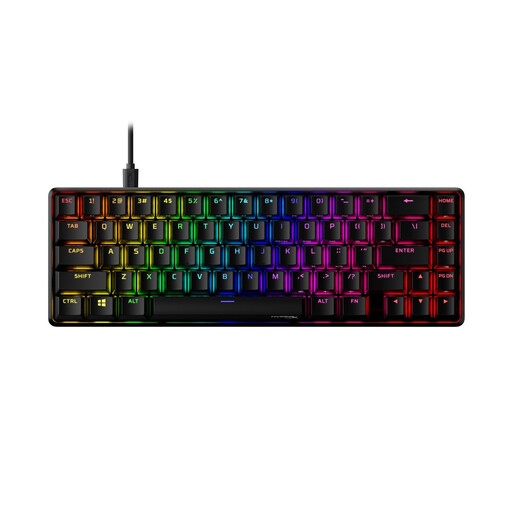 No image available
This 65% mechanical gaming keyboard suits consumers who want a compact board with dedicated arrow keys. Its title specifies HX Red switches and a US layout; check the physical dimensions and key arrangement against your desk and typing preferences.
 No image available
Consider this mechanical board if you use function keys as well as playing card games and can accommodate a 75% layout. Its title lists wired, Bluetooth and 2.4G connections, PBT keycaps and RGB backlighting. Confirm its dimensions, switch variant and US key arrangement before choosing it.
 No image available
This compact membrane keyboard is an alternative if you mainly play mouse-led card games and prefer conventional keys to a mechanical gaming board. The title lists a 78-key US layout, 2.4GHz and Bluetooth connections, and support for four devices; confirm its dimensions and key arrangement for your setup.
 No image available
Consider this analogue optical gaming keyboard when freeing desk space matters more than having dedicated navigation keys. Its 60% layout lacks dedicated arrow keys and a function row; check whether function-layer controls and the selected key-layout variant suit you.
Not if desk space is your priority and you are comfortable using key combinations for navigation. Logitech G UK notes that a 60% layout lacks dedicated arrow keys and a function row, so consider 65% or 75% if you use those controls regularly outside a match.
Choose 65% if dedicated arrow keys are the main controls you want to retain; consider 75% if you also use a function row. Compare the dimensions of specific models, because either layout takes more space than 60%.
Choose UK-ISO if its physical key arrangement and legends match how you prefer to type, particularly if you use UK symbols regularly. Check the selected variant: the layout shown for a product range may not describe every version.
Check the exact variant for its connection modes and any device-switching features you need. Keychron UK lists wired, Bluetooth and 2.4 GHz connections for the K3 Max, while Razer lists a detachable wired USB-C connection for the Huntsman Mini; those details should not be assumed for other models.
Check local electrical-equipment recycling guidance rather than putting the keyboard in general waste. GOV.UK explains that the UK’s waste electrical and electronic equipment framework aims to increase recovery, reuse and recycling; your local collection options and any seller take-back arrangements are worth checking before disposal.