
24/7 Customer Support

Free returns

Same-day & Next-day Delivery

Quality Guaranteed

Unlock Your Welcome Offers: FREE Delivery | Up to 80% OFF | Free 30-day JoyPlus trial
Download the APP
A computer mouse is one of the most-used tools in any desk setup, yet it's often an afterthought. A poorly chosen mouse can lead to a cluttered desk, frustrating lag and even discomfort after a long day of work. Whether you're a student, an office professional or a creative, finding a mouse that fits your workflow is essential for productivity.
This guide is designed to help you navigate the options. We will break down the key features to consider and present a few carefully selected models that cater to different needs and budgets, from reliable wired workhorses to sleek wireless companions.
Before diving into specific products, let's cover a few key considerations. Understanding these will help you identify what matters most for your daily use.
The first decision is often whether to cut the cord. Each option has distinct advantages.
wired usb mouse offers a direct, stable connection to your computer. This means you never have to worry about signal interference, lag or replacing batteries. They are typically plug-and-play, making them a straightforward and reliable choice for a permanent desk setup in an office or at home.wireless mouse provides a clutter-free workspace and greater freedom of movement, which is ideal for those who travel or prefer a minimalist setup. Most connect via a small USB receiver (2.4GHz) or directly through Bluetooth. A bluetooth mouse is particularly useful as it doesn't occupy a USB port, making it a great mouse for a laptop with limited ports.Nearly all modern mice use an optical sensor. An optical mouse works by shining an LED light onto the surface below and tracking movement with a small sensor. This technology is reliable and works well on most non-reflective surfaces, like desks and mouse pads.
You may also see a "DPI" (Dots Per Inch) specification. This measures how sensitive the mouse is. A higher DPI means the cursor moves further on the screen with less physical mouse movement. For general office work and web browsing, a standard DPI (around 1000-1600) is perfectly adequate.
Comfort is key, especially if you use your computer for hours at a time. Mice come in various shapes and sizes. Some are ambidextrous, designed to be comfortable for both left- and right-handed users. Others are ergonomically sculpted to fit a specific hand, which can help reduce strain. Consider the size of your hands and your typical grip when making a choice. For instance, an Apple Mac mouse is known for its distinct, low-profile design that prioritises aesthetics and gesture controls.
Here are our recommendations, chosen to suit a range of common user needs in the UK.
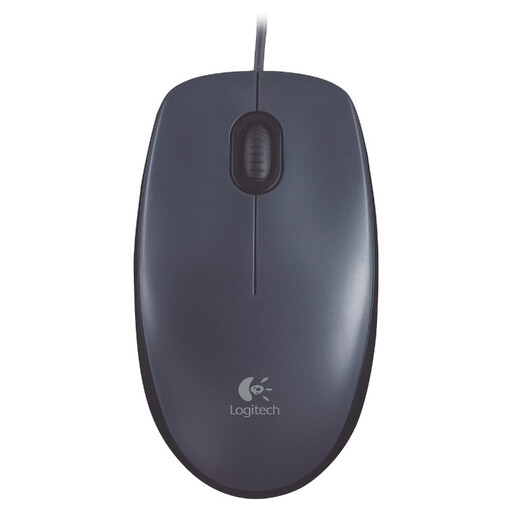
Why It Stands Out The Logitech mouse M100 is the definition of simplicity and reliability. There are no complex features or software to install; you simply plug the USB cable in and it works. Its full-size, ambidextrous shape provides comfortable support for either hand, while the optical tracking ensures smooth and precise cursor control for everyday tasks.
Pros
Who is it for? This is an excellent choice for office environments, schools or anyone seeking a dependable, affordable wired usb mouse that gets the job done without any fuss.
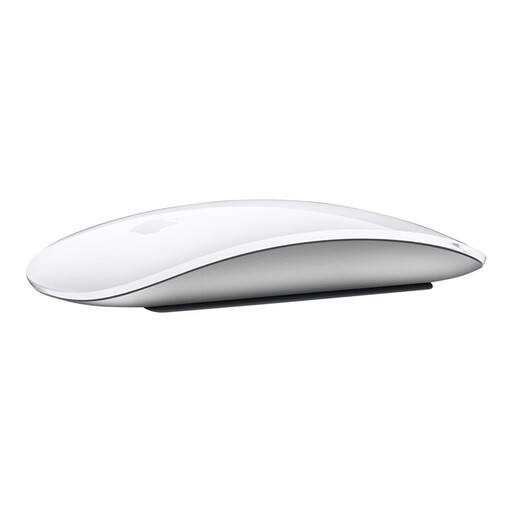
Why It Stands Out The Apple Magic Mouse redefines navigation with its seamless Multi-Touch surface. Instead of traditional buttons and a scroll wheel, the entire top surface acts as a trackpad, allowing you to scroll, swipe and click using intuitive gestures. It connects wirelessly via Bluetooth and features a rechargeable battery, making it a sleek and functional companion for any Mac or iPad.
Pros
Who is it for? This is the definitive Apple Mac mouse for users who are embedded in the Apple ecosystem and value design, aesthetics and the unique functionality of gesture-based controls.
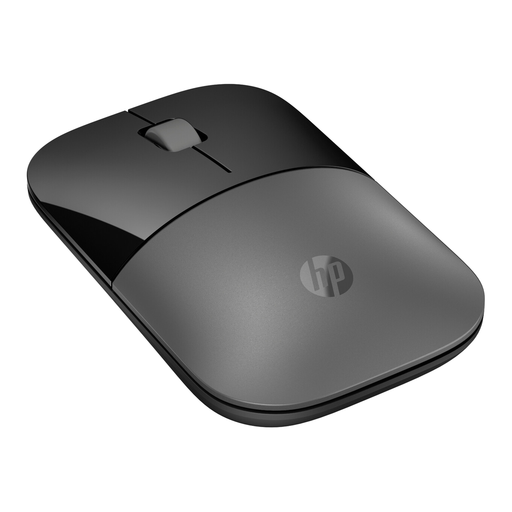
Why It Stands Out The HP mouse Z3700 is built for flexibility. Its standout feature is the dual-mode wireless connectivity, allowing you to connect via a 2.4GHz USB dongle or Bluetooth 5.0+. This makes it incredibly easy to switch between devices. Its slim, lightweight profile makes it an ideal mouse for a laptop, while its long battery life (up to 16 months on a single AA battery) means you can rely on it for extended periods.
Pros
Who is it for? This is a great option for mobile professionals, students and anyone who uses multiple devices and needs a versatile, portable and reliable wireless mouse.
A great mouse deserves a great keyboard. If you are aiming to create a coordinated and stylish workspace, consider completing your setup with a matching peripheral.
Explore our collection of silver keyboards to find the perfect partner for your new device.
1. What is the difference between an optical and a laser mouse? Both are types of optical mice, but they use different light sources. A standard optical mouse uses an LED light, which works well on most non-glossy surfaces. A laser mouse uses a laser beam, which can track more precisely on a wider variety of surfaces, including glass. For most everyday users, a modern optical mouse provides more than enough accuracy.
2. Do I need to install drivers for a new computer mouse? For the vast majority of mice, including all the models recommended above, you do not. They are "plug-and-play," meaning your operating system (Windows, macOS, etc.) will automatically recognise them as soon as you connect them. Some specialised gaming or design mice may come with optional software for customising buttons or sensitivity, but it is rarely required for basic operation.
mouse for a laptop, key factors are portability and connectivity. A compact, lightweight wireless mouse is often preferred to avoid carrying extra cables. A bluetooth mouse is particularly convenient as it connects directly without using up a valuable USB port. Also, consider models with long battery life to avoid being caught without power while on the move.