What matters when choosing
Compact webcam
Choose when: One or two colleagues sit close to a laptop and the camera can frame them together.
Trade-off: Check the actual seating width: OBSBOT specifies a 79.4° diagonal view for Meet 2, which may not include people spread along a sofa.
USB video bar
Choose when: Several people face the same display and need a front-of-room camera, microphones and speaker in one unit.
Trade-off: Plan its position, power and storage. Logitech specifies a 120° diagonal view for MeetUp 2, while Jabra specifies 180° horizontal coverage for the larger PanaCast 50; those angles use different measurements.
360-degree table camera
Choose when: Contributors sit around a table rather than facing a camera from one side.
Trade-off: The camera needs a suitable central position among laptops and papers; its all-round coverage adds little if everyone sits together facing one screen.
For a draft review in a shared flat, decide whether the seating fits the frame, then consider group audio and what must be set up or put away after each call.
| Concern |
What to check |
Who this matters to |
| Group visibility |
Compare the seating width and camera position with the stated field of view; check whether the angle is diagonal or horizontal. |
If colleagues sit beyond the edge of my laptop screen, I want remote attendees to see whoever is speaking without shifting the camera. Around 42% of consumers would put group visibility first. |
| Shared-room audio |
Check microphone placement and stated pickup conditions, whether a speaker is built in, and how the device connects to your laptop. |
When several people contribute from different seats, I need their comments to be heard without everyone crowding the laptop. Roughly 33% of consumers would prioritise shared-room audio. |
| Privacy and storage |
Check the mount, power arrangement and whether the exact product includes a physical lens cover or shutter. |
In a shared living space, I may need to remove the camera after a call and cover its lens between reviews. About 25% of consumers would make privacy and easy pack-away their primary concern. |
Compact webcams on Joybuy
These webcam options suit laptop-centred draft reviews where the group can sit within the camera's view. Check seating coverage and microphone pickup before choosing either for several people in one room.
 No image available
EMEET All-in-One 4K Webcam with Sony Sensor, 98° View
Consider this for a laptop-centred group if everyone fits within its stated view. The listing specifies 4K at 30 fps, a 98° adjustable field of view, fixed focus, four microphones with stated pickup within 10 feet, dual speakers and USB connection. Confirm how the view adjusts and what form of lens privacy protection the exact product provides.
View on Joybuy
 No image available
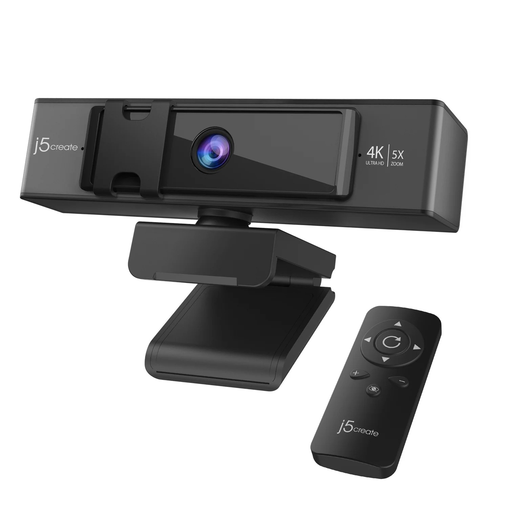
j5create JVCU435 USB 4K Webcam with 5x Digital Zoom, Black and Silver
This is an option for temporary laptop-centred reviews where remote reframing and covering the lens between calls matter. The listing specifies 4K video, remote-controlled 5x digital zoom and ePTZ, dual microphones, UVC/UAC support, clip or stand mounting and an included privacy cover. Check that its view includes the seating arrangement and that its microphones can pick up speakers from their planned positions.
View on Joybuy
Frequently asked questions
Will a conference camera let remote colleagues read our draft?
Share the draft as a file or through screen sharing so remote colleagues can read its text. Use the camera for the people discussing it; Jabra's whiteboard-camera feature on PanaCast 50 does not replace sharing a working text document.
How wide a view does a small group need?
Choose a view that includes the actual seating arrangement from the camera's planned position. OBSBOT specifies a 79.4° diagonal view for the compact Meet 2, while Logitech specifies 120° diagonal for MeetUp 2; compare like-for-like angle measurements and check the group's position before ordering.
Can I connect a USB video bar to my laptop?
A USB video bar can be a laptop-connected option, provided the exact model works with your laptop and meeting software. Yealink describes UVC40 as a standard UAC/UVC device; confirm the connector, supplied cable and power arrangement for the product you choose.
What should I check on a mains-powered bar for use in the UK?
Check the exact product's plug, power supply and voltage rating against the place where you will use it. Electrical Safety First states that UK nominal mains supply is 230 V at 50 Hz and that a travel adaptor does not convert either voltage or frequency.
What should I do with an old conference camera?
Use an appropriate electrical-recycling route or a retailer take-back option where available, rather than putting the device in ordinary household rubbish. GOV.UK explains that waste electrical and electronic equipment rules support the recovery, reuse and recycling of electrical products and components.


