Choose by the household task: a speaker or display suits voice control or an on-device screen, a camera is for monitoring, a hub coordinates compatible devices, and a streaming stick adds a TV-specific interface. Before buying, check the exact model’s security-update end date, required app or account, and update method against how long you expect to keep it. Cameras bring separate decisions about placement and access to footage, while hubs add compatibility checks; neither a brand-wide policy nor a stated minimum update period guarantees that every feature or service will continue.
Who this guide is for
People keeping devices for years
If you expect to keep a connected device for years, check the exact model’s stated security-update period and how updates are managed. The National Cyber Security Centre advises avoiding devices that are no longer supported, or whose support period will end soon.
Household camera buyers
If monitoring is your main task, consider account access, recording arrangements and what the camera might capture. The Information Commissioner’s Office says data-protection law applies when home CCTV captures someone else’s property, a public area or a communal space.
People coordinating several devices
If you want devices to work together, check the specific hub, app and device combination rather than relying on a protocol label alone. Confirm that the features you plan to use are compatible.
What to check before choosing
Start with your main household task, then compare the exact model’s support date, setup requirements and any ongoing service dependency.
| Concern |
What to check when buying |
Who this matters to |
| Security-support lifetime |
Find the update end date for the exact model and generation. Check whether a date is fixed or depends on purchase or manufacturing. |
If I plan to keep a device for years, I want its exact update end date before choosing; around 33% of consumers put support lifetime first. |
| Camera privacy and access |
Check camera placement, what footage or audio may include, and who can access recordings. |
If I use a camera, I want to know what it may capture and who can see footage before setting it up; around 27% of consumers put camera privacy and access first. |
| Interoperability and setup |
Check the exact model’s supported integrations, required phone or account, and firmware-update method. |
If I want automations across devices, I need the exact hub, app and device combination to work together; around 27% of consumers prioritise manageable setup and integration. |
| Services and replacement |
Read the terms for features that rely on an online service. Compare the intended use period with the disclosed security-support period. |
If a feature relies on an online service, I want to understand its terms and what I may need to replace later; around 13% of consumers put ongoing services and replacement first. |
Buying pitfalls
-
Assuming a brand-wide promise tells you a model’s remaining support
Update dates and conditions can differ by model, generation, hardware code or purchase channel, so a general policy may not tell you how long the device you are considering will receive updates.
Record the full model and the applicable minimum date before buying. Distinguish a stated minimum from updates a manufacturer may choose to provide afterwards.
You may need to reassess or replace the device sooner than expected.
-
Assuming a protocol label guarantees an automation will work
A hub’s stated protocols do not establish that every planned device or feature will be compatible.
Check each intended device and feature against the hub and app you plan to use.
If the combination does not work, you may need another hub or a replacement device.
-
Treating a camera as only a hardware purchase
Camera placement can affect privacy obligations if footage captures areas beyond your property.
Plan the camera’s position and account access before installation, and check recording-service terms separately. The Information Commissioner’s Office says data-protection law applies when home CCTV captures someone else’s property, a public area or a communal space.
Relevant brands to consider
Ring
A camera line for buyers whose main task is household monitoring.
- Ring lists Indoor Cam (2nd Gen) for security updates through at least 31 December 2030.
- That update date does not establish recording-service costs or independent camera effectiveness.
Roku
Separate streaming players for an existing television.
- Roku lists Streaming Stick 4K hardware codes 3820X and 3820X2 for critical security updates through at least March 2028.
- A Roku account is needed to download and stream channels; check the hardware code for the model you are considering.
Philips Hue
Smart lighting with a separately maintained Hue Bridge for bridge-based setups.
- Signify’s policy says it intends to provide a Hue Bridge bought from an authorised reseller with required security, quality and interoperability updates for a minimum total of three years from purchase.
- This policy is distinct from its undertaking for major platform updates; check the exact bridge and purchase conditions.
TP-Link
Tapo lighting and plugs for app-managed switching and lighting.
- TP-Link says listed Tapo firmware updates are delivered through its app and describes a support-period policy tied to a product’s end-of-life date.
- The brand-level policy does not give a specific end date for every plug or bulb; check the exact model’s support information.
Aeotec
Smart Home Hub 2 for households planning compatible multi-device automations.
- Aeotec and SmartThings describe Zigbee, Thread and Matter support for Smart Home Hub 2.
- Protocol support does not confirm that every accessory will work or state a minimum security-update end date for this UK model.
Joybuy products
These Joybuy product choices cover indoor monitoring, compatible-device coordination, smart lighting and plugs, and streaming for an existing TV.
 No image available
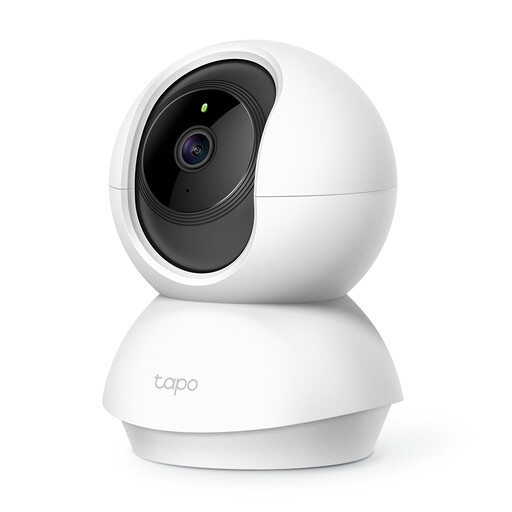
Tapo C200 Pan/Tilt Home Security Wi-Fi Camera
For indoor household monitoring; check that the app and Wi-Fi setup suit your home and consider the privacy mode when deciding when the camera should record.
Plan placement carefully: the Information Commissioner’s Office says data-protection law applies if home CCTV captures someone else’s property, a public area or a communal space.
Joybuy
 No image available
Xiaomi Smart Home Hub 2
For coordinating Xiaomi and Mijia devices; check that the exact devices and automations you plan to use are compatible.
Joybuy
 No image available
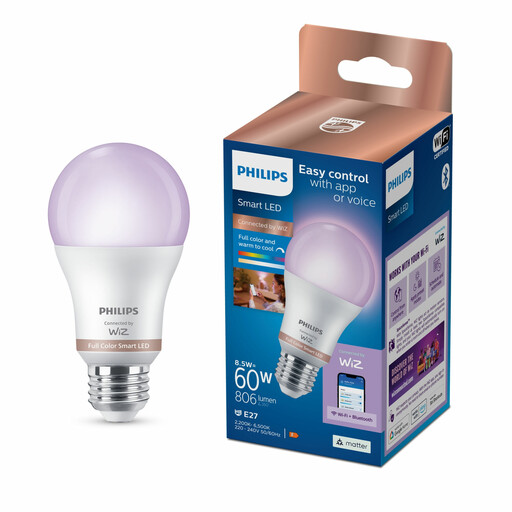
Philips Smart Light Bulb, E27, Full Colour and Warm/Cool Spectrum, 60W
For scheduled app-controlled lighting without an added hub, as described for this Wi-Fi bulb.
E27 fitting; full colour and warm/cool spectrum; 60W as stated in the product name. Requires Wi-Fi and the WiZ app; use only in dry environments or an appropriately rated luminaire.
Joybuy
 No image available
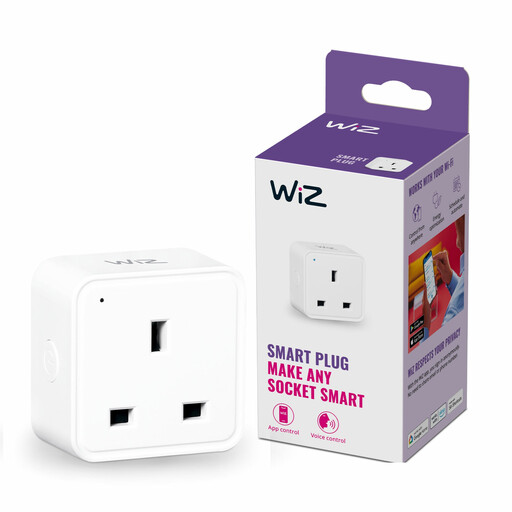
WIZ Smart Plug, White
For app-based remote switching and schedules with devices that use simple on/off power.
Wi-Fi and WiZ app setup; designed for dry environments.
Joybuy
 No image available
Roku Streaming Stick 4K
For adding streaming to a TV with an HDMI port; check the TV connection and the exact hardware code before choosing.
Roku says an account is needed to download and stream channels.
Joybuy
FAQs
Does UK product-security law guarantee a fixed update period?
No single duration applies to every covered product. UK government guidance says manufacturers must state the minimum period for which a covered product will receive security updates, so compare the exact model’s disclosure with how long you intend to use it.
Does the same product-security rule apply to every connected device supplied in Northern Ireland?
No blanket conclusion applies. UK government guidance identifies an exception for products made available for supply in Northern Ireland where specified Windsor Framework legislation applies. Check whether that condition applies to the particular product before making a claim about its applicable regime.
What should I check when setting up and maintaining a connected device?
Follow the manufacturer’s setup instructions and check how the exact model receives firmware updates. TP-Link says listed Tapo devices update through its app rather than a browser, and automatic-update availability varies by model.
Can a household camera record beyond my property without additional duties?
The Information Commissioner’s Office says data-protection law applies when home CCTV captures someone else’s property, a public area or a communal space. Where possible, position the camera to capture only your property.
Does a security-update date guarantee a device’s lifespan or every online feature?
No. Ring says its update period is not a guarantee of device lifespan, while Signify distinguishes Hue Bridge security, quality and interoperability updates from major platform updates. Check service terms separately for features that rely on an app or online service.


