Start with the games your child wants to play and the platforms their friends use, then choose a console ecosystem whose child-account and communication settings work for your household. PlayStation, Xbox and Nintendo offer different family controls, and multiplayer membership requirements vary by platform and game; check the intended games before buying.
Who this setup is for
Parents managing online communication
These households want their child to play with friends while retaining control over chat, multiplayer interaction and account privacy. Ofcom’s UK research identifies online gaming and interaction with people children know only online as relevant parts of children’s online experiences.
Families matching an existing friend group
The child has particular games and friends in mind. For these households, the games’ availability, online modes and any cross-play arrangements matter more than choosing a console by its general catalogue alone.
Households managing spending and playtime
These families need a separate child account and settings they can review for purchases, game access or time spent playing. The available settings and whether they apply to an account or a shared console differ by ecosystem.
What matters when choosing
Match the games and friend group before comparing hardware, then check how each ecosystem handles the child’s account and online access.
PlayStation 5
Consider it when: The intended games and friends are on PlayStation, and you want controls configured for a separate child account.
Account for: PlayStation says most PS4 and PS5 online multiplayer games require PlayStation Plus; check each intended game.
Xbox Series S
Consider it when: The games and friends fit Xbox, and an all-digital console suits the household.
Account for: Xbox Series S does not use physical game discs. For online console multiplayer, check the game and applicable Game Pass plan; Xbox says free-to-play multiplayer is an exception.
Nintendo Switch 2
Consider it when: The intended games are available on Switch 2 and both handheld and TV play matter.
Account for: Nintendo says Switch parental controls apply to the console rather than each user. Many online games require Nintendo Switch Online, while GameChat has additional conditions for children.
| Concern |
What to check |
Who this matters to |
| Communication and multiplayer |
Identify the chat features the child will use, then check the relevant child-account and multiplayer settings before enabling them. |
If my child will play with others online, I want to decide which conversations and interactions are allowed; around 31% of consumers put communication supervision first. |
| Games and friends |
Check each intended game’s platform, online mode, cross-play information and PEGI age rating. |
When the point is to join a particular game with friends, a different console may not meet that need; for around 25% of consumers, matching games and friends is the primary concern. |
| Child account and household limits |
Check how to create the child’s account and configure purchase and playtime settings. Review any balance or gift cards on the account. |
I need settings that fit my child rather than an adult profile, especially for purchases and playtime; account and household limits come first for around 25% of consumers. |
| Membership and connection |
Check the game’s membership requirement and the connection conditions for any online feature you intend to use. |
If online play is the reason for buying, I need to know what access the game requires before setting it up; around 19% of consumers prioritise membership and connection planning. |
Buying pitfalls to avoid
-
Choosing the console before checking the games
A console choice alone cannot establish whether a particular game, online mode or friend group will work together. Cross-play also varies by game.
List the intended games and friends’ platforms, then check each game’s UK store or publisher information for availability, online access, account requirements and PEGI rating.
-
Using an adult account for the child
Child-specific restrictions depend on the family and account setup. PlayStation says each child needs a separate child account for its online services, and Ofcom advises registering children with their correct age.
Create the child account with the correct date of birth, set up the adult family manager or organiser and review communication and purchase settings before online play begins.
-
Assuming purchase approval covers every payment method
Xbox Support says purchases can still be made from a child account using gift cards or money in its Microsoft account.
Review the account balance, gift cards, saved payment methods and approval settings together.
-
Overlooking shared-console and GameChat settings
Nintendo says Switch parental controls apply to the whole console, not separately to each user. Switch 2 GameChat has additional requirements, including parent or guardian approval for children.
Set shared-console restrictions with everyone who uses it in mind. If the child intends to use GameChat, check its membership, phone-registration and approval requirements separately from the game’s online-play requirements.
Console brands to consider
PlayStation
A PS5 ecosystem to consider when the child’s intended games and friends use PlayStation.
- PlayStation describes separate child accounts and family settings for communication, game access, playtime and monthly spending limits.
- PlayStation says most PS4 and PS5 online multiplayer games require PlayStation Plus; the intended game’s requirements still need checking.
Xbox
An Xbox Series ecosystem to consider when the games and friend group fit Xbox; Series S is an all-digital console.
- Xbox Family Settings includes screen-time, age-content, communication and multiplayer settings for family members.
- Xbox Support notes that child-account balances and gift cards can still be used for purchases. Check the relevant Game Pass plan for paid-game online console multiplayer; free-to-play multiplayer is an exception.
Nintendo
A Switch or Switch 2 ecosystem to consider when the child’s games fit Nintendo and handheld alongside TV play is useful.
- Nintendo provides Switch parental controls and separate Nintendo Account settings relevant to family purchasing and friend-related restrictions.
- Nintendo says Switch parental controls apply across the console. Many online games require Nintendo Switch Online, and Switch 2 GameChat has further conditions for children.
Joybuy products for this setup
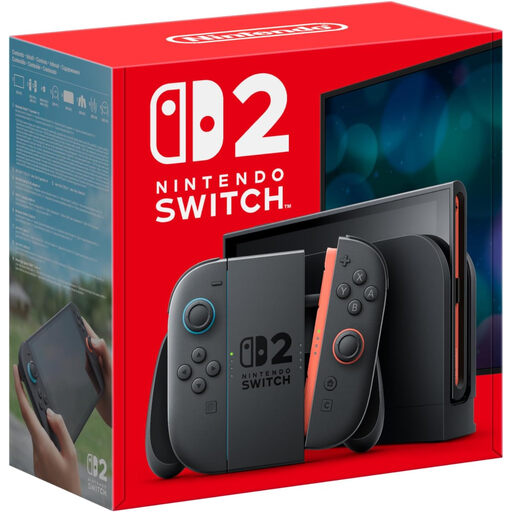
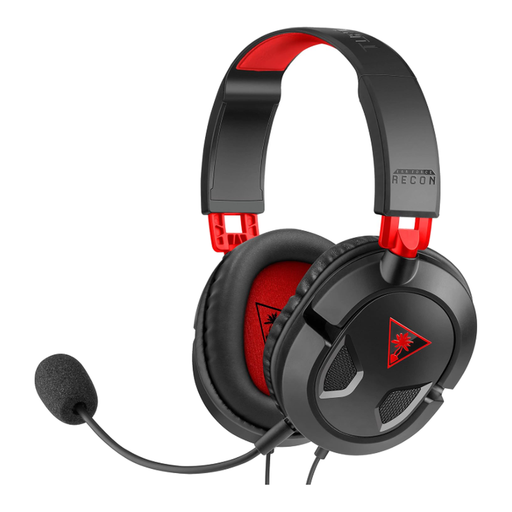
These choices cover a Nintendo Switch 2 console and a wired headset for considering voice communication with the platforms named for that headset. A headset does not replace child-account communication settings.
 No image available
Nintendo Switch 2 Console (UK Version)
Consider this console if the child’s intended games and friends fit Nintendo Switch 2. Nintendo says many compatible online games require Nintendo Switch Online, with exceptions for some free-to-play titles; check each game before buying.
If the child will use Switch 2 GameChat, Nintendo requires parent or guardian approval through its Parental Controls app, as well as a paid membership and mobile-phone-number registration.
View on Joybuy
 No image available
Turtle Beach Recon 50 Wired Gaming Headset
Consider this wired headset if voice communication is part of a child’s planned setup on one of the platforms named for this variant: PC, Xbox Series X or S, Xbox One, PS5 or PS4.
Check the connection needed for the exact device in use. Set who the child may communicate with through the relevant family-account controls rather than relying on a headset control alone; confirm compatibility before buying it for a Nintendo console.
View on Joybuy
Common questions
Should my child use my adult console account?
Set up a separate child account with the correct date of birth rather than using an adult account for online play. PlayStation requires a separate child account for each child using its online services, while Ofcom advises parents to register children with their correct age so age-related platform settings can apply.
Does every online multiplayer game need a paid membership?
No; requirements depend on the game and platform. PlayStation says most PS4 and PS5 online multiplayer games need PlayStation Plus. Nintendo says many compatible games need Nintendo Switch Online but identifies free-to-play exceptions, while Xbox says free-to-play multiplayer is open to Xbox players and includes online console multiplayer in specified Game Pass plans. Check the intended game’s UK listing and the current membership terms.
What does a child need to use Nintendo Switch 2 GameChat?
Nintendo says Switch 2 GameChat requires an internet connection, a paid Nintendo Switch Online membership and mobile-phone-number registration. A child also needs parent or guardian approval through the Nintendo Switch Parental Controls app.
Does a PEGI rating show whether a game will be easy to play?
No. PEGI says its age ratings address content suitability, not difficulty. Check the game’s play requirements and online communication features separately when deciding whether it suits your child.


