Choose a handheld or hybrid console if you want to inspect puzzle details close up without relying on a TV; Nintendo Switch – OLED Model offers handheld, tabletop and TV modes, while Steam Deck OLED offers access to Steam games but calls for a game-by-game compatibility check. Choose a PS5 setup if you prefer a larger TV or monitor, bearing in mind that its picture depends on the connected display. Whichever route appeals, check that your exact puzzle game and edition are available before choosing the hardware.
Who each setup suits
Close-up solo puzzle players
If you want to read grids, icons and clues without relying on a TV, compare built-in screen size and how comfortably you can position the device for a session. Nintendo UK documents the Switch – OLED Model's adjustable stand, while Valve specifies a built-in screen for Steam Deck OLED.
Steam puzzle-library owners
A handheld route may appeal if you already use Steam, but check each game's Steam Deck compatibility label. Valve notes that a Playable game may require manual adjustments.
Living-room puzzle players
If you prefer playing on a larger TV or monitor, consider the PS5 alongside that display. PlayStation UK documents system settings including display zoom and controller adjustments, while noting that picture quality depends on the connected setup.
What matters when choosing
Nintendo Switch – OLED Model
Choose it when: You want to move between handheld, tabletop and TV play using one hybrid console.
Bear in mind: Nintendo UK's approximate 4.5–9-hour battery range is not a promise for a particular game or session.
Steam Deck OLED
Choose it when: Steam access is important and you want a built-in handheld display.
Bear in mind: Valve's compatibility labels apply to individual games; Playable titles can require adjustments.
PS5 with a TV or monitor
Choose it when: You chiefly play at a larger display or want PS5 system accessibility settings.
Bear in mind: PlayStation UK says the resulting image depends on your home-entertainment setup.
| Concern |
What to check |
Who this matters to |
| Close-up readability |
Compare built-in screen size and the game's text-size or display options; for PS5, assess the connected screen. |
If I spend a session reading small clues and grids, I want to judge the screen I will actually look at. Roughly 33% of consumers put close-up display readability first. |
| Flexible play positions |
Check the handheld, tabletop and TV modes you intend to use, plus charging needs during portable play. |
I want to change where I sit without changing gaming devices, but unplugged sessions still need planning. Around 27% of consumers make play-format flexibility their primary concern. |
| Game compatibility |
Confirm the exact title and edition on your chosen platform; read the game's Deck status if considering Steam Deck. |
If I have a particular puzzle game in mind, its availability matters more to me than the console's screen specification. About 20% of consumers put game compatibility first. |
| Large-screen setup |
Check your TV or monitor's capabilities and the console's display and controller settings. |
I would rather work through clues on a larger screen, or I need settings such as display zoom. Approximately 20% of consumers prioritise the external-display and accessibility setup. |
Buying pitfalls
-
Choosing the console before checking the game
A puzzle title available on one platform is not necessarily available on another. Valve also distinguishes Steam Deck Verified games from Playable games, which may need adjustments, and from Unsupported or Unknown titles.
Start with the exact game and edition, then check its availability and any Steam Deck compatibility notes before settling on hardware.
-
Assuming a PS5 determines the picture on its own
PlayStation UK says PS5 image quality depends on the home-entertainment setup. The console's HDR or resolution capabilities do not establish what your particular screen will show.
Check the TV or monitor you plan to connect before treating a display feature as a reason to choose PS5.
If you do not already have a suitable display, this route also involves obtaining one.
-
Treating a battery range as a fixed session length
Nintendo UK gives an approximate 4.5–9-hour range for Switch – OLED Model; Valve states 3–12 hours for Steam Deck OLED depending on content. Neither figure guarantees runtime for your chosen game and settings.
If you expect long handheld sessions, plan where you can charge rather than choosing by the upper end of a stated range alone.
-
Overlooking the Digital Edition's lack of a disc drive
PlayStation UK describes the PS5 Digital Edition as an all-digital console: buying and downloading games requires a PlayStation account and internet connection.
If you want to use physical game discs, compare a disc-capable option instead of assuming every PS5 accepts them.
Brands to consider
Nintendo
Nintendo's Switch – OLED Model is a hybrid option for handheld, tabletop and TV puzzle play.
- Nintendo UK specifies a 7-inch OLED screen, adjustable stand and dock for this model.
- Its approximate battery range varies with use; check that your chosen puzzle game is available for Nintendo Switch.
Valve
Valve's Steam Deck OLED provides a handheld route for people interested in Steam games.
- Valve specifies a 7.4-inch HDR OLED display and an up-to-90Hz refresh rate for the OLED model.
- Deck compatibility varies by title; Valve says Playable games may require manual changes.
PlayStation
PlayStation's PS5 is a TV- or monitor-based option with system display and controller accessibility settings.
- PlayStation UK documents PS5 display zoom and controller-setting options.
- Picture quality depends on the connected setup. The PS5 Digital Edition has no disc drive.
Joybuy product choices
These choices cover handheld play and a PS5 setup for a TV or monitor. They are different models from some of the console examples above, so check each product and your preferred puzzle game on its own terms.
 No image available
Nintendo Switch 2 Console (UK Version)
Consider this console if you want handheld puzzle play with the option to use a TV. Check your exact game's availability, its small-text options and the contents of this UK Version before buying.
View on Joybuy
 No image available
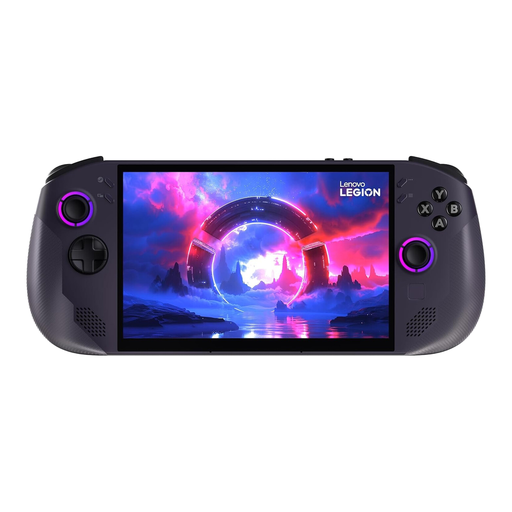
Lenovo Legion Go S – AMD Ryzen Z2 Go, 1TB
This handheld option suits a closer look if you want to play puzzle games away from a TV. Check the exact game's compatibility and any setup it needs on this device; the listed configuration is AMD Ryzen Z2 Go with 1TB storage.
View on Joybuy
 No image available
Sony PlayStation 5 Digital Edition, Slim Version
Consider this PS5 for puzzle play on a TV or monitor, checking both the game's availability and your display's capabilities. PlayStation UK states that the Digital Edition has no disc drive; games are bought and downloaded through PlayStation Store using an account and internet connection.
View on Joybuy
Common questions
Do I need an OLED console for puzzle games in a dark room?
No: OLED is a screen option, not a requirement for puzzle games. Nintendo UK specifies a 7-inch OLED screen for Switch – OLED Model, and Valve specifies a 7.4-inch HDR OLED screen for Steam Deck OLED; if you choose a PS5 instead, PlayStation UK says the resulting image depends on your TV or monitor. Check the text and display options in the game you intend to play.
How can I check whether a Steam puzzle game works on Steam Deck?
Look up the exact title's Steam Deck compatibility label and accompanying notes. Valve distinguishes Verified games, which work out of the box, from Playable games that may need manual adjustments, as well as Unsupported and Unknown titles.
Can a PS5 Digital Edition play physical game discs?
No. PlayStation UK describes the PS5 Digital Edition as having no disc drive; buying and downloading games through PlayStation Store requires an account and internet connection. If discs matter to you, consider a disc-capable option.
Should I check age ratings when buying a puzzle game for a child?
Yes. UK government guidance says video games have age ratings under UK law using the PEGI system, and PEGI explains that its ratings help consumers assess content suitability. Check the rating of the exact game and edition; it is not a measure of puzzle difficulty.


