What to check before buying
Choose the device and its account setup first. Then check how the intended game handles communication, whether accessories fit that device and how the connection performs when the household is busy.
| Concern |
Buying checks |
Who this matters to |
| Child accounts and communication |
Check child-account setup, communication and multiplayer permissions, and how adult access is protected. |
If a child will play with others online, I want an adult to manage who they can contact rather than relying on an unrestricted profile. About 33% of consumers put account and communication controls first. |
| Shared connection |
Check broadband availability at the address and what happens during simultaneous gaming, calls and streaming. |
When several people use the connection at once, I need to know whether gaming will fit around their calls or streams. Connection capacity comes first for about 27% of consumers. |
| Voice chat and accessories |
Check the headset’s connection with the exact device and the platform and game’s chat permissions. |
For voice chat with approved contacts, I need compatible equipment as well as the right permissions; the headset alone cannot set those rules. About 20% of consumers prioritise communication and accessory fit. |
| Console or computer |
Decide who will share the device, where it will be used and whether it must also serve general computing needs. |
If the device must do more than run games, I need to weigh a Windows computer’s flexibility against the account setup it requires. That platform choice is the primary concern for about 20% of consumers. |
Joybuy products for this setup
These consoles, headset and controllers are options for a Nintendo Switch-centred family setup. Choose the console and account arrangements before deciding which accessories the intended players and games need.
 Image unavailable
Nintendo Switch 2 Console + Nintendo Switch Sports Resort
A console option for a household planning Switch 2 play and considering the named game. Check the precise game entitlement and any online membership included with this bundle before relying on either for online play.
Nintendo says Switch 2 parental controls apply to the console rather than an individual user. Check the current account and parental-approval conditions before enabling GameChat for a child.
View on Joybuy
 Image unavailable
Nintendo Switch 2 Console (UK Version)
A Switch 2 console option when the family wants to choose games and online arrangements separately. Confirm whether the intended game or an online membership is included before planning multiplayer use.
Nintendo’s parental controls apply at console level; GameChat has separate requirements for supervised users.
View on Joybuy
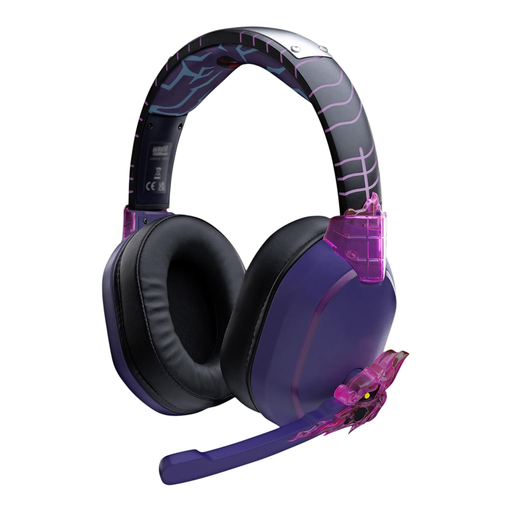 Image unavailable
Lexip Naruto Sasuke Headset
A headset to consider if approved voice chat is part of the family’s gaming plan. Confirm its connection and microphone operation with the exact console, controller or computer to be used.
A headset does not decide who can contact a child; set platform and game communication permissions separately.
View on Joybuy
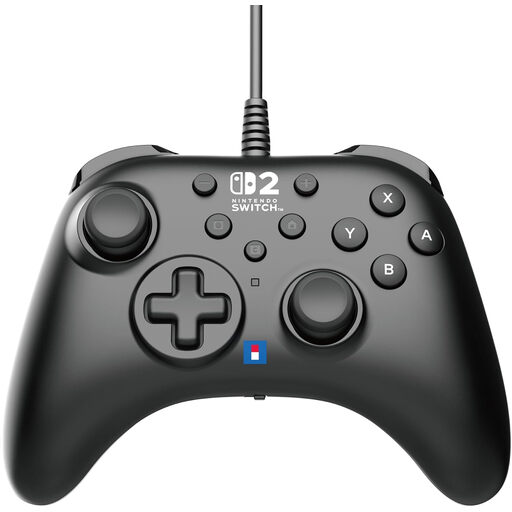 Image unavailable
HORI HORIPAD Turbo Wired Controller – Black (Nintendo Switch)
A wired controller option for a Nintendo Switch setup where the player can sit within cable reach. Confirm the supplied regional variant and compatibility with the exact console, particularly if it is a Switch 2.
Check whether the intended games require motion controls or HD Rumble before choosing this controller.
View on Joybuy
 Image unavailable
Turtle Beach Rematch Wireless Controller for Nintendo Switch – Invincible Mario
A wireless controller option for a family that wants another controller for Switch play. Check compatibility with the exact console and any controls the intended games require.
If Switch 2 GameChat is part of the plan, check whether this controller has the button access needed for the way the family intends to use it.
View on Joybuy
Questions families ask
Do parental controls limit chat to people my child knows?
Not automatically. Set up the child or supervised account, then check platform friend, communication and multiplayer permissions alongside the game’s own settings. Nintendo says supervised Switch 2 GameChat users can chat with friends approved by a parent through its parental-controls app; other systems have different rules.
Should we buy a headset before enabling online chat?
Buy one when voice communication is an approved use case and its connection works with the intended device. Set contact permissions in the platform and game first: the headset itself cannot restrict who a child talks to.
How can we tell whether the home connection needs changing?
Check the address in Ofcom’s broadband checker and observe the connection when gaming coincides with calls or streaming. Ofcom describes ultrafast broadband of 300 Mbit/s or more as suited to several people using a connection at once, but checker speeds are predictions and actual speeds can differ.
Is a PEGI age rating enough to assess online play?
No. PEGI ratings guide decisions about game content; they do not replace checks of the game’s chat, multiplayer and other online-interaction settings or the platform’s child-account controls.
What should we set up after buying a PlayStation for a child?
Create a separate child account under the family manager and configure its playtime and communication permissions. Sony also advises protecting adult access with a console restriction passcode and restricting guest login or new-user creation to reduce ways around those settings.


