What matters at a small desk
Decide whether the desk can accommodate a monitor before comparing consoles. Then check your intended games and the play mode you would actually use: an integrated screen alone does not guarantee tabletop play, access to an existing library or local multiplayer.
| Concern |
What to check |
Who this matters to |
| Desk footprint |
Decide between handheld, tabletop and monitor play; check the exact model’s stand and display-output options. |
If I cannot leave a monitor and console on the desk, I need a screen I can put away after playing. Around 37% of consumers put a self-contained setup first. |
| Existing games |
Check each intended game on the chosen platform; confirm Steam Deck compatibility or the PS5 and Remote Play requirements for Portal. |
I want to keep playing games I already own rather than assume they will transfer to another device. For around 27% of consumers, access to an existing game library is the main concern. |
| Monitor-based play |
Measure the available space and check the monitor’s HDMI input; decide whether an all-digital console works for you. |
My monitor already has a place on the desk, so I would rather fit a compact fixed console beside it. That is the primary need for around 18% of consumers. |
| Tabletop sharing |
Check the game’s player count and play modes, plus the stand and controllers needed by the exact device. |
When someone joins me for a platform game, I need both players to see the screen and use suitable controls. Around 18% of consumers prioritise making shared tabletop play workable. |
Relevant brands to consider
Compare the specific device and its requirements rather than choosing by brand alone: these product lines solve the small-desk problem in different ways.
Nintendo
The Switch family includes handheld, tabletop and TV-output options, but the available modes depend on the model.
- Switch OLED has an adjustable tabletop stand; Switch 2 combines an integrated screen with tabletop play and HDMI output.
- Switch Lite is smaller and handheld-focused, but has no integrated stand or TV mode. Check game-specific play modes before choosing any Switch model.
Valve
Steam Deck OLED is a portable PC option for playing compatible Steam games on its own screen, with external-display use available through a dock.
- Its integrated display lets you play without reserving space for a desk monitor.
- Some games need additional configuration or are incompatible with SteamOS; check Valve’s rating for each intended title.
PlayStation
PlayStation Portal offers screen-and-controls Remote Play for someone who already owns a PS5.
- Compatible games on the PS5 can be played away from the main TV over Wi-Fi.
- Portal is not standalone and cannot connect to a PS4 as its host; PS5 ownership and a suitable network are essential.
Xbox
Xbox Series S is a compact fixed-console option for a desk that already has a suitable display.
- Xbox lists the standard 512 GB Series S model at 6.5 cm × 15.1 cm × 27.5 cm.
- It requires an external display and has no optical disc drive; the monitor still determines much of the desk space needed.
Joybuy product choices
These choices cover two ways to keep a monitor off the small desk: a Nintendo console with its own screen, and a Remote Play device for someone who already owns a PS5. They serve different game libraries and are not interchangeable.
 No image available
Nintendo Switch 2 Console (UK Version)
Consider this for platform games you can play handheld or in tabletop mode without a separate desk monitor; check each game’s supported modes first.
Nintendo specifies a 7.9-inch, 1920 × 1080 integrated display. Dock-based HDMI output provides an option for a compatible monitor later.
View on Joybuy
 No image available
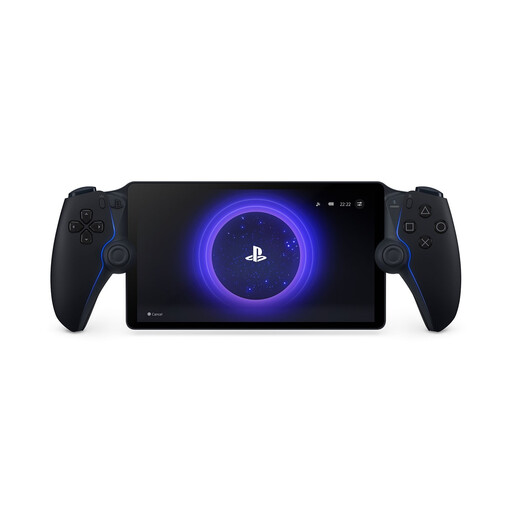
Sony PlayStation Portal Remote Player, Midnight Black (PS5)
Consider this if you already own a PS5 and want to play compatible games at a small desk without putting a TV there.
It has an 8-inch, 1080p screen and uses Wi-Fi for Remote Play. It is not a standalone console: check your intended game and network setup before buying.
View on Joybuy
Common questions
Can I play platform games at a small desk without a monitor?
Yes, if the games you want support a device with its own screen. Switch 2, Switch OLED, Switch Lite and Steam Deck provide handheld options, although their tabletop and external-display arrangements differ. PlayStation Portal has a screen too, but needs a PS5 and Wi-Fi.
Can Switch Lite connect to my desk monitor?
No. Nintendo says Switch Lite does not support TV mode or the Switch dock. If monitor output matters, check a Switch model that offers it and confirm the connection you intend to use.
Is PlayStation Portal a standalone console?
No. PlayStation Portal uses Remote Play to access compatible games on a PS5 over Wi-Fi. PlayStation says it cannot use a PS4 as its host console.
Will every Steam platform game run on Steam Deck?
No. Valve says some Steam games need additional configuration and some are incompatible with SteamOS. Check the current Steam Deck compatibility rating for each game you plan to play.


