Choose a controller for the console or computer your flat uses most, then check the exact game’s local-player count and controller requirements before buying enough for everyone. An Xbox Wireless Controller suits an Xbox and Windows PC setup; DualSense fits a PS5-first setup, with some PC features depending on the connection and game. For Switch, a Joy-Con pair can serve two players in compatible games, while a wired full-size pad suits a fixed setup where a cable is practical.
Who is choosing?
Mixed Xbox and PC flatmates
If the shared setup moves between an Xbox console and a Windows PC, the Xbox Wireless Controller is one controller family to assess for both. Microsoft lists support for those devices; the individual PC game still needs checking for local controller play.
PS5-first co-op players
Extra controllers for a shared PS5 session should be chosen around the games everyone plans to play. For occasional PC use, Sony says DualSense haptic feedback requires USB on PC, while adaptive triggers depend on game support.
Switch households sharing two-player games
Nintendo says detached Joy-Con can act as two individual controllers. That makes sharing a pair worth considering when the particular Switch game supports one Joy-Con per player; other games may need a different arrangement.
What matters when buying?
For local co-op, settle the host platform and the game’s controller arrangement before deciding how many pads the flat needs.
Xbox Wireless Controller
Choose when: Xbox and Windows PC are the main devices; Microsoft lists support for both.
Bear in mind: Each player using a full-size pad needs a controller, and PC game support varies by title.
PlayStation DualSense
Choose when: The shared-screen setup centres on PS5, with supported PC or other-device use as an additional consideration.
Bear in mind: Sony says PC haptic feedback requires USB and adaptive triggers require game support.
Nintendo Switch Joy-Con pair
Choose when: A Switch game supports two players using one detached Joy-Con each, as described by Nintendo.
Bear in mind: Single-Joy-Con controls depend on the game, and players may prefer a full-size grip.
Wired Switch pad
Choose when: Play stays at a fixed TV setup and a full-size controller with a cable suits the seating arrangement.
Bear in mind: Check the chosen pad’s cable reach, connection and game requirements before arranging seats.
| Concern |
What to check |
Who this matters to |
| Platform and game fit |
Check the host device, the exact game’s local-player count and its supported controller arrangement. |
If I am buying pads for a group session, I need to know that the game can accommodate our planned setup before adding controllers. Around 42% of consumers would put platform and game fit first. |
| Use across devices |
Check support for each intended device and whether the desired features work over Bluetooth or require USB. |
When flatmates move between a console and a computer, I want a full-size pad I can use on both without assuming its features carry over. Cross-device use would come first for roughly 33% of consumers. |
| Two-player Switch sharing |
Confirm one-Joy-Con-per-player support and the required controller orientation in the particular game. |
If two of us want to start a compatible Switch game together, I would rather establish whether we can share a Joy-Con pair before adding full-size pads. About 25% of consumers would prioritise that two-player arrangement. |
Checks before you buy
-
Buying pads before checking the game
A controller that connects to the host device will not necessarily meet a particular game’s local-player or input requirements. Steam provides controller-oriented game filters, but the relevant game details still matter.
Check the game’s store page or official support information for its local-player count and supported controller arrangement before deciding on quantity.
A different arrangement may mean obtaining additional compatible controllers.
-
Expecting identical DualSense features on wireless PC play
Sony says DualSense haptic feedback requires a USB connection on PC and adaptive triggers require support from the game.
If either feature influences your choice, check the individual PC game and plan the required connection rather than assuming Bluetooth provides the same experience as PS5.
-
Counting Switch controllers without considering Bluetooth audio
Nintendo says Switch wireless-controller limits vary with controller type and active features. With Bluetooth audio connected, no more than two wireless controllers can be connected.
Test the intended group arrangement before play, counting individual Joy-Con where relevant. If more than two wireless controllers are needed, disconnect Bluetooth audio.
Brands to consider for these setups
Xbox
Microsoft’s Xbox Wireless Controller is an official route for Xbox consoles and Windows PC.
- Microsoft lists Xbox Wireless and Bluetooth connections, device switching, textured grips and a hybrid D-pad.
- Support for the controller does not establish a PC game’s local-player count or its support for multiple pads.
PlayStation
DualSense is an official controller route for PS5 owners considering use on other supported devices.
- Sony lists USB-C and Bluetooth connections for supported devices.
- Sony says PC haptic feedback requires USB and adaptive triggers depend on game support; feature availability can differ by device.
Nintendo
Joy-Con suit Switch local play where the chosen game supports the intended controller arrangement.
- Nintendo says detached Joy-Con can operate as two individual controllers for compatible co-operative play.
- Controller limits vary by type and active features; Nintendo says Bluetooth audio limits the console to two connected wireless controllers.
PowerA
A wired, full-size Switch controller is another route for a fixed TV setup.
- Joybuy describes the PowerA Enhanced Wired Controller – Zelda: Hyrule Defender as Nintendo-licensed, with a 3 m cable and two mappable buttons; those details apply to that model.
- A wired controller needs a suitable connection and cable route between the console and seating.
Joybuy controller choices
These controllers cover Switch, Xbox and PS5 setups, including a wired option for Switch. Match the chosen model to your host device and the games your flat plans to play.
 No image available
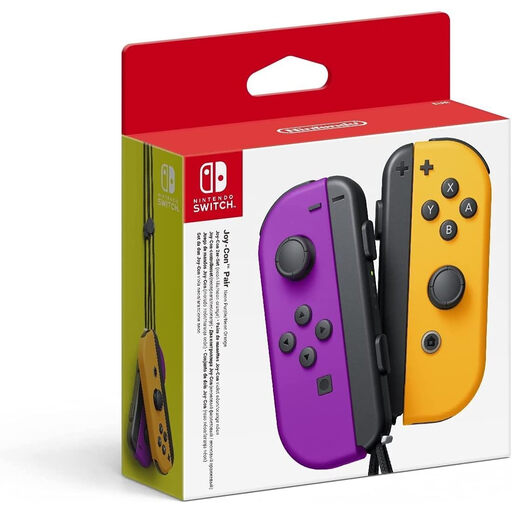
Nintendo Joy-Con Pair – Neon Purple/Neon Orange
Consider this pair for a Switch game that allows two people to play using one Joy-Con each. Check the game’s required controller arrangement before counting the pair as two player controls.
View on Joybuy
 No image available
Xbox Wireless Controller – Carbon Black
This wireless model suits a flat using an Xbox console or Windows PC, devices Microsoft lists for the Xbox Wireless Controller. Check each PC game’s controller support and local-player arrangement before adding one for every player.
View on Joybuy
 No image available
Sony DualSense Edge PS5 Wireless Controller – White
Consider this DualSense Edge model for a PS5-first shared setup. Confirm the game’s local-player count and required controllers; if PC use matters, check feature support and the intended connection separately.
View on Joybuy
 No image available
Microsoft Xbox Elite Wireless Controller Series 2
For an Xbox Series X setup, check whether this Elite Series 2 controller meets the particular game’s local-play requirements. If you also plan to use an Xbox One or PC, confirm compatibility for the exact variant before buying: the listing’s platform details differ.
View on Joybuy
 No image available
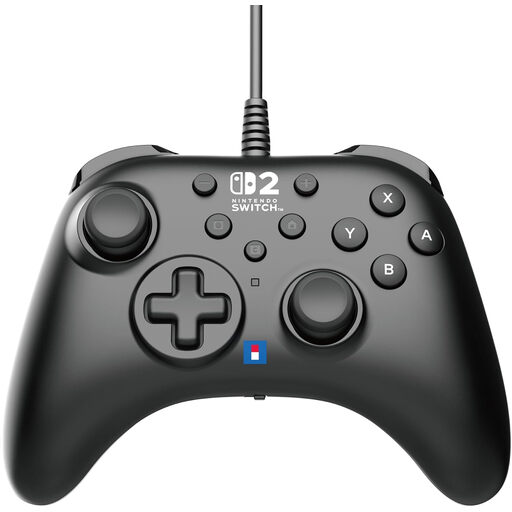
HORI HORIPAD Turbo Wired Controller – Black (Nintendo Switch)
This wired Switch pad is a choice for a fixed seating arrangement where a cable is acceptable. Check the connection, cable reach and the particular game’s controller requirements before setting up a group session.
View on Joybuy
Questions about local co-op
How many controllers do we need for local co-op?
The game’s local-player count and supported controller arrangement determine how many you need. Nintendo says detached Joy-Con can work as two individual controllers, but check whether your particular Switch game allows one per player or requires a pair or full-size pad for each person.
Will DualSense features work on PC just as they do on PS5?
Not necessarily: Sony says DualSense haptic feedback on PC requires USB, while adaptive triggers require game support. Check the game and connection you intend to use before choosing a controller for those features.
Can Bluetooth audio affect Switch multiplayer?
Yes. Nintendo says no more than two wireless controllers can be connected to Switch while a Bluetooth audio device is connected. Controller limits also vary by type and active features, so test the planned arrangement before a larger session.


