Console football players using a TV
If your game runs on an Xbox, PS5 or Nintendo Switch, start with controller support for that console. Then consider wireless use and whether you need another controller for local matches.


Choose a controller that supports the console or PC running your football game; the size of the television does not determine compatibility. Xbox Wireless Controller, DualSense and Nintendo Switch Pro Controller each have different supported devices, while a PC setup offers further connection choices. Once you know the playing device, check the game, connection method and practical distance from your seat.
If your game runs on an Xbox, PS5 or Nintendo Switch, start with controller support for that console. Then consider wireless use and whether you need another controller for local matches.
If a Windows PC runs the game, check how the controller connects to that PC before weighing up layout or customisation. USB, Bluetooth and receiver-based connections are distinct options.
If friends will play locally, check the game’s player support, the number of controllers your setup can pair and how each controller will be charged or connected from the seating area.
For football games on a television, identify the device running the game first. Then decide how you want to connect from your seat and which controls you would actually use.
| Concern | What to check | Who this matters to |
|---|---|---|
| Device and game compatibility | Match the controller to the exact console or PC and check the football game’s controller support. | I need a controller for the device actually running my game, rather than one that merely looks familiar. Around 33% of consumers put compatibility first. |
| Connection and shared play | Check the host’s supported connection method, cable reach or charging arrangement, and local controller capacity. | From the sofa, I want a workable connection and enough controllers for the people playing. Connection and shared play are the primary need for around 25% of consumers. |
| Control feel | Consider grip, familiar button layout and any optional adjustments after confirming compatibility. | I will use the sticks and buttons throughout a match, so I care about how the controller feels in my hands. Around 25% of consumers make control feel their main concern. |
| PC configuration | Confirm the exact variant’s mapping software and whether its features work with your planned connection mode. | On PC, I want to tailor controls or use a particular connection rather than rely on the default setup. Around 17% of consumers prioritise that flexibility. |
A familiar-looking gamepad is not proof that it will work with your console or PC. Xbox, PlayStation, Nintendo and Windows support varies by controller.
Note the exact device and football game, then check the controller maker’s compatibility information for that setup.
Xbox Wireless, Bluetooth and a 2.4 GHz receiver use different connection routes. A wireless description alone does not tell you which one your device can use.
Check both the host and controller, including whether a receiver is needed and how you will charge the controller from your usual seat.
PlayStation says immersive DualSense features are available in select PC games. Standard controller input and game-specific effects are separate questions.
Check the football game, platform and connection mode before treating haptics, trigger effects or configurable controls as deciding features.
A controller is an electrical product that needs an appropriate disposal route when you have finished with it.
GOV.UK advises taking waste electrical products to a local household waste recycling centre; follow local instructions for any removable battery.
The Xbox Wireless Controller is a route for Xbox consoles and Windows PCs.
DualSense is the PS5 controller family and can also connect to a Windows PC.
The Nintendo Switch Pro Controller is an official option for a Switch connected to a television.
A route to consider for PC players who want configurable controls, provided the exact model supports their device.
Its wired Recon Controller is relevant to Xbox and compatible Windows setups where headset controls matter.
These controllers cover Xbox or Windows PC play, plus a DualSense option for PS5 or a compatible PC game. Choose by the device running your football game before comparing wired and wireless arrangements.
 No image available
Consider this controller when the football game runs on a supported Xbox console or Windows PC. Microsoft lists Xbox Wireless, Bluetooth and a 3.5 mm headset jack for the Xbox Wireless Controller; check which connection your host can use.
 No image available
This wireless Xbox and PC variant is worth considering if you want to compare alternative controller layouts for football games. Confirm support for your exact device and game, and check the connection accessories supplied with this variant.
 No image available
This is a PS5 choice that can also connect to a Windows PC for compatible games. PlayStation documents USB Type-C and Bluetooth PC connections; check the football game before relying on DualSense-specific effects.
 No image available
Consider this Xbox and PC controller if you want to assess an Elite Series 2 model for your football-game setup. Check support for your device and game, then compare the included controls and accessories with what you intend to use.
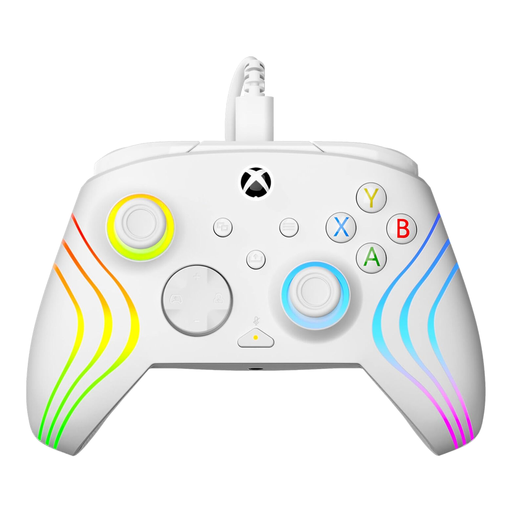 No image available
This wired Xbox controller suits a setup where a cable can run safely between the playing device and your seat. Check the cable reach and the football game’s controller support before choosing it.
No. Controller compatibility depends on the Xbox, PS5, Nintendo Switch or PC running the football game, not the display size. Once you have checked device and game support, choose a connection that works from your seating position.
Yes, for compatible games and applications: PlayStation documents DualSense connection to a Windows PC by USB Type-C or Bluetooth. It says immersive DualSense features work in select PC games, so check your football game if those effects matter to you.
Nintendo says a Switch can pair with up to eight wireless controllers. That pairing capacity does not establish how many local players your particular football game supports, so check the game and your planned controller mix.
Take it through an appropriate electrical-waste route rather than putting it in ordinary household rubbish. GOV.UK says waste electrical products can be taken to a local household waste recycling centre; follow local instructions for any removable battery.