Xbox and Windows PC players
If you play detective adventures on Xbox or a Windows PC connected to a large display, you may want one controller family that Microsoft lists for both devices. Check support in the particular PC game as well.


Choose for the console or PC running your detective game, not the size of the TV or monitor. Microsoft lists the Xbox Wireless Controller for Xbox and Windows PC; DualSense is the PS5 route, with PC use subject to game support; and Nintendo documents its Switch Pro Controller for docked Switch play. Check the individual game and your preferred connection before buying, particularly if DualSense features on PC matter to you.
If you play detective adventures on Xbox or a Windows PC connected to a large display, you may want one controller family that Microsoft lists for both devices. Check support in the particular PC game as well.
If you mainly play on PS5, or use a compatible PC, you may prefer the DualSense layout. PlayStation says haptic feedback and adaptive triggers depend on the game and may require USB.
If your Switch is connected to a TV, Nintendo documents pairing its Switch Pro Controller through the dock with a USB cable or pairing it wirelessly. Check the controller and game if you plan to use another device.
Choose when: You play on Xbox or a Windows PC and want a controller Microsoft lists for both.
Bear in mind: PC game support still needs checking for the title you intend to play.
Choose when: You play on PS5, or a compatible PC and prefer the PlayStation layout.
Bear in mind: PlayStation says PC game support varies, while haptics and adaptive triggers require game support and may require USB.
Choose when: You play on a Nintendo Switch connected to a TV through its dock.
Bear in mind: Nintendo’s Switch pairing instructions do not establish compatibility with an Xbox, PS5 or every PC game.
For detective adventures on a large screen, identify the device running the game before weighing layout, special features or the practicalities of playing from your seat.
| Concern | What to check | Who this matters to |
|---|---|---|
| Platform and game compatibility | Match the controller to the console or PC, then check the particular game’s controller-support information. | If I move between an Xbox and a PC, I need the controller to work with the device and the game before extras matter. Around 50% of consumers would put compatibility first. |
| Layout and in-game feedback | For DualSense on PC, check the game’s feature support and whether USB is needed for haptics or adaptive triggers. | For a story-led game, I may care most about a familiar layout or supported tactile effects. Roughly 30% of consumers would make layout or feedback their main priority. |
| Connection and upkeep | Check the connection method, box contents and whether a wired setup works from your seat. | If I play from the sofa, I want charging and any necessary cable connection to fit my setup. About 20% of consumers would prioritise those practicalities. |
A larger display does not tell you whether a controller works with the console, PC or particular game. PlayStation notes that PC game support can vary even when a controller is connected.
Identify the device running your detective adventure and check the game’s controller-support information before settling on a controller.
PlayStation says haptic feedback and adaptive triggers are game-dependent and may require USB.
If those features influence your choice, check the title and its connection requirements before buying.
A USB-dependent setup also needs a suitable cable that reaches your playing position.
A wireless connection does not remove the need to plan for a wired connection when a desired feature requires USB.
Check the contents of the exact controller package and the cable required for your intended device.
A controller is an electrical product, so disposal matters when you replace it.
GOV.UK says waste electrical products can be taken to a local household waste recycling centre.
Microsoft’s Xbox Wireless Controller is an official route for Xbox consoles and Windows PCs.
DualSense is the official PS5 controller route, with Bluetooth or USB Type-C connection documented by PlayStation for compatible PCs.
Nintendo’s Switch Pro Controller is a route for playing on a docked Switch.
These choices include controllers labelled for Xbox and Windows PC, PS5, and Switch and PC. Choose the device and game first: the Switch/PC option here is a LEXIP controller, not Nintendo’s Switch Pro Controller.
 No image available
Consider this model if your detective game runs on Xbox or a Windows PC and you want the Xbox controller layout. Check the particular PC game’s controller support before buying.
 No image available
This wireless controller is labelled for Xbox Series X|S, Xbox One and Windows 10/11 PC. Check the intended detective game’s controller support and whether this model’s controls suit the way you play.
 No image available
Consider the DualSense Edge if you play detective adventures on PS5 and want this specific controller model. For PC play, check support for the exact game and any features or connection method you intend to use.
 No image available
This PS5 DualSense variant suits players choosing the PlayStation controller layout. If haptics or adaptive triggers matter on PC, check the game’s support and whether USB is required; confirm the package contents if you need a cable.
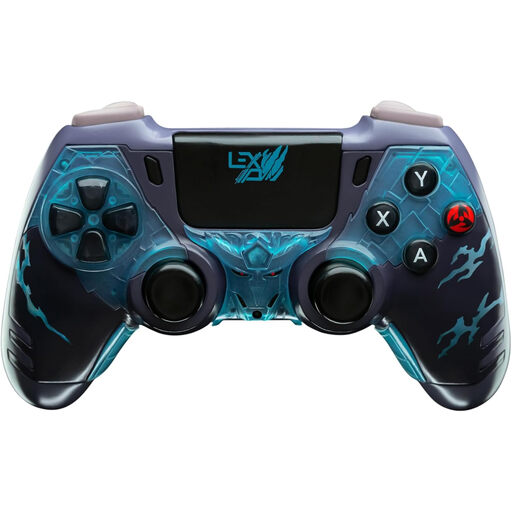 No image available
Consider this PC-and-Switch-labelled controller if you want an alternative to the Nintendo Switch Pro Controller. Confirm the connection method for this exact version and support in your intended game before buying.
No: choose a controller for the console or PC running your detective game, rather than for the screen size. Then check the game’s controller support and whether your preferred connection works from where you sit.
Check the game’s controller-support information before buying. PlayStation points to Steam store listings for full or partial controller support, but that label does not by itself confirm DualSense-specific haptics or adaptive triggers.
Yes, PlayStation documents a Bluetooth connection to Windows PC as well as USB Type-C. Support in the game still varies, and PlayStation says haptic feedback and adaptive triggers may require USB.
Nintendo documents pairing it by connecting the controller to the docked Switch with a USB cable. Wireless button pairing is also available through the console’s Controllers menu.
Yes, Microsoft says the Xbox Wireless Controller can be updated wirelessly. Microsoft also documents USB and the Xbox Accessories app on a PC as update options.