Choose for the console or device you will actually use, then check controller support for your detective games; a dark room does not itself call for a different type of controller. An Xbox Wireless Controller suits its listed Xbox, Windows and mobile devices, DualSense is the native PS5 choice, and a Switch Pro Controller is a Switch-focused option. Battery arrangements, game-dependent features and any need for adaptive controls may change which of those routes works for you.
Who needs which controller?
Players using one console
Start with your console generation: Microsoft lists the Xbox Wireless Controller for Xbox consoles, Sony positions DualSense for PS5, and Nintendo positions the Switch Pro Controller for Switch. Check the particular game before buying, especially if you are relying on a game-specific feature.
PC or multi-device players
Compare the controller’s listed devices with every device you intend to use. Microsoft lists Xbox, Windows PC, iOS and Android for its Xbox Wireless Controller; 8BitDo lists Windows and Android for the Ultimate 2C Wireless Controller. Steam’s encouragement of controller support does not establish support for every individual game.
Players seeking adaptive controls
If standard button positions, reach or grip make play difficult, consider the controls and physical setup before extra feedback features. Sony’s PS5 Access controller offers configurable controls, alternative caps and expansion ports; assess whether its arrangement meets your particular needs.
What matters when choosing?
Confirm device and game compatibility first, then decide how you want to manage power, controls and any physical-access requirements during a longer session.
| Concern |
What to check |
Who this matters to |
| Platform and game compatibility |
Match the exact controller to your console, computer or mobile device, then check each game’s controller support. |
If I move between devices, I need the controller to work with the games I intend to play before its other features matter. Around 31% of consumers put platform and game compatibility first. |
| Power and connection |
Check whether it uses replaceable batteries or USB charging, and whether the cable and charging arrangement suit your seat. |
For a long evening of investigating, I would rather plan charging or battery changes than interrupt play. Around 31% of consumers make session continuity their primary concern. |
| Control feel and feedback |
Consider the layout and directional controls; check game and platform support before choosing for haptics or adaptive triggers. |
When menus and dialogue choices occupy much of a game, I care about a layout I find intuitive; enhanced effects matter only in supported titles. Around 23% of consumers put control feel and feedback first. |
| Adaptive physical access |
Assess button placement, remapping, positioning and any compatible external controls against your individual needs. |
If reaching or pressing standard controls is difficult, I need a workable physical setup before considering conventional features. Around 15% of consumers put adaptive access first. |
Buying mistakes to avoid
-
Choosing by shape or colour before checking support
A controller you like holding may still be unsuitable for your device or a particular game. Steam encourages developers to support controllers, but that is not a guarantee for each title.
Compare the manufacturer’s device list with the game’s controller-support information before ordering.
-
Expecting enhanced feedback in every game
Sony describes haptic feedback and adaptive triggers for DualSense, but whether you experience those effects depends on the game and platform.
Check support for the detective games you plan to play before making those effects a deciding factor.
-
Overlooking how the controller is powered
Wireless play still requires a workable battery or charging routine. A quoted battery-life figure can vary with use.
Check the power method, what charging equipment is included and whether your planned seating position suits any cable you will use.
Depending on the controller and your preferred setup, batteries or compatible charging accessories may need to be obtained separately.
Relevant controller brands
Xbox / Microsoft
The Xbox Wireless Controller is a route for players using Xbox consoles, Windows PC, iOS or Android.
- Microsoft lists Xbox Wireless and Bluetooth connectivity, button mapping, a hybrid D-pad and a 3.5 mm headset jack.
- The standard controller uses replaceable batteries; decide whether that or a compatible rechargeable option suits your routine.
PlayStation / Sony
DualSense is Sony’s standard PS5 controller, while its Access controller addresses configurable physical access on PS5.
- Sony describes DualSense haptic feedback and adaptive triggers, and offers alternative caps, configurable controls and expansion ports on the Access controller.
- Enhanced DualSense effects depend on game and platform support; the Access controller calls for an individual setup rather than a one-for-one assumption about standard controls.
Nintendo
Nintendo’s Switch Pro Controller is a full-size alternative to separate Joy-Con use for Nintendo Switch players.
- Nintendo lists motion controls, HD Rumble, NFC amiibo support and USB-C charging, with battery life stated at approximately 40 hours.
- That battery figure varies with use. Check the exact console generation: the Switch Pro Controller discussed here is distinct from the Switch 2 model listed below.
8BitDo
The Ultimate 2C Wireless Controller is a feature-led option that 8BitDo lists for Windows and Android.
- 8BitDo lists Hall Effect sticks and triggers, remappable extra bumpers and wireless connection options for this model.
- Do not assume that this Windows-and-Android model works with Xbox, PS5 or Switch consoles.
Joybuy controller options
These controllers offer different starting points for Xbox and PC, PS5, PS4 or Switch 2 play. Match the named platform and exact controller variant to your device and detective game; a wired model also calls for a suitable cable route.
 No image available
Xbox Wireless Controller – Robot White
Consider this wireless model if you play on Xbox or another device Microsoft lists for the Xbox Wireless Controller. Check your game’s support and decide whether its replaceable-battery arrangement suits longer sessions.
View on Joybuy
 No image available
Sony DualSense Wireless Controller – Starlight Blue (PS5) V3
This PS5 controller suits a PS5-centred setup. Sony’s DualSense features include haptic feedback and adaptive triggers, but check whether your chosen games support the effects you want.
View on Joybuy
 No image available
Turtle Beach Rematch Advanced Wired Controller – Blue Kitsune (Xbox & PC)
Consider this wired Xbox and PC option if a cable fits your seating arrangement. Confirm your exact device and game support, as well as how you will route the cable in a dark room.
View on Joybuy
 No image available
Nintendo Switch 2 Pro Controller – Black
This is the Switch 2 model, not the earlier Switch Pro Controller. Choose by your console generation and confirm that your intended game supports the controller.
View on Joybuy
 No image available
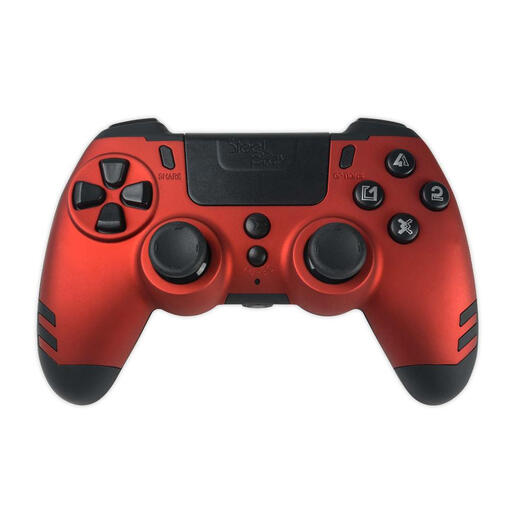
Lexip SteelPlay Slim Pack Wireless Controller – Ruby Red (PS4, PC)
Consider this PS4 and PC model if those are your playing platforms and you prefer a wireless controller. Confirm support for your particular detective game; if motion controls matter to you, check this exact variant before buying.
View on Joybuy
Common questions
Do I need an illuminated controller to play in a dark room?
No: darkness alone does not change controller compatibility. Prioritise a controller that works with your device and game, with controls you can use comfortably and a power arrangement you can manage during play.
Will every PC detective game work with Xbox, PlayStation and Nintendo controllers?
No, support can differ by game and controller. Steam encourages developers to include controller support, but check the individual game’s store information or publisher guidance before choosing one for a specific PC title.
Should I choose replaceable batteries or a rechargeable controller?
Choose the power arrangement that fits how you pause and resume longer sessions: replaceable batteries can be swapped, while a built-in battery needs a charging routine. Microsoft’s standard Xbox Wireless Controller uses replaceable batteries, whereas Sony’s DualSense has a built-in rechargeable battery and USB-C charging.
Can the PS5 Access controller take the place of a standard controller?
It can be the primary control option for a PS5 player whose needs suit its configurable layout, alternative caps or external-switch connections. Sony also says it can be combined with DualSense or DualSense Edge controllers, so assess the complete arrangement rather than assuming a direct one-for-one replacement.


