Choose for the system and the particular game first: Xbox Wireless Controller is an option for Xbox or Windows PC, DualSense for PS5, and 8BitDo Pro 2 for its supported platforms, but Pro 2 does not work with PS5 or Xbox Series consoles. At a small desk, decide between Bluetooth and USB after checking the features you want; Sony says DualSense haptic feedback on PC requires USB and a supporting game. Check the game’s own controller-support information before buying.
Who this choice affects
Platform-first adventure players
If you play on Xbox, PS5, Windows PC, Switch or SteamOS, start with the system you use and the game’s controller support. A controller’s device compatibility alone does not establish that it works with your chosen game.
Small-desk PC players
Bluetooth may keep a cable off the desk, while USB may be needed for a feature you want. Check your computer, the game and the controller’s connection requirements before choosing between them.
Custom-control explorers
Button mapping or profiles may help you arrange controls to your preference, provided the controller works with your system and its customisation options work in the mode you intend to use.
What to check before choosing
For historical-adventure play at a small desk, establish system and game compatibility before weighing connection choices and personalised controls.
| Concern |
Buying checks |
Who this matters to |
| System and game compatibility |
Confirm your console or computer operating system, then check the individual game’s controller-support information. |
If I cannot use the controller with my system or adventure game, its other features will not settle the choice. Around 42% of consumers put system and game compatibility first. |
| Desk setup and connection |
Check Bluetooth availability or the USB port and cable you would use; for DualSense haptic feedback on PC, Sony requires USB and a supporting game. |
I want a connection that fits my limited desk space without losing a feature I intend to use. Desk setup is the primary concern for around 33% of consumers. |
| Personalised controls |
Check whether mapping and profiles work on your intended platform and in the controller mode you will use. |
Once the controller works with my game and desk setup, I may want to change the controls for repeated interactions. Around 25% of consumers make personalisation their first priority. |
Buying pitfalls
-
Choosing a layout before checking the platform
A familiar layout cannot overcome a console incompatibility: 8BitDo says Pro 2 does not work with PS5, Xbox Series S/X or Xbox One.
Identify your actual console or computer operating system before comparing layouts and custom controls.
-
Expecting every DualSense feature over Bluetooth on PC
Sony says DualSense haptic feedback on PC needs both USB and support from the game. Adaptive triggers also depend on game support.
If these features matter to you, check the game’s feature information and whether a USB connection suits your desk.
-
Assuming device compatibility means game compatibility
A controller connecting to your computer does not establish that a particular historical-adventure game supports it.
Check the game’s own listing or support page. Steam’s controller-device filters can help you narrow the search, but check the individual game.
Relevant brands to consider
Xbox
The standard Xbox Wireless Controller is relevant to Xbox-console and Windows-PC players considering Bluetooth or Xbox Wireless connectivity.
- Microsoft lists Xbox-console, Windows-PC, Android and iOS compatibility, alongside textured grips, a hybrid D-pad and button mapping.
- Those device options do not confirm support in a particular game; check its controller information separately.
PlayStation
DualSense is a route for PS5 play and for compatible PC, Mac or mobile games.
- Sony documents Bluetooth and USB connections for compatible devices.
- On PC, haptic feedback requires USB and a supporting game; adaptive triggers also depend on game support.
8BitDo
Pro 2 is relevant when its supported platforms and switchable control modes fit the devices you use.
- 8BitDo lists multi-platform support, mode switching, custom profiles and remapping for Pro 2.
- 8BitDo says Pro 2 does not work with PS5, Xbox Series S/X or Xbox One, and its Ultimate Software is not supported in Mac mode.
Joybuy controllers for these setups
These choices include controllers labelled for Xbox and PC, a wired LEXIP model, and a DualSense variant labelled for PS5, PC, Mac and mobile. Match the individual model and your adventure game to the device you actually use.
 No image available
Xbox Wireless Controller – Carbon Black
Consider this model for Xbox or Windows-PC play once you have checked your game’s controller support.
Microsoft lists Bluetooth and Xbox Wireless connectivity for the Xbox Wireless Controller. Its quick-start guidance calls for replaceable batteries; check which power setup you prefer.
View on Joybuy
 No image available
Turtle Beach PDP Victrix Pro BFG Wireless Controller – Black
Consider this wireless model if you play on Xbox Series X|S, Xbox One or a Windows 10/11 PC and want to compare control layouts.
Before relying on personalised controls, check the customisation software and connection requirements for your setup.
View on Joybuy
 No image available
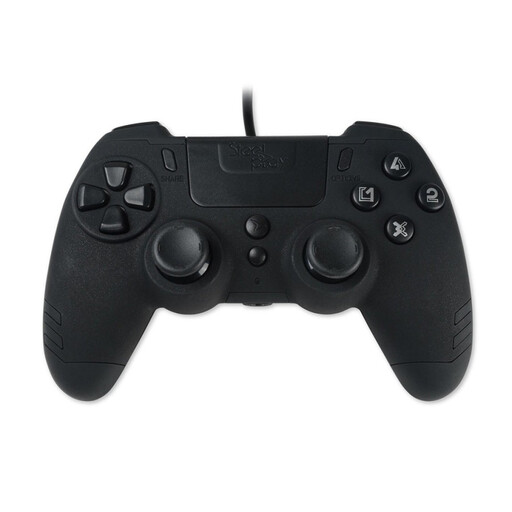
LEXIP SteelPlay Slim Pack Wired Controller – Ebony Black
Consider this wired model if a cable suits your desk and its listed device compatibility matches your playing system.
Plan where the cable will run, and check the game’s controller support before choosing it.
View on Joybuy
 No image available
Turtle Beach Afterglow Ignite Time RGB Wired Controller – Time Machine
Consider this Xbox-and-PC model if you prefer a wired connection and have room to route its cable.
The product is identified as wired; check your game’s support and whether that connection suits your small desk.
View on Joybuy
 No image available
Sony DualSense Wireless Controller – HYPERPOP Techno Red
Consider this variant for PS5 or a compatible PC, Mac or mobile game if you prefer the DualSense layout.
Sony documents Bluetooth and USB connections for compatible devices. On PC, haptic feedback requires USB and a supporting game; adaptive triggers also need game support.
View on Joybuy
Frequently asked questions
How can I check whether my historical-adventure game supports a controller?
Check that individual game’s store listing or support information. Steam offers filters for controller types, but a controller-friendly listing does not establish that every controller feature works in the game.
Can I use DualSense wirelessly on a Windows PC?
Sony says DualSense can connect to a compatible Windows PC by Bluetooth or USB. If PC haptic feedback matters to you, it requires USB and a supporting game; adaptive triggers also depend on game support.
Will 8BitDo Pro 2 work on PS5 or Xbox Series X|S?
No. 8BitDo’s Pro 2 FAQ excludes PS5, Xbox Series S/X and Xbox One, so choose a controller compatible with your console instead.
What should I do with an old controller in the UK?
Use an appropriate reuse or electrical-equipment recycling route rather than treating it as ordinary waste. GOV.UK explains that the UK’s waste electrical and electronic equipment rules aim to increase recovery, reuse and recycling.


