Choose a controller that works with your main gaming device, then check how your headphones will connect; a wireless controller does not necessarily carry headset audio in every connection mode. Xbox Wireless Controller, GameSir G7 SE and Nintendo Switch 2 Pro Controller have stated controller-mounted headset jacks for their respective platforms. DualSense offers game-supported PS5 features, but its headset jack requires a wired controller connection on PC and Mac.
Who these controllers suit
Players who plug a headset into the controller
If you want the headphone cable beside your hands rather than at the console or computer, start with the exact controller’s audio connection. Xbox, Nintendo and GameSir specify controller-mounted headset jacks on particular models, but the supported platform and headset plug still matter.
Players committed to one main platform
Choose for the console or computer you actually use before comparing extra features. PlayStation, Xbox, Nintendo and GameSir state different device and connection conditions for their controllers; support for one device does not establish support for another.
Players who adjust controls for long sessions
Button placement, remapping and stick design may matter more to you over a long adventure than a feature you rarely use. Nintendo, GameSir and 8BitDo describe different configurable controls, so check the exact model, supported device and setup requirements before choosing an extra feature.
What matters when choosing
Establish platform support and your complete headphone connection first. Once both work for your setup, compare the controls you will use during longer sessions.
| Concern |
What to check |
Who this matters to |
| Headphone connection |
Check the headset plug, controller jack and audio behaviour in your chosen wired or wireless controller mode. Confirm microphone support if you need chat. |
I want to plug my headset in where I hold the controller, without discovering that my chosen connection mode leaves me without audio or chat. Around 37% of consumers put this headphone route first. |
| Platform and game support |
Check your main device, the game’s controller support and whether a feature you want needs a particular connection or supported game. |
If I mainly play on one console or computer, the controller must work there before its extra features matter. For around 36% of consumers, platform certainty is the primary need. |
| Controls for longer sessions |
Compare button layout and any remapping you would use; check the exact model’s configuration requirements. |
During a long fantasy adventure, I may want easier access to frequently used controls once my platform and headphones are sorted. That control preference comes first for around 27% of consumers. |
Buying pitfalls to avoid
-
Assuming a wireless controller makes headset audio wireless
The controller’s connection and the headphones’ connection are separate decisions. PlayStation says the DualSense headset jack requires a wired controller connection on PC and Mac. Nintendo offers Stable and Low Latency audio settings when headphones are plugged into a Switch 2 Pro Controller used wirelessly.
Before buying, identify the gaming device, how the controller connects, where the headphones plug in and whether you need a microphone.
-
Choosing extra features before checking the platform
Xbox Wireless Controller, GameSir G7 SE and Nintendo Switch 2 Pro Controller have different stated device compatibility. A headset jack or remappable button is useful only if the controller works with your intended device and game.
Confirm your main platform first, then compare audio connections and controls among controllers that suit it.
-
Treating stick or latency specifications as guarantees
GameSir’s Hall Effect specifications and 8BitDo’s TMR-stick and latency statements describe their own products; they do not establish how long a controller will last or how every game will feel. 8BitDo’s stated 1 ms latency figure is laboratory data from ideal conditions.
Use those specifications to narrow your choices, then check the exact platform, connection mode and control layout you need.
Controller brands to consider
Xbox
The standard Xbox Wireless Controller is a first-party route for Xbox consoles, with Xbox also listing Windows PC, Android and iOS compatibility.
- Xbox specifies Xbox Wireless, Bluetooth and a 3.5 mm jack for a compatible headset on the standard controller.
- That stated device list does not establish native PS5 or Nintendo Switch support.
PlayStation
DualSense is the first-party PS5 route for players interested in adaptive triggers and haptic feedback in games that support them.
- PlayStation also describes supported PC, Mac and mobile use, with features varying by device and game.
- On PC and Mac, its headset jack requires a wired controller connection; the jack is not compatible with mobile devices.
Nintendo
Nintendo Switch 2 Pro Controller is a first-party option for Switch 2 players seeking a controller-mounted wired headset connection.
- Nintendo specifies a CTIA-standard 4-pole 3.5 mm jack and mappable GL/GR buttons. Switch 2 also offers Stable and Low Latency audio settings for headphones plugged into the controller while it is used wirelessly.
- Check the exact model: these Switch 2 Pro Controller features should not be assumed for the older Switch Pro Controller.
GameSir
The wired G7 SE is an Xbox and Windows option for a seated setup.
- GameSir lists a 3 m detachable USB-C cable, a 3.5 mm audio jack, Hall Effect sticks and two mappable back buttons for G7 SE.
- Its stated compatibility is Xbox Series X|S, Xbox One and Windows 10/11. Its stick specifications are not independent durability findings, and its wired connection will not suit cable-free controller use.
8BitDo
Ultimate 2 Wireless Controller is a configurable option aimed at PC and other listed devices.
- 8BitDo lists profiles, remappable bumpers and a charging dock, alongside compatibility with Windows, Android, SteamOS and several Apple platforms.
- If your headphones must plug into the controller, confirm the exact model’s audio connection before choosing it. Treat TMR-stick and latency statements as manufacturer specifications rather than guarantees of feel or performance.
Joybuy controllers for Xbox play
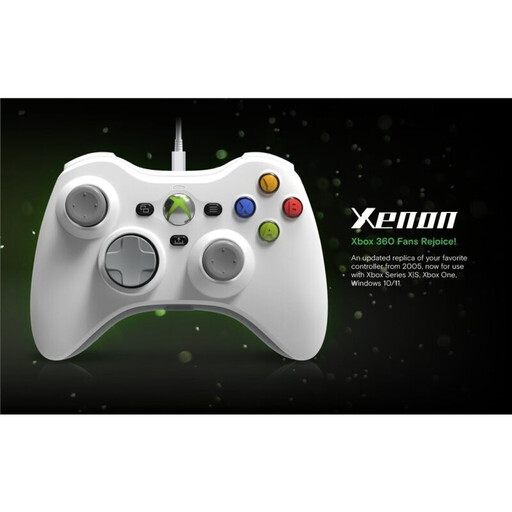
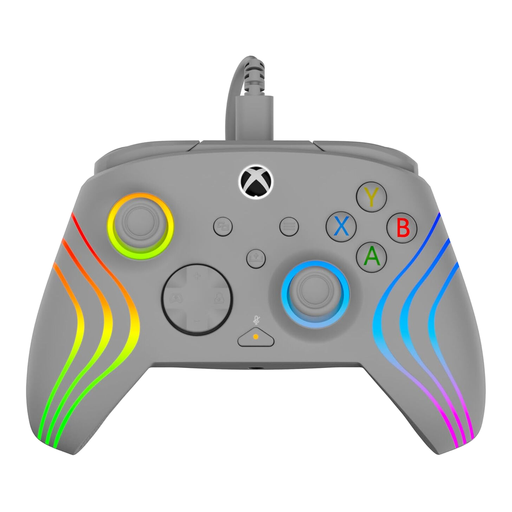
These wired controllers are relevant to Xbox play, with Windows use also stated for the two Hyperkin variants. Compare the exact headphone connection before choosing one, particularly if your headset must plug into the controller rather than your gaming device.
 No image available
Hyperkin Xenon Wired Controller for Xbox Series X|S, Xbox One and Windows 11/10 (White)
Consider this wired option for the stated Xbox or Windows setup if you want to keep a headset near the controller. Confirm that its headset connection suits your headphones, and that a cable reaches your playing position.
View on Joybuy
 No image available
Hyperkin DuchesS Wired Controller for Xbox Series X|S, Xbox One and Windows 11/10 (White)
This is another wired choice for the stated Xbox or Windows devices when controller-side headset use matters. Check the connection with your headset and whether a wired controller suits where you sit.
View on Joybuy
 No image available
Turtle Beach Afterglow Wave Wired Controller for Xbox (Grey)
Consider this wired Xbox option if configurable controls matter to you. Check how its controls are set up and confirm the exact headphone-audio route before choosing it for a headset plugged into the controller.
View on Joybuy
Common questions
Can I plug a wired headset directly into a game controller?
Yes, if the exact controller and platform support that connection and your headset has a compatible plug. Xbox specifies a 3.5 mm jack for a compatible headset on Xbox Wireless Controller, GameSir lists one for G7 SE, and Nintendo specifies a CTIA-standard 4-pole 3.5 mm jack on Switch 2 Pro Controller.
Does the DualSense headphone jack work on PC?
Yes, but PlayStation says the DualSense controller must have a wired connection to the PC for its headset jack to work. The same condition applies on Mac; the headset-jack feature is not compatible with mobile devices.
How do I use headphones with Nintendo Switch 2 Pro Controller?
Plug a compatible headset or headphones into its CTIA-standard 4-pole 3.5 mm jack. If you use the controller wirelessly, Nintendo provides Stable and Low Latency settings for that audio route on Switch 2; try both with your own headset and game.
Are haptics, rear buttons or alternative stick sensors worth choosing?
Choose them when they meet a control preference you will use, after confirming platform and headphone compatibility. DualSense haptics and adaptive triggers depend on game and device support; mappable buttons offer a different control layout, while Hall Effect and TMR descriptions alone do not establish controller lifespan or how a game will feel.


