Choose a controller for the platform you use most: the Xbox Wireless Controller suits Xbox or Windows PC play, DualSense suits PS5 play or supported PC games where you want its feedback features, and the Nintendo Switch Pro Controller suits Switch-first play. Check whether your narrative puzzle games accept controller input before prioritising wireless convenience or special effects; some DualSense features depend on the game and, on PC, a USB connection.
Who each controller route suits
Players moving between Xbox and Windows PC
If you play at a desk but also use an Xbox or a supported mobile device, the Xbox Wireless Controller offers Xbox Wireless and Bluetooth connection options, according to Microsoft. Check the connection available on each device you intend to use.
PS5 players and feature-focused PC players
DualSense makes sense if PS5 is your main platform or you want its feedback features in compatible PC games. PlayStation says PC haptic feedback requires USB, so a Bluetooth connection alone should not decide that purchase.
Nintendo Switch puzzle players
If you mainly play on Nintendo Switch and want a full-size controller for seated sessions, consider the Nintendo Switch Pro Controller. Nintendo estimates its battery life at approximately 40 hours, depending on use, and says a full charge takes approximately six hours.
What matters when choosing
Start with your main console or computer and the games you plan to play. Connection method, room layout and optional feedback features matter only after those basics fit.
Xbox Wireless Controller
Choose when: Xbox or Windows PC is your main platform and you also want connection options for supported mobile devices.
Allow for: Check your computer’s Bluetooth or other compatible connection, and follow Microsoft’s controller-update guidance for compatibility.
DualSense Wireless Controller
Choose when: You mainly play on PS5, or a PC game you intend to play supports the DualSense effects you want.
Allow for: PlayStation says haptic feedback on PC requires USB, and feature availability depends on the game.
Nintendo Switch Pro Controller
Choose when: Nintendo Switch is your main platform and you want a full-size controller instead of using Joy-Con controllers.
Allow for: Nintendo’s approximately 40-hour battery figure varies with use, and a full charge takes approximately six hours.
| Concern |
What to check |
Who this matters to |
| Platform and game compatibility |
Confirm your main device, its connection options and controller support in each intended game. Steam notes that gamepad-specific commands require gamepad support. |
If I mainly want to start playing without troubleshooting, I need both my device and my puzzle games to accept the controller. Around 36% of consumers put this compatibility check first. |
| Cables and everyday setup |
Check Bluetooth support on your device, the available wired connection and whether a suitable cable is included. |
A cable across my compact desk would get in the way, but I still want a workable connection when wireless play is inconvenient. For around 29% of consumers, room setup is the primary concern. |
| Game-supported feedback |
Check which effects your games support. PlayStation says DualSense haptic feedback on PC requires USB. |
I would value tactile effects in a story-led game, provided that game actually uses them. Supported feedback comes first for around 21% of consumers. |
| Switch controls and charging |
Confirm your console model and plan around Nintendo’s variable battery estimate and approximately six-hour charge time for the Nintendo Switch Pro Controller. |
Most of my play is on Nintendo Switch, so I care more about a full-size Switch controller and a manageable charging routine than moving between platforms. Around 14% of consumers place that need first. |
Mistakes to avoid
-
Assuming a connected controller works in every PC game
Pairing with a computer does not establish that a particular narrative puzzle supports gamepad controls. Steam says gamepad-specific commands function properly only in games with gamepad support.
Check the controller-support information for the games you intend to play before choosing a controller.
-
Expecting DualSense PC haptics over Bluetooth
PlayStation says haptic feedback on PC requires USB, and DualSense effects also depend on game support.
If those effects matter to you, confirm support in your chosen games and make sure a wired PC setup suits your room.
-
Treating a battery estimate as guaranteed runtime
Nintendo’s approximately 40-hour estimate for the Nintendo Switch Pro Controller varies with usage conditions; Nintendo also says a full charge takes approximately six hours.
Keep a suitable charging arrangement accessible rather than planning sessions around the quoted estimate alone.
-
Putting an old controller in general waste
GOV.UK directs consumers to electrical-waste collection routes, including household waste recycling centres.
Check your local collection instructions. If you are disposing of a removable lithium battery, GOV.UK advises taping its terminals to reduce fire risk.
Relevant brands for reference
Xbox
The Xbox Wireless Controller is relevant to players whose main device is an Xbox or Windows PC and who may also use supported mobile devices.
- Microsoft lists Xbox Wireless and Bluetooth connectivity and a 3.5 mm headset jack for this controller.
- Check the connection available on each device. Microsoft recommends controller updates to maximise capability and compatibility.
PlayStation
DualSense is a route for PS5 players and PC players interested in effects supported by their chosen games.
- PlayStation lists USB-C and Bluetooth connections for supported PC, Mac and mobile devices.
- PlayStation says PC haptic feedback requires USB; haptics and adaptive triggers depend on game support.
Nintendo
The Nintendo Switch Pro Controller is a full-size option for players whose main platform is Nintendo Switch.
- Nintendo lists an estimated battery life of approximately 40 hours for the Nintendo Switch Pro Controller.
- That estimate varies with use, and Nintendo says a full charge takes approximately six hours. Check compatibility separately before using it with another platform.
Controller choices on Joybuy
These controllers cover different starting points for a student-room setup: Xbox or Windows PC play, PS5 play, and the PC or Nintendo console models identified in individual product names. The Nintendo Switch 2 Pro Controller is for Switch 2; do not confuse it with the Nintendo Switch Pro Controller discussed above.
 No image available
Xbox Wireless Controller – Robot White
Consider this model if you mainly play on Xbox or Windows PC and want a wireless connection option for a compact room.
Microsoft lists Xbox Wireless and Bluetooth for the Xbox Wireless Controller. Check your device’s connection options and whether each intended game supports a controller.
View on Joybuy
 No image available
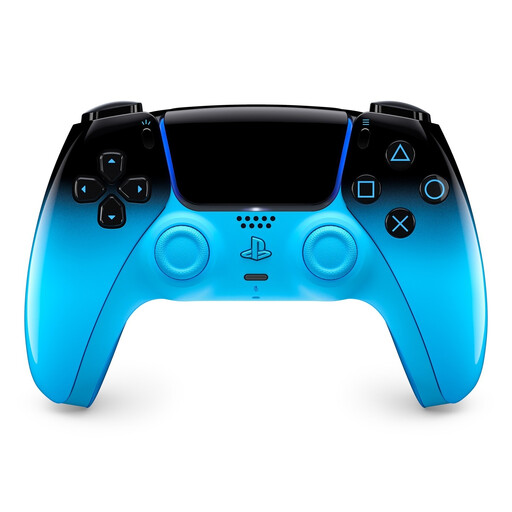
Sony DualSense Wireless Controller – HYPERPOP Rhythm Blue
Consider DualSense if you mainly play on PS5 or have identified PC games that support the feedback effects you want.
PlayStation lists USB-C and Bluetooth connection options. On PC, haptic feedback requires USB, and feature availability depends on the game.
View on Joybuy
 No image available
Machenike G3 V2 Tri-mode Controller – White
If you want to consider different connection methods for desk or wireless play, check which modes this G3 V2 variant supports with your device.
Confirm compatibility with your chosen platform and narrative puzzle games before relying on a particular pairing method.
View on Joybuy
 No image available
Nintendo Switch 2 Pro Controller – Black
This is the model to consider if your main console is Nintendo Switch 2 and you want a separate full-size controller.
Confirm that your console is Switch 2 and check controller support in the games you intend to play. The battery figures given above for the Nintendo Switch Pro Controller should not be applied to this different model.
View on Joybuy
 No image available
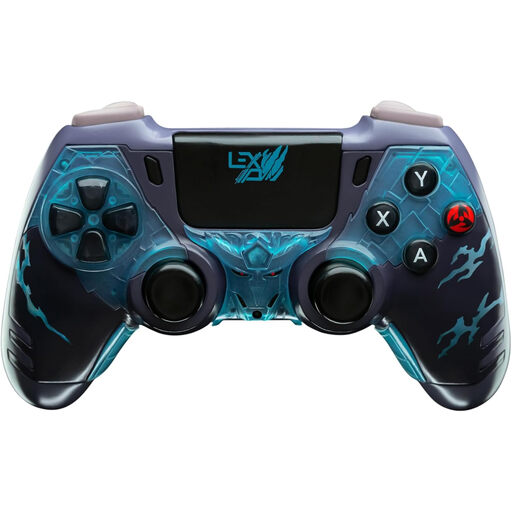
LEXIP Kakashi Kamui Controller – PC and Switch
Consider this named PC-and-Switch option if you play at a desk or on Nintendo Switch.
Check the exact variant’s connection method and cable inclusion before planning a wired setup, and confirm controller support in your intended games.
View on Joybuy
Common questions
Will any controller work with every narrative puzzle game on PC?
No. Check each game’s store listing or support information for controller input before buying. Steam notes that gamepad-specific commands function properly only in games with gamepad support.
Can I use DualSense wirelessly on PC and still get its haptic effects?
You can connect DualSense to supported PCs by Bluetooth, but PlayStation says haptic feedback on PC requires USB. The game must also support the effect; adaptive triggers likewise depend on game support.
Should I update an Xbox Wireless Controller?
Follow Microsoft’s update guidance when an update is available. Microsoft says keeping the Xbox Wireless Controller updated maximises its capabilities and compatibility.
What should I do with a controller at the end of its life?
Use an appropriate electrical-waste collection route rather than general waste; GOV.UK identifies household waste recycling centres as one option. Follow local instructions for batteries, and tape the terminals if you are disposing of a removable lithium battery, as GOV.UK advises.


