Players sharing a bedroom
If someone else is in the room while you play an RPG, private game audio, deliberate microphone muting and manageable vibration may matter more to you than decorative features.


Choose for your main gaming device before comparing extra controls: DualSense is the PS5-first option, the Xbox Wireless Controller has stated support across Xbox and several other devices, and the 8BitDo Ultimate 2C Wireless is an option for Windows or Android. In a shared bedroom, check how private audio, microphone muting and vibration settings work with your particular device and connection; a controller feature alone does not guarantee the whole setup will behave as you need.
If someone else is in the room while you play an RPG, private game audio, deliberate microphone muting and manageable vibration may matter more to you than decorative features.
Whether you play on PS5, Xbox, Windows, Android, iOS or Mac, you need to establish support for your device and intended connection before deciding whether extra controller features are useful.
If you repeatedly open menus or use the same abilities and camera controls, remapping, saved profiles or extra physical buttons may help you arrange those actions to suit your preferences.
For science-fiction RPGs in a shared bedroom, establish device compatibility first, then work out how you will manage sound and voice chat before weighing up extra controls.
Consider it when: PS5 is your main device and you want adaptive triggers and haptic feedback in games that support them.
Bear in mind: DualSense can pair with computers and mobile devices, but pairing alone does not establish support for every game or controller feature.
Consider it when: Xbox is your main platform and you also want Microsoft's stated support for Windows, Android or iOS.
Bear in mind: The standard Xbox Wireless Controller uses AA batteries or a rechargeable battery pack, and most Xbox Accessories app features on Windows are not supported over Bluetooth.
Consider it when: You play on Windows or Android and want the model's two remappable R4/L4 bumpers.
Bear in mind: 8BitDo lists a 2.4G or wired connection for Windows and Bluetooth for Android; that is not a claim of PlayStation or Xbox console support.
| Concern | What to check | Who this matters to |
|---|---|---|
| Private audio and manageable feedback | Confirm headset audio for the device and connection you will use, plus microphone muting and vibration controls. | If I play while someone else is in the room, I want to hear the game without relying on speakers and control when my microphone is live. Around 42% of consumers would put this low-disturbance need first. |
| Platform and connection | Match the exact controller to your device, operating system and intended wired or wireless connection. | A controller is no use to me if it will not work with my main console or computer. For roughly 33% of consumers, device compatibility would be the primary concern. |
| Long-session controls | Check whether you need remapping, saved profiles or extra buttons, and whether those features work on your setup. | When an RPG has actions I use repeatedly, I want controls I can arrange and reach comfortably. This would be the leading need for around 25% of consumers. |
Xbox Wireless Controller, DualSense and 8BitDo Ultimate 2C Wireless have different stated device support. A familiar-looking button layout does not establish that a controller will work with your platform.
Write down your main device and preferred connection, then check the exact model's compatibility and your game's controller support.
A 3.5 mm connection on a controller does not, by itself, establish how audio will be routed through every console, computer or connection mode.
Confirm headset-audio behaviour for the controller and device you intend to pair before relying on it in a shared room.
DualSense haptics and adaptive triggers add tactile effects in supported games, while the Xbox Accessories app offers vibration configuration for supported Xbox controllers. Whether you want that feedback is a separate choice from whether the controller connects.
Decide how much tactile feedback you want, then check the settings available for your particular controller, platform and connection.
Microsoft says the standard Xbox Wireless Controller can use AA batteries or a rechargeable battery pack. GOV.UK advises that unwanted batteries and electrical products should not go in household rubbish.
Check the battery arrangement and what charging equipment comes with the exact product, and use an appropriate collection route when batteries or the controller reach end of life.
Microsoft lists the standard Xbox Wireless Controller for Xbox Series X|S, Xbox One, Windows PC, Android and iOS, with Xbox Wireless, Bluetooth and a 3.5 mm headset jack.
DualSense is centred on PS5 play. PlayStation also lists pairing with computers and mobile devices.
8BitDo lists the Ultimate 2C Wireless for Windows over 2.4G or a wired connection and for Android over Bluetooth.
These controllers cover PS5, Xbox or PC-oriented choices for RPG play. For a shared bedroom, check private-audio and vibration behaviour on your own setup as well as the device compatibility stated for each product.
 No image available
Consider this model for Xbox One, Xbox Series X|S or PC play if you are looking at the Elite Series 2 rather than the standard Xbox Wireless Controller.
Check compatibility with your exact device and game, and confirm headset-audio and vibration-setting behaviour for your intended connection.
 No image available
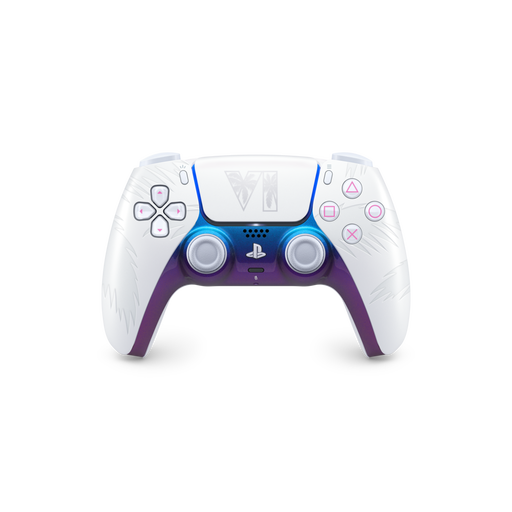
This DualSense variant is a PS5-oriented choice when you want to manage voice chat while sharing a room.
PlayStation lists a built-in microphone, dedicated mute button and 3.5 mm headset jack for DualSense. Confirm headset audio and the level of tactile feedback available on your exact device and connection.
 No image available
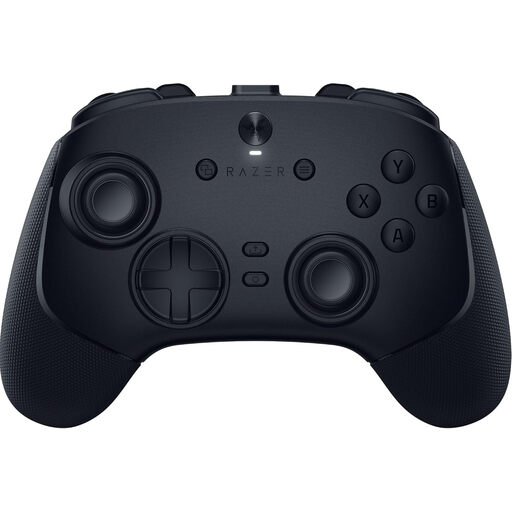
This PC-labelled controller is worth considering if your RPG setup calls for a wireless controller.
Before choosing it for a shared bedroom, check the headset, microphone and vibration options you need, along with compatibility with your PC and game.
 No image available
This PS5-focused Edge model is a separate choice from the standard DualSense when you are comparing controller variants for repeated RPG actions.
Confirm support for your exact game and device, and check headset-audio and vibration controls for the way you intend to connect it.
 No image available
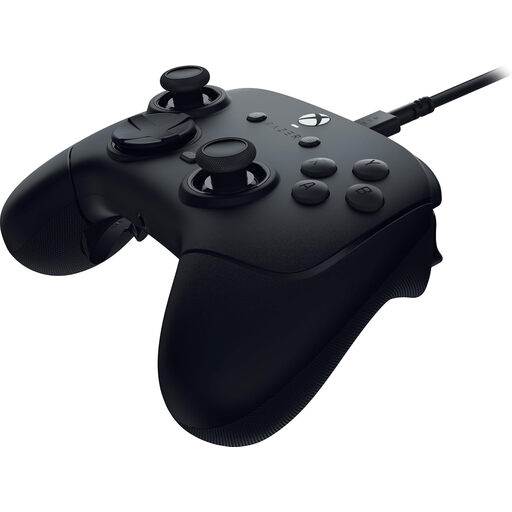
Consider this Xbox-oriented model if you are choosing a controller for repeated actions during longer RPG sessions.
Check support for your exact Xbox or PC setup and game. If private audio or manageable vibration is essential, confirm those features for this model before buying.
Use private audio where your setup supports it, mute an unused microphone and adjust vibration if your controller and platform allow it. PlayStation lists a dedicated microphone mute button and headset jack for DualSense; Microsoft lists a headset jack for the standard Xbox Wireless Controller and vibration configuration through the Xbox Accessories app for supported controllers. Check audio routing for your actual connection.
Some can, but the device and connection depend on the model. Microsoft lists the standard Xbox Wireless Controller for Xbox consoles and Windows PC, while PlayStation says DualSense can pair with PS5 and computers. 8BitDo lists the Ultimate 2C Wireless for Windows and Android rather than a console-and-PC route. Check game support as well as device pairing.
It depends on the controller. Microsoft says the standard Xbox Wireless Controller uses either AA batteries or a rechargeable battery pack, while 8BitDo describes a rechargeable battery in the Ultimate 2C Wireless. Check the exact product's battery arrangement and included charging equipment before buying; do not assume that another controller variant uses the same system.
Keep unwanted electrical products and batteries out of household rubbish, as GOV.UK advises. Use an appropriate electrical-waste or battery collection route for the item, and check local collection arrangements when you are ready to dispose of it.