What matters when buying?
Confirm the gaming device and game’s controller support before comparing D-pads, desk connections or extra controls.
| Concern |
What to check |
Who this matters to |
| Platform and game compatibility |
Match the exact controller and connection method to your PC or console; check controller support in the games you intend to play. |
If my games run on a particular device, I need a controller that works with it before other features matter. Roughly 36% of consumers put platform and game compatibility first. |
| D-pad feel |
Compare the directional-pad shape and layout, and try its feel if possible. |
For frequent changes of direction and precise jumps, I want a pad whose movement feels predictable to me. Directional input is the primary concern for roughly 29% of consumers. |
| Desk connection and charging |
Check the supported wired or wireless mode and whether the receiver or suitable cable you need is supplied. |
At my desk, I need a connection and charging routine that fit my ports and seating position. Around 21% of consumers put that practical setup first. |
| Custom controls and features |
Check whether remapping or other features work on your platform and in your games. |
If I regularly change button assignments or use a game’s extra controller features, those options may shape my choice. For roughly 14% of consumers, they are the main priority. |
Joybuy controller choices
These controllers cover Xbox and PC-oriented choices alongside a wired Nintendo Switch option. Match each model to the device and game you actually use; the choices here do not replace that compatibility check.
 No image available
Xbox Wireless Controller – Robot White
Consider this model if you play on Xbox or Windows PC and want the hybrid D-pad described by Microsoft. Check which connection method suits your device and whether your particular game supports controller input.
View on Joybuy
 No image available
Microsoft Elite Wireless Controller Series 2
This is an Xbox-oriented option to examine if configurable controls matter to you. Confirm compatibility with your exact gaming device and check which D-pad components are included before relying on a particular directional layout.
View on Joybuy
 No image available
Turtle Beach PDP Victrix Pro BFG Wireless – Black
Consider this controller for the Xbox or Windows PC platforms named in its product title if adjustable directional controls appeal to you. Check the included D-pad modules and the connection mode you intend to use.
View on Joybuy
 No image available
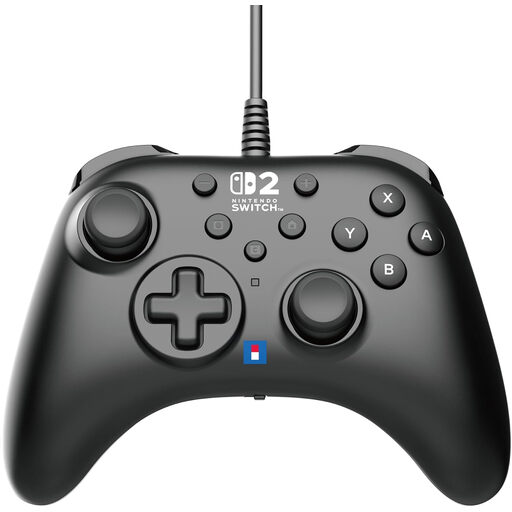
HORI HORIPAD Turbo Wired Controller – Black, Nintendo Switch
This wired model is worth considering for a Nintendo Switch desk setup. Check the exact version’s compatibility with your console and examine its directional-pad layout if precise movement is your priority.
View on Joybuy
 No image available
Turtle Beach Rematch Advanced Wired Controller – Blue Kitsune
Consider this Xbox and PC-labelled model if you prefer a wired controller at your desk. Check its directional-pad layout and game compatibility before deciding whether it suits your platform games.
View on Joybuy
Common questions
Should I decide on a controller before choosing where to play?
Choose the gaming platform first. Microsoft documents the Xbox Wireless Controller for Xbox consoles and Windows PC, 8BitDo documents the Ultimate 2C Wireless Controller for Windows and Android, and PlayStation and Nintendo describe controllers centred on their respective consoles. Check the particular game’s controller support as well.
Is Bluetooth always the right wireless choice for a home-office PC?
No: use a connection mode documented for your exact controller and PC. For example, 8BitDo specifies 2.4 GHz or wired Windows use for the Ultimate 2C Wireless Controller, while its Bluetooth mode is documented for Android. If you use an Xbox Wireless Adapter, Microsoft’s troubleshooting guidance also points to placement, line of sight and a distance of no more than 6 metres.
Do wireless controllers need software updates?
Check for manufacturer-provided updates for your model. Microsoft says Xbox Wireless Controller updates can improve capabilities and compatibility; follow its instructions for the update method available to your controller and device.
How should I dispose of an old controller or battery in the UK?
Take electrical products and batteries to an appropriate recycling collection point rather than putting them in household rubbish, as UK government guidance advises. A household waste recycling centre or suitable battery collection point can help you choose the appropriate route for the item.


