What matters when choosing
For a student-room RPG setup, establish platform and game support first. Connection, charging and optional features are useful comparisons once you know the controller will work where you play.
| Concern |
What to check |
Who this matters to |
| Platform compatibility |
Confirm your console or computer, the intended connection and controller support in your RPG. |
If I play on a particular PC or console, I need the controller to work there before its extra features matter. Around 33% of consumers put compatibility first. |
| Connection and power |
Check wired and wireless options, battery type, and whether you have the cable or charging arrangement you need. |
A cable across my desk would be inconvenient, but I also need a way to keep a wireless controller powered. Around 27% of consumers put that setup concern first. |
| Game-specific feedback |
Check support in each planned game; Sony says DualSense haptic feedback on PC requires USB. |
If a favourite RPG supports enhanced feedback, I want to know whether my usual connection lets me experience it. About 20% of consumers make available game features their primary concern. |
| Useful customisation |
Decide whether you will use remapping, extra controls or profiles, and account for any power accessories you need. |
I would rather pay for controls I will regularly use than for options that remain untouched during story-driven play. About 20% of consumers put practical long-term value first. |
Relevant brands to consider
These brands offer different controller routes, but compatibility and features depend on the particular model and device.
Microsoft Xbox
The standard Xbox Wireless Controller is a route for Xbox and Windows PC play; Microsoft also lists Android and iOS support.
- Microsoft lists Bluetooth, Xbox Wireless, button mapping and a 3.5 mm headset connection for the standard controller.
- It uses replaceable batteries; a rechargeable battery solution is a separate consideration.
Sony PlayStation
DualSense is the PS5 controller route and can also connect to supported PCs, Macs and mobile devices through USB or Bluetooth.
- Sony lists adaptive triggers and haptic feedback for games that support them.
- Sony says PC haptic feedback requires USB; check the individual game and whether your chosen package includes a cable.
8BitDo
The Ultimate 2C Wireless is a PC-led option specified by 8BitDo for Windows and Android.
- 8BitDo lists 2.4 GHz wireless and wired connections for Windows, Bluetooth for Android, Hall Effect sticks and triggers, and two remappable bumpers.
- Do not assume this model works with PlayStation, Xbox or Nintendo consoles; its stated battery figures come from ideal-environment laboratory conditions.
Nintendo
Nintendo's Pro Controller models are routes to consider when the RPG is played on Nintendo hardware.
- Nintendo says the original Switch Pro Controller pairs wirelessly or through the dock. The Switch 2 Pro Controller has mappable GL/GR buttons and a headset jack.
- Those Switch 2 features should not be assumed for the original Switch Pro Controller; check the model against your console.
Controllers on Joybuy
These controllers cover several ways to play on a PC or console, from a wired Xbox and Windows setup to models listed for PS5, PC or Switch. Check the exact device and connection for your RPG before choosing among them.
 Image unavailable
Sony DualSense Wireless Controller – HYPERPOP Techno Red
Consider this variant for PS5 or supported PC RPGs if you also want to check whether your games use DualSense feedback.
The product name also lists Mac and mobile use. Sony says advanced feedback needs game support and PC haptic feedback requires USB; confirm whether the cable you need is included.
View on Joybuy
 Image unavailable
Xbox Wireless Controller – Carbon Black
This standard controller suits a player choosing the Xbox or Windows PC route.
Microsoft lists Bluetooth, button mapping and a 3.5 mm headset connection. It uses replaceable batteries, so decide how you will power it between sessions.
View on Joybuy
 Image unavailable
Machenike G3 V2 Tri-mode Controller – White
Consider it if you want to assess connection options for your PC or Switch setup.
Before buying, confirm which of this variant's connection modes works with the device you own.
View on Joybuy
 Image unavailable
Hyperkin DuchesS Wired Controller – White (Xbox Series X|S/1, Win11|10)
This is a wired option for the Xbox and Windows systems named in its product title.
Check where its cable will run between your seat and the device, particularly if the same small desk is used for other work.
View on Joybuy
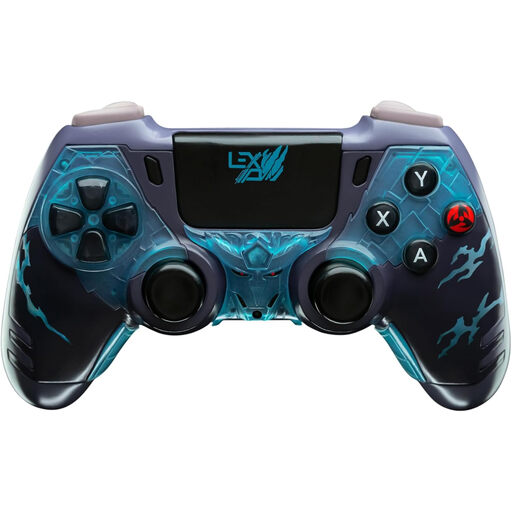 Image unavailable
LEXIP Kakashi Kamui Controller (PC, Switch)
Its named platforms make it relevant if your RPG is on PC or Switch.
Confirm the exact connection for this variant and whether the cable needed for your setup is included.
View on Joybuy
Common questions
Will every PC sci-fi RPG use DualSense adaptive triggers and haptic feedback?
No. Sony says those features depend on support from the individual game, and PC haptic feedback requires USB. Check the PC version of each RPG before choosing DualSense for its advanced feedback.
Should I use Bluetooth, 2.4 GHz wireless or a cable at my desk?
Choose a connection supported by both your controller and gaming device, then consider whether you prefer less cable clutter or a wired setup. For example, 8BitDo lists 2.4 GHz and wired connections for Windows on the Ultimate 2C Wireless, but Bluetooth for Android; Sony says DualSense PC haptic feedback requires USB.
What if a new controller is faulty in the UK?
If goods do not conform to the contract and the repair or replacement remedy applies, section 23 of the UK Consumer Rights Act 2015 requires the trader to provide that remedy within a reasonable time, without significant inconvenience, and to bear necessary costs. Keep your order details and contact the seller about the fault; this statutory remedy is distinct from a change-of-mind return policy.
How should I dispose of an old controller in the UK?
Treat the controller as electrical waste. GOV.UK says waste electrical products can be taken to a local household waste recycling centre; a battery that cannot be removed remains part of the electrical product.


