Choose a controller for your gaming platform and the specific RPG before comparing its extra controls. PlayStation’s DualSense is the direct PS5 route; Microsoft Xbox lists Xbox, Windows, Android and iOS support for its Xbox Wireless Controller, while 8BitDo and GameSir specify different platform and connection options for their models. A controller will not remove reflections from a bright-room display, so deal with screen position and lighting separately.
Who is choosing?
Platform-first RPG players
If you play on a console, computer or mobile device, start with the controller’s stated platform support and check the particular game. Microsoft Xbox lists several systems for its Xbox Wireless Controller, while PlayStation says some DualSense features vary by device and game.
Long-session exploration players
For extended sessions with maps, inventories and repeated commands, consider the layout, grip and whether useful actions can be remapped. The available controls differ between the Xbox Wireless Controller, 8BitDo Ultimate 2C and GameSir G7 SE; comfort remains a personal fit.
Bright-room setup troubleshooters
If daylight or lamps reflect across the screen, address the display setup as well as the controller choice. The Health and Safety Executive advises positioning a desk and screen to avoid glare and bright reflections.
What matters when buying?
For a science-fiction RPG in a bright room, establish platform and game support first. Then assess the screen, the controls you will use through a long session and how the controller will connect from your seat.
| Concern |
What to check |
Who this matters to |
| Platform and game support |
Match the exact controller to your console or operating system and check the RPG’s controller support. For optional feedback features, check the game and connection mode too. |
I need the controller to work with my system and game before its extras matter. Around 42% of consumers put compatibility first. |
| Screen visibility |
Look for window or lamp reflections across the display; consider screen position and adjustable room lighting. |
When bright reflections obscure dark scenes or menus, I need a readable screen rather than a different gamepad. Around 25% of consumers put visibility first. |
| Long-session controls |
Consider the controller’s shape and grip, then check whether remapping or extra inputs work on your platform. |
During long stretches of exploration and combat, I want commands I can reach comfortably. Around 17% of consumers make control layout their primary concern. |
| Connection and power |
Check USB cable reach or the stated wireless mode, and whether wanted features require a particular connection. |
If I sit away from the PC or console, I need a connection that suits my seating position and charging routine. Around 16% of consumers prioritise that setup. |
Mistakes to avoid
-
Buying a controller to solve screen glare
Controller lighting does not remove reflections from a TV or monitor. The Health and Safety Executive’s screen guidance identifies bright reflections as a display-positioning issue.
Check where light falls on the screen before changing controllers; choose the gamepad for compatibility and controls.
-
Expecting every DualSense feature in every PC game
PlayStation says DualSense haptic feedback on PC needs USB and a supported game. Adaptive triggers also depend on game support.
Check the specific RPG’s feature support and required connection before choosing DualSense for those effects.
-
Reading a platform label as universal compatibility
Microsoft Xbox, 8BitDo and GameSir list different supported systems and connection methods for their respective controller models. One model’s platform list does not establish support for another console.
Match the exact model, system, connection mode and game before comparing additional buttons or design details.
-
Overlooking cable reach and wireless requirements
Connection options differ by model, and some features depend on using USB rather than Bluetooth.
Check the route from your system to your seat for wired play. For wireless play, confirm which connection mode your device accepts.
A wired arrangement may also call for a suitable cable route or extension, depending on where you sit.
Controller brands to consider
These model-specific manufacturer details offer starting points for comparison, not a promise that every controller from a brand works with your system or game.
Xbox
The Xbox Wireless Controller is a first-party option for players using the systems in Microsoft Xbox’s stated compatibility list.
- Microsoft Xbox lists Xbox consoles, Windows PC, Android and iOS support, alongside Bluetooth, button mapping and a 3.5 mm headset jack for the standard controller.
- That compatibility list does not establish PS5 support; check your game and intended device separately.
PlayStation
DualSense is the first-party PS5 route, with use on other compatible devices subject to connection and game support.
- PlayStation lists USB-C and Bluetooth connection options for compatible devices and describes haptic feedback and adaptive triggers in supported games.
- PlayStation says PC haptic feedback requires USB and a supported game; feature availability varies by device and title.
8BitDo
The Ultimate 2C Wireless Controller is an option to assess for its stated Windows and Android setups.
- 8BitDo lists two remappable fast bumpers and Hall Effect joysticks and triggers. It specifies 2.4G or wired Windows connections and Bluetooth for Android.
- Its stated platform scope does not include PlayStation or Xbox consoles; 8BitDo’s 1000 Hz polling specification applies to 2.4G and wired modes, not Bluetooth.
GameSir
The G7 SE is a wired option to assess for Xbox, Windows and Android systems listed in GameSir’s manual.
- GameSir lists a USB-C wired connection, two lockable rear buttons, Hall Effect controls and GameSir Nexus software for the G7 SE.
- Plan for a cable. GameSir’s anti-drift wording is a manufacturer claim, not a guarantee of how long the controller will last.
Joybuy controller choices
These choices cover Xbox-oriented wired and wireless controllers alongside a DualSense option for PS5 and its listed compatible devices. Check your particular RPG and system before choosing; screen glare needs a separate display adjustment.
 No image available
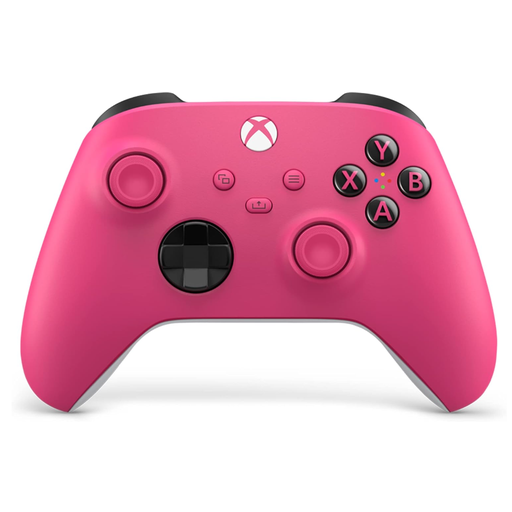
Xbox Wireless Controller – Deep Pink
Consider this for Xbox or Windows RPG play if you also want the device options Microsoft Xbox lists for its standard wireless controller. Microsoft Xbox specifies Bluetooth, button mapping and a 3.5 mm headset jack; check the game’s controller support before buying.
View on Joybuy
 No image available
Turtle Beach PDP Victrix Pro BFG Wireless Controller – Xbox and Windows PC, Black
This is a wireless option for the Xbox Series X|S, Xbox One or Windows 10/11 PC use named in its title. If you want to customise RPG commands, check which mappings your game and chosen platform will accept.
View on Joybuy
 No image available
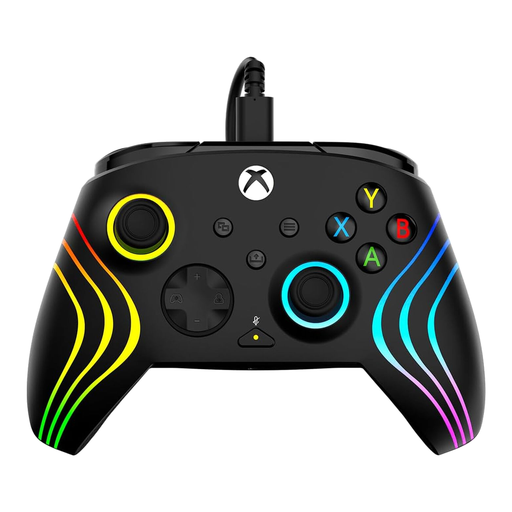
Turtle Beach Afterglow Wave Wired Controller for Xbox – Black
Consider this if you want a wired Xbox controller for your RPG setup. Check the cable route from the console to your seat and confirm support for the game you intend to play.
View on Joybuy
 No image available
Turtle Beach Afterglow Ignite Time Wired RGB Controller – Xbox and PC, Time Machine
This wired Xbox and PC option may suit a seat within a practical cable route of your system. Its RGB lighting is a controller feature, not a way to remove reflections from the RPG display.
View on Joybuy
 No image available
Sony DualSense Wireless Controller – HYPERPOP Remix Green
Consider this for PS5 play or for a compatible PC, Mac or mobile setup listed for this variant. For a Windows RPG, PlayStation says haptic feedback needs USB and a supported game; check the title’s support before choosing it for haptics or adaptive triggers.
View on Joybuy
Common questions
Will an illuminated controller help with screen glare?
No: controller lighting will not remove reflections from a TV or monitor. For a bright-room RPG setup, check screen position and intrusive light; the Health and Safety Executive advises arranging a screen to avoid glare and bright reflections.
Will DualSense haptics and adaptive triggers work in my Windows RPG?
Only where the particular game supports the feature. PlayStation says DualSense haptic feedback on PC requires USB as well as game support, while adaptive triggers also depend on the game; check the RPG’s feature information and your intended connection.
Can I use the GameSir G7 SE wirelessly?
No: GameSir describes the G7 SE as a USB-C wired controller for its listed Xbox, Windows and Android systems. Check that a cable can reach your usual seat before choosing it.
What should I do with an old battery-powered controller?
Check your local electrical recycling options rather than assuming the controller belongs with ordinary rubbish. Slough Borough Council classifies items needing batteries or a plug as electrical or electronic; ask your local council or retailer how to recycle or reuse yours.


