What to check before choosing
For visual novels, establish whether the particular game accepts controller input, then match the controller’s connection method to your device. Treat optional feedback and extra buttons as a later decision.
| Concern |
What to check |
Who this matters to |
| Game and device compatibility |
Check the exact game’s controller-support information and whether the controller connects to your operating system. |
If my visual novel uses controls the gamepad cannot reach, I still need my keyboard and mouse; around 45% of consumers put game and device compatibility first. |
| Desk connection |
Confirm the supported Bluetooth, USB or 2.4G method for your computer and the ports it requires. |
I want to keep cables off my desk without choosing a wireless mode my PC cannot use; for around 28% of consumers, the connection setup is the primary concern. |
| Optional controls and feedback |
Look for the mapping you need, then check whether the game supports any desired feedback and whether USB is required. |
Extra controls would help me only if I can use them in my chosen games; around 27% of consumers prioritise customisation or enhanced feedback. |
Joybuy controllers for desk setups
These controllers offer wired or wireless options to consider for visual novels at a PC desk. Choose a connection that suits your setup, and check support in the particular game before buying.
 Image unavailable
Microsoft Xbox Elite Wireless Controller Series 2
Consider this if you want configurable controls for PC play as well as an Xbox controller. Check whether its customisation options matter for your visual novels and whether your chosen game supports controller input.
View on Joybuy
 Image unavailable
Xbox Wireless Controller – Carbon Black
A conventional gamepad option for a Windows PC desk. Microsoft lists Bluetooth, button mapping and a hybrid D-pad for this controller line; check your game’s controls and which battery option you prefer.
View on Joybuy
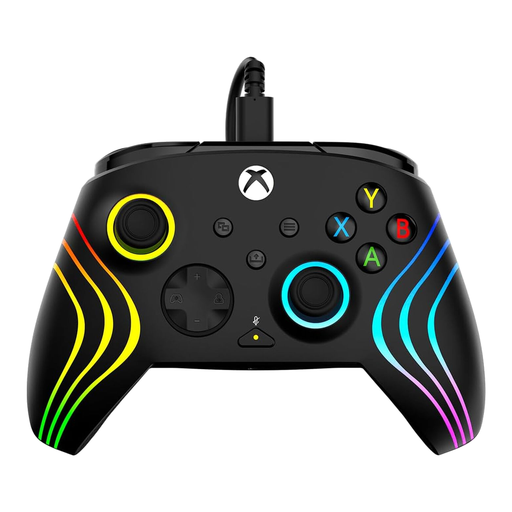 Image unavailable
Turtle Beach Afterglow Wave Wired Controller for Xbox – Black
Consider this for a desk where a wired controller is acceptable. Check that the cable will reach your PC comfortably and that your visual novel supports gamepad controls.
View on Joybuy
 Image unavailable
Machenike G3 V2 Tri-mode Controller – White
This is an option if you want to consider more than one desk connection method. Confirm which of its modes works with your PC before relying on a particular wireless setup, then check your game’s controller support.
View on Joybuy
 Image unavailable
Hyperkin DuchesS Wired Controller – White
A wired option if your PC desk has a suitable USB connection. Check that its cable arrangement works for where you sit and that the visual novel you want to play accepts controller input.
View on Joybuy
Common questions
Will any PC visual novel work with a controller?
No: controller support depends on the individual game and its control scheme. Steam says gamepad-only input styles work only with gamepad-supported games, so check the title’s support information and any configuration it requires.
Should I use Bluetooth, USB or a 2.4G receiver at my desk?
Use a method explicitly supported by both your computer and the controller you choose. Microsoft lists Bluetooth for the Xbox Wireless Controller, PlayStation lists Bluetooth and USB for DualSense, and 8BitDo lists 2.4G or wired Windows connections for the Ultimate 2C Wireless.
Will DualSense feedback improve a visual novel?
Only consider it a benefit if the particular game supports the feature you want. PlayStation says adaptive triggers depend on game support and PC haptic feedback requires USB; neither establishes an improvement for every visual novel.
Where should an old controller or its batteries go?
Take electrical products and batteries to an appropriate recycling collection point rather than putting them in household rubbish, as GOV.UK advises. Check the collection point’s instructions for the controller and any removable batteries.


