PC-to-TV visual-novel players
If a Windows PC runs your game on a TV or large monitor, confirm how the controller connects to that PC. Keep a keyboard or mouse within reach for titles whose menus are awkward with a gamepad.


Check the visual novel’s controller support and menus before choosing a gamepad: a controller that connects to your PC or console may still be awkward for mouse-oriented choices. Match the controller to the device running the game, not the TV; Xbox Wireless Controller suits a supported Xbox or Windows setup, DualSense offers a PS5 route with PC and Mac connectivity, and 8BitDo Ultimate 2C offers stated Windows 2.4G and wired modes.
If a Windows PC runs your game on a TV or large monitor, confirm how the controller connects to that PC. Keep a keyboard or mouse within reach for titles whose menus are awkward with a gamepad.
If you use a PS5 but also play on a Windows PC or Mac, check the connection method and which DualSense features work in the particular game. PlayStation confirms USB-C and Bluetooth connectivity beyond PS5, with feature limits on PC.
If you sit away from the display to read dialogue and make choices, focus on the wireless method your host accepts, how you will power the controller and whether the game’s interface works comfortably without a mouse.
Start with the intended game’s controls, then identify the PC, console or other device running it. The TV is the display, not necessarily the device the controller must connect to.
| Concern | What to check | Who this matters to |
|---|---|---|
| Game controls | Check controller support and whether menus, save screens and choices are usable without a cursor. Valve says Steam Input offers custom bindings and community configurations, but a suitable layout still needs checking in the game. | If I want to read from the sofa, I need to know I can reach every choice and menu without repeatedly picking up a mouse. Around 29% of consumers put game-input fit first. |
| Host and connection | Identify the device running the game and match it to a stated USB, Bluetooth, Xbox Wireless or 2.4G connection method. Microsoft Xbox, PlayStation and 8BitDo each specify different supported devices and modes. | When I switch between a console and a computer, I need a controller that connects to the devices I actually use. For around 36% of consumers, host and connection fit is the primary concern. |
| Sofa use | Consider the distance to the host, its available ports and how the controller is powered; a wired option also needs a workable cable arrangement. | From my usual seat, I want to advance dialogue and make choices without arranging a cable across the room. Around 21% of consumers place everyday sofa convenience first. |
| Features and upkeep | For DualSense on PC, check game support for adaptive triggers and whether USB is practical for haptic feedback, as PlayStation requires both USB and game support for PC haptics. Plan an appropriate collection route when a controller or removable battery reaches end of life, in line with GOV.UK guidance. | If I use one controller across devices, I want to understand which features will work and how I will manage it over time. Feature limits and upkeep come first for around 14% of consumers. |
A game can recognise a controller yet leave mouse-oriented menus or cursor interactions inconvenient. Valve’s Steam Input supports custom bindings for supported controllers, but that does not establish a comfortable layout for a particular title.
Check the game’s input information and try its menus with a controller before relying on one for a long playthrough. Keep a keyboard or mouse available if needed.
PlayStation says adaptive triggers require game support. On PC, haptic feedback also requires a USB connection.
Choose DualSense for a compatible device and connection method; check the intended game before counting on its additional features.
A controller needs a connection to the PC, console or other host running the visual novel. Compatibility with one host does not establish compatibility with another.
Identify the host first, then compare its connection options with the controller manufacturer’s stated compatibility.
GOV.UK advises that electrical products and batteries should not be put in household rubbish when they are no longer wanted.
Use an appropriate electrical-waste collection point for the controller and a battery collection point for removable batteries.
The Xbox Wireless Controller is a route for supported Xbox consoles and Windows PCs.
DualSense is a PS5-oriented option that PlayStation also says can connect to Windows PCs and Macs by USB-C or Bluetooth.
The Ultimate 2C Wireless Controller is a Windows-and-Android route with connection modes specified by the manufacturer.
These controllers cover Xbox and Windows PC setups, PS5 use and other stated PC-compatible options. Choose for the device running your visual novel, then check the game’s own controller controls.
 No image available
Consider this for a supported Xbox or Windows PC setup once you have checked the visual novel’s controls. Microsoft Xbox lists Xbox Wireless and Bluetooth connection options for this controller.
 No image available
For a large-screen game running on Xbox Series X|S, Xbox One or a Windows 10/11 PC, check whether its menus work well with a gamepad. Those host variants and wireless design are identified in the product name; confirm the connection method you intend to use.
 No image available
This PS5-oriented controller is also an option for a Windows PC or Mac setup: PlayStation confirms USB-C and Bluetooth connectivity. On PC, haptic feedback needs USB and game support, while adaptive triggers also depend on the game.
 No image available
For a PC connected to a large display, check which of this controller’s connection modes your host can use and whether the visual novel has workable gamepad controls. Do not assume that a connection mode establishes compatibility with another host.
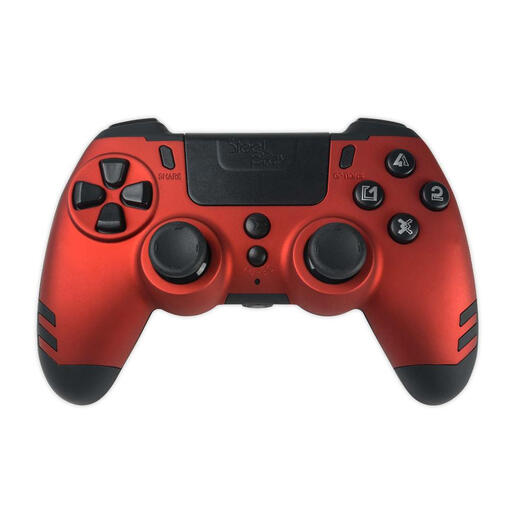 No image available
Consider this wireless PS4 or PC model only after checking how it pairs with your intended host and whether the game’s choices and menus can be navigated by controller. Confirm the wireless method before planning a sofa setup around it.
No: the particular game’s input support and interface determine whether a controller is practical. Valve says Steam Input offers custom bindings and community configurations for supported controllers, but check the game’s menus and cursor interactions before relying on a layout.
Yes, PlayStation says DualSense can connect to a Windows PC by USB-C or Bluetooth; the visual novel must still work with controller input. Adaptive triggers need game support, and PC haptic feedback needs both game support and USB.
Yes, Microsoft Xbox lists Windows PC compatibility and Xbox Wireless and Bluetooth technologies. Check that your PC supports the connection method you plan to use, and that the visual novel’s controls suit a gamepad.