What matters when choosing?
Start with the visual novel and the device running it. Once those match the controller, decide where the headphone cable will go and which power or cable arrangement you would prefer for longer reading sessions.
| Concern |
What to check |
Who this matters to |
| Device and game compatibility |
Match the exact controller to your PC, console or mobile device. Check each visual novel’s controller support and, on Steam, whether its input style suits the game. |
If my regular visual novels still need mouse input, connecting a gamepad will not make it useful for reading and choices. Roughly 46% of consumers put device and game compatibility first. |
| Headphone connection |
Check the headset plug, supported device and controller connection mode. PlayStation requires a wired DualSense connection for headset-jack use on PC and Mac. |
I want the wired headset cable at the controller rather than running it to another device. For around 36% of consumers, that controller-side audio route is the primary need. |
| Long-session setup |
Choose between a wired controller, replaceable batteries and a rechargeable controller; consider where a cable would run while you play. |
During a long reading session, I would rather manage a cable or battery arrangement that suits where I sit than pay attention to extra controls. Approximately 18% of consumers prioritise that simpler setup. |
Controllers on Joybuy
These Xbox- and PlayStation-oriented controllers are options for console or PC visual-novel setups. For any of them, check your games’ controls and your intended headphone connection; a controller listing’s device compatibility does not establish headset-jack behaviour in every connection mode.
 No image available
Xbox Wireless Controller – Robot White
Consider this standard Xbox controller for visual novels on an Xbox console or compatible Windows PC. Microsoft specifies a 3.5 mm jack for compatible headsets, and the standard controller uses AA batteries. Check your game’s controller support and the jack’s behaviour with your intended PC connection.
View on Joybuy
 No image available
Turtle Beach PDP Victrix Pro BFG Wireless Controller – Black
This Xbox Series X|S, Xbox One and Windows 10/11 PC variant is worth considering if you also want its configurable controls for other games. For visual novels, check the individual game’s input support and confirm how your headset will connect on the platform and controller mode you plan to use.
View on Joybuy
 No image available
Microsoft Xbox One S Elite Wireless Controller Series 2
This Xbox One, Xbox Series X/S and PC controller is a choice to examine if you want adjustable controls for games beyond visual novels. Confirm your visual novels’ input support and the headset connection for your intended device; customisation alone does not settle either question.
View on Joybuy
 No image available
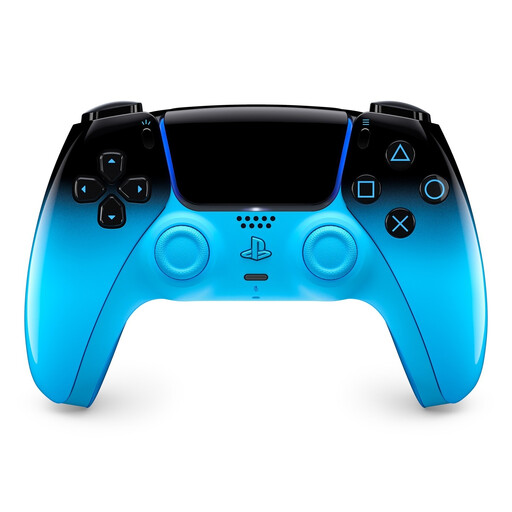
Sony DualSense Wireless Controller – HYPERPOP Rhythm Blue
Consider this PS5, PC, Mac and mobile DualSense variant if PS5 play is central to your setup. The standard DualSense has a 3.5 mm headset jack, but PlayStation says using that jack on PC or Mac requires a wired controller connection; the jack is not compatible with mobile devices.
View on Joybuy
 No image available
Sony DualSense Edge Wireless Controller – White
This PS5 controller is an option if its configurable controls matter to you beyond visual-novel navigation. Before choosing it for headphone play, confirm the controller-side audio connection you need and check support for your particular games and any other device you intend to use.
View on Joybuy
Common questions
Do I need a controller with a headphone jack for visual novels?
No: a controller-side jack matters only if that is where you want to plug in your wired headset. You can instead plan to connect headphones to the device or display you use for audio, provided that setup supports them. If you want the cable at the controller, check its jack against your device, headset and connection mode.
Will any PC visual novel work with a controller?
No. Check the individual game’s controller support before buying. Valve explains that Steam Input gamepad emulation works with controller-supported games; it does not make a gamepad-only input style work in a game without gamepad support.
Can I use the DualSense headphone jack over Bluetooth on a PC?
For PC headset-jack use, plan on a wired DualSense controller connection rather than Bluetooth. PlayStation says the headset-jack feature requires a wired connection with PC and Mac and is not compatible with mobile devices.
Can the Switch 2 Pro Controller provide headphone audio on a PC?
Do not choose it on the assumption that its jack provides a PC audio connection. Nintendo specifies the Switch 2 Pro Controller and its audio jack for Nintendo Switch 2 use only; choose a PC headphone arrangement that matches your actual setup instead.
How should I clean a controller used for long reading sessions?
Disconnect the controller before cleaning and keep liquids off its surfaces and openings. Xbox recommends a soft, lint-free cloth lightly dampened with mild soap and water, an isopropyl-alcohol solution of 70% or less, or a premoistened disinfectant wipe; it says never to apply liquid directly to the controller.


