Platform-first open-world players
If you mainly play on PS5, Xbox, Switch or Windows PC, start with a controller that supports that device. Then check whether the game and your chosen connection support the particular controls or feedback you want.


Choose a controller that works with your main gaming device and game before comparing feedback features or extra buttons. DualSense is a route for PS5 and supported PC games, Xbox Wireless Controller for Xbox and compatible Windows or mobile devices, Nintendo Switch Pro Controller for Switch, and 8BitDo Ultimate 2C for Windows via 2.4 GHz or cable and Android via Bluetooth. In a compact room, check which connection your preferred features require and whether the power arrangement suits longer quest sessions.
If you mainly play on PS5, Xbox, Switch or Windows PC, start with a controller that supports that device. Then check whether the game and your chosen connection support the particular controls or feedback you want.
If a cable across a small desk would get in the way, check the wireless method specified for your computer. Bluetooth, a 2.4 GHz receiver and USB can serve different purposes even on the same controller.
If stopping mid-quest to charge or replace batteries would be inconvenient, compare the controller’s power arrangement and make a routine for keeping it ready.
Settle the platform first: a comfortable wireless setup or specialised control is of little use if the controller does not work as expected with your game.
Consider it when: You play mainly on PS5, or want DualSense features in a PC game that supports them.
Bear in mind: PlayStation says PC haptic feedback needs USB as well as game support; adaptive triggers also depend on the game.
Consider it when: You play on Xbox or a compatible Windows PC and may also use Android or iOS.
Bear in mind: Microsoft specifies AA batteries or a compatible rechargeable pack for the standard controller; rechargeable AAs do not charge inside it.
Consider it when: Your games are on Switch and you want its motion controls, HD Rumble or amiibo functionality where supported.
Bear in mind: Do not assume those Switch-oriented functions will transfer to another gaming platform.
Consider it when: You want a rechargeable Windows controller with a supplied 2.4 GHz adapter, or a Bluetooth controller for Android.
Bear in mind: 8BitDo specifies 2.4 GHz or wired use for Windows, but Bluetooth use for Android; check which connection your device needs.
| Concern | What to check | Who this matters to |
|---|---|---|
| Platform and game features | Confirm your main device, the game’s controller support and whether desired features work with your connection. | If I play chiefly on one platform, I need the controller to work with that game before its extras matter. Around 36% of consumers put platform and feature fit first. |
| Connection and desk space | Check wireless modes for your device, whether a receiver is supplied and whether USB is needed for a desired feature. | At a compact desk, I would rather keep a cable out of the way without losing a function I intend to use. Room-friendly connection is the main concern for around 29% of consumers. |
| Power and charging | Check whether it uses AAs or an internal rechargeable battery, and what you need to keep it powered during longer sessions. | When a quest runs long, I want to know how I will replace or recharge the power supply before play stops. Around 21% of consumers prioritise that routine. |
| Control options | Check whether the exact variant offers the remapping or extra inputs you want and whether your game can use them. | If I repeatedly use the same actions, I may want to move them to more convenient buttons. Extra or configurable controls come first for around 14% of consumers. |
PlayStation says DualSense haptic feedback on PC requires both a supporting game and a USB connection. Pairing over Bluetooth does not meet that USB requirement.
Check the exact game, feature and connection together before choosing Bluetooth for a cable-free PC setup.
The standard Xbox Wireless Controller can use AA batteries or a compatible rechargeable pack, according to Microsoft. Rechargeable AAs must be charged outside the controller.
Before ordering, check which power accessories come with the particular controller and decide how you will keep it ready for play.
Nintendo says its approximately 40-hour Switch Pro Controller estimate varies with use. Connection mode and usage conditions can also affect how useful another controller’s stated runtime is for your routine.
Compare figures for the mode you intend to use, then allow time to charge before a longer session.
DualSense is Sony’s controller route for PS5, with supported connections to Windows PC, Mac and mobile devices.
The standard Xbox Wireless Controller serves Xbox consoles and compatible Windows, Android and iOS devices.
The Nintendo Switch Pro Controller is a Switch-focused option.
Ultimate 2C Wireless offers a rechargeable controller route for Windows and Android, using different connection methods.
These controllers cover Xbox or Windows PC, PS5, and compatible Nintendo Switch setups. Choose by your actual platform and game; the Sony, Microsoft and third-party models have different controls and power arrangements even when they serve a similar setup.
 No image available
Consider this variant if you play on Xbox Series X|S, Xbox One or Windows 10/11 PC and want a wireless controller. Confirm support for your particular game and the connection you plan to use.
 No image available
This wireless Series 2 model is a choice to check for Xbox One, Xbox Series X|S or PC play. Confirm your exact platform, game support and included accessories before choosing it for a particular desk or charging setup.
 No image available
This PS5 controller is also worth considering for a supported PC game. PlayStation says PC haptic feedback requires USB and game support, while adaptive triggers depend on the game; check those conditions if either feature is central to your choice.
 No image available
Consider the standard Xbox controller for Xbox play or use with a compatible Windows or mobile device. Microsoft specifies AA batteries or a compatible rechargeable pack for this model; rechargeable AAs do not charge inside the controller.
 No image available
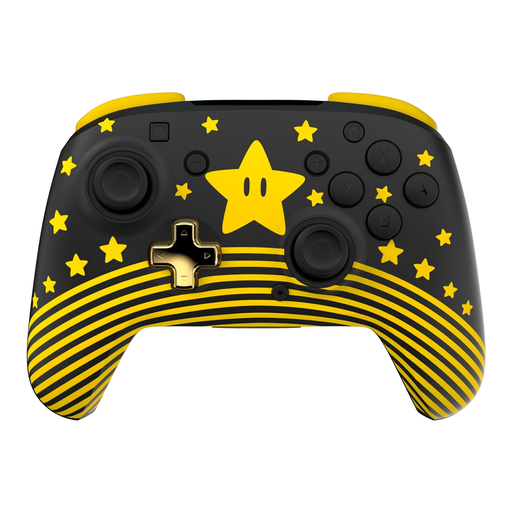
This wireless Switch variant suits a player choosing controls for a compatible Nintendo Switch game. If you use Switch 2, check the game’s control requirements: this listing notes that the controller has no C Button.
Yes. Confirm whether you mainly play on PS5, Xbox, Switch or PC, then check the game’s controller support. A wireless connection alone does not establish that another platform will provide the controls or features you expect.
Not under PlayStation’s stated conditions for PC haptic feedback: it requires a USB connection and a supporting game. DualSense can pair over Bluetooth, but that does not meet the USB requirement; adaptive triggers also depend on game support.
No. Microsoft says rechargeable AA batteries used in the standard Xbox Wireless Controller must be charged by the method their manufacturer recommends, outside the controller. A compatible rechargeable battery pack is a separate power option.
No; choose extra buttons only if you have actions you want to move and your game and platform can use the controller as intended. The 8BitDo Ultimate 2C Wireless has R4/L4 bumpers, but platform and connection compatibility still come first.