What should you check before buying?
Start with your device and connection method, then decide whether you need to identify controls visually or can navigate them by feel. Assess the D-pad in the context of the platform games you play.
| Concern |
What to check |
Who this matters to |
| Device compatibility |
Match the exact model and its wired or wireless connection method to your console, PC or mobile device. |
If I use a particular device, I need the controller to connect to it before its other features matter. Around 39% of consumers put device compatibility first. |
| Controls in low light |
Look for an explicit description of illuminated buttons, labels or D-pad directions; RGB zones alone do not establish this. |
When I play without much room light, I need to find the right control without mistaking decorative lighting for readable labels. Roughly 38% of consumers prioritise identifying controls in low light. |
| Directional control |
Consider the exact model’s D-pad design and whether its connection method suits your setup. |
For repeated directional inputs in platform games, I care about a D-pad I can use confidently. About 23% of consumers place directional control first. |
Joybuy controllers to consider
These options include Xbox and PC controllers, plus a tri-mode controller to check against a PC, Switch or Android setup. Choose by your exact device and connection method; if you need to read controls in the dark, confirm that feature for the particular model.
 No image available
Microsoft Xbox Elite Wireless Controller Series 2 (Xbox One/Xbox Series X/S/PC)
Consider this wireless model if you want to assess different directional-control setups for platform games.
Check its compatibility and connection method against your exact Xbox or PC setup. If you need to see controls in darkness, confirm whether the relevant labels or D-pad directions illuminate.
Joybuy
 No image available
Xbox Wireless Controller – Carbon Black
This is an option for players who want a wireless Xbox controller and plan to assess its directional layout for platform games.
Confirm support for your particular device and connection method. Check control illumination separately if you rely on seeing button labels in the dark.
Joybuy
 No image available
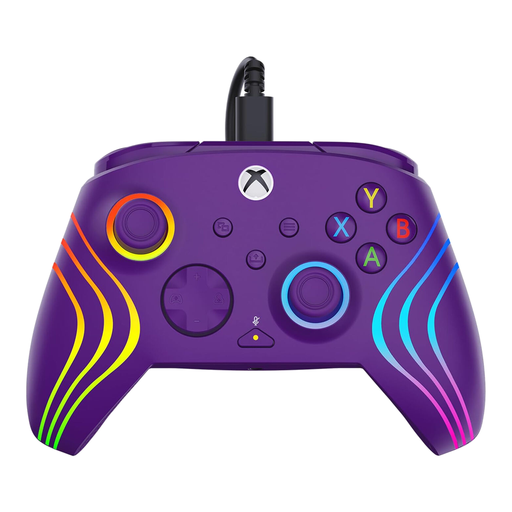
Turtle Beach Afterglow Wave Wired Controller for Xbox – Purple
Consider this Xbox model if a wired controller fits where you play platform games.
Plan for a cable and check the connection against your setup. Confirm whether any lighting illuminates the controls you need to identify, rather than only the controller exterior.
Joybuy
 No image available
Turtle Beach Afterglow Ignite Time Wired RGB Controller – Time Machine (Xbox/PC)
This wired Xbox and PC option may suit a setup where a cable is practical and adjustable exterior lighting appeals to you.
Check cable reach and device compatibility before choosing it. RGB in the name does not establish that button labels or D-pad directions are illuminated.
Joybuy
 No image available
Machenike G3 V2 Tri-mode Controller – White
Consider this tri-mode model if you need to investigate a connection route for a PC, Switch or Android device.
Check the pairing method for your exact device, along with the D-pad layout and whether the controls you need are visible in low light.
Joybuy
Common questions
Does RGB make a controller’s buttons easier to see in the dark?
Not necessarily: RGB lighting does not by itself establish that button labels or D-pad directions are illuminated. Turtle Beach describes adjustable RGB on the Stealth Ultra, and PowerA describes exterior lighting zones on the FUSION Pro Wireless with Lumectra; check the exact model’s control-lighting description if visual identification matters to you.
Will one wireless controller work with every console, PC and phone?
No controller should be assumed to support every device. 8BitDo lists Windows and Android for the Ultimate 2C Wireless Controller, Turtle Beach lists Xbox Series X|S, Xbox One, Windows 10/11 and Android smart devices for the Stealth Ultra, and PowerA lists Xbox Series X|S, Xbox One and Windows 10/11 for its FUSION Pro Wireless with Lumectra. Check the full model name and intended connection method.
Do I need software to change a controller’s button settings?
That depends on the setting and the model. 8BitDo says the extra bumpers on its Ultimate 2C Wireless Controller can be remapped without software; Turtle Beach and PowerA describe settings or profile options on their named models. Check how the particular change you want is made on your intended device.
How should I dispose of a rechargeable controller?
Use an appropriate electrical-waste collection route rather than household rubbish. GOV.UK advises that batteries and electrical products should be recycled; follow the collection point’s instructions for a controller with a non-removable battery.


