PC party-game hosts
If a Windows PC runs the game, check which controllers it recognises, how they connect and how many people can play locally before buying several pads.


Choose for the device running the party game and the game’s supported inputs before deciding which controller feels convenient to use. Xbox Wireless Controller is a route for Xbox or Windows PC, DualSense for PS5 or compatible PC games, and Joy-Con controllers for supported games on their matching Nintendo Switch generation. Check the game’s local-player limit before buying controllers for everyone.
If a Windows PC runs the game, check which controllers it recognises, how they connect and how many people can play locally before buying several pads.
If you also play on Xbox or PS5, you may want a controller that connects to your computer. Connection alone does not mean every PC game or controller feature will work.
For an original Nintendo Switch or Nintendo Switch 2 game, the choice between shareable Joy-Con-style controls and a full-size pad depends on the console generation and the game’s supported play modes.
Start with the host device and exact game; then work out how many people need controllers and whether sharing, connection method or desk layout changes the choice.
Consider when: The game runs on Xbox or a Windows PC and supports the intended controller input.
Bear in mind: PC game support and the number of recognised controllers still need checking.
Consider when: You play on PS5, or your PC game supports DualSense input.
Bear in mind: PlayStation says PC haptic feedback needs both game support and USB; adaptive triggers also depend on the game.
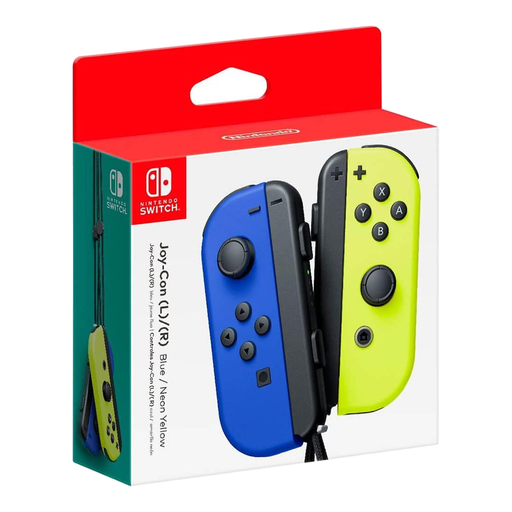
Consider when: The Switch game supports sharing an original Joy-Con pair between two players.
Bear in mind: A single Joy-Con per player is an option only in games that support that control mode.
Consider when: A Switch 2 game supports local multiplayer with Joy-Con 2.
Bear in mind: Nintendo identifies Joy-Con 2 as a Switch 2 controller, not an accessory for the original Switch.
| Concern | What to check | Who this matters to |
|---|---|---|
| Device and game compatibility | Identify the host console or computer, then check the game’s supported controllers and inputs. | I need the pad to work with the device running our chosen game, not merely connect to it. Around 36% of consumers put compatibility first. |
| Simultaneous players | Check the game’s local-player limit and input method. Valve says Windows permits up to four XInput devices. | We plan to play together, so I need enough controllers recognised at once. For around 29% of consumers, player capacity is the primary concern. |
| Shareable controls | For Nintendo play, check whether the game accepts one Joy-Con per person or uses motion input. | I would like a friend to join using a shared controller pair, if our game allows it. That is the leading need for around 21% of consumers. |
| Desk setup and charging | Check the connection and charging arrangements, including any cable or adaptor needed for the feature you want. | In a small office, I want controllers that are straightforward to charge and use from our seats. Around 14% of consumers prioritise that practical setup. |
Controllers have different host-device and generation boundaries. Nintendo identifies Joy-Con 2 as a controller for Switch 2, so it should not be treated as interchangeable with original Switch Joy-Con.
Note the device running the game and the game’s title, then check its controller-support information before choosing a controller family.
A console’s connection capacity does not establish a game’s local-player count. For Windows games using XInput, Valve documents a four-device limit.
Check both the game’s player limit and its input method before buying a controller for each guest.
PlayStation says PC haptic feedback requires USB and game support; adaptive triggers also depend on game support.
Check the planned game’s feature information rather than choosing DualSense solely for those effects.
Xbox advises keeping a controller within 6 metres and in line of sight when using its Wireless Adaptor for Windows. Original Joy-Con charging arrangements also matter if controllers are passed around during play.
Plan seating and charging positions before the session, and check whether your intended charging arrangement needs an accessory.
For off-console original Joy-Con charging, a separately sold Charging Grip may be needed.
Xbox Wireless Controller is a route to consider for Xbox consoles and Windows PC games that support it.
DualSense is a PS5 controller that PlayStation says can connect to compatible PC games through Bluetooth or USB.
Nintendo offers different controller options for local multiplayer on the original Switch and Switch 2.
These controllers offer choices for original Nintendo Switch, Xbox or Windows PC, and PS5 or compatible PC games. Match the controller to your host device, then check the specific party game’s supported inputs and local-player count.
 No image available
Consider this pair for an original Switch party game that supports sharing one Joy-Con with each of two players. Check the game’s control mode and how you will charge the pair.
 No image available
Consider this full-size wireless controller if your Nintendo Switch party game calls for a separate pad rather than a shared Joy-Con pair. Check the game’s controller requirements and local-player limit.
 No image available
Consider this controller for an Xbox or supported Windows PC party game. On PC, check the game’s input method and player count; Valve documents a four-device limit for Windows XInput setups.
 No image available
Consider DualSense for a PS5 party game or a compatible PC game. PlayStation says PC haptic feedback needs USB and game support, so check the game before relying on that feature.
 No image available
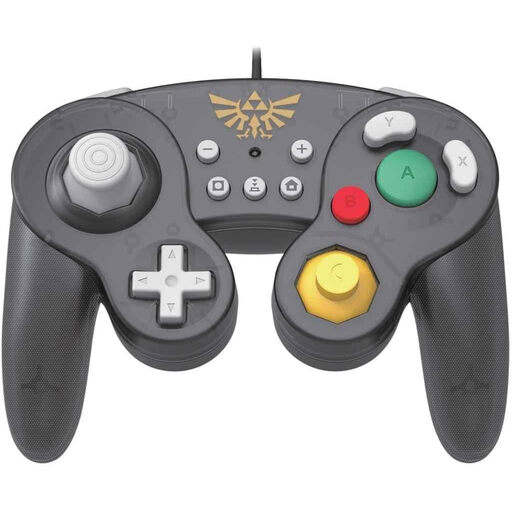
Consider this GameCube-style option for a Nintendo Switch game that supports its controls. Check the game’s requirements and connection arrangement before planning where guests will sit; confirm compatibility separately if the host is a PC.
Yes, if the particular game accepts it. Xbox Support provides PC connection guidance for Xbox controllers, and PlayStation says DualSense can connect to compatible Windows PCs by Bluetooth or USB; check the game’s supported inputs separately.
The game’s local-player limit and its input system both matter. Valve says Windows permits up to four XInput devices, while Nintendo says up to eight wireless controllers can be paired to an original Switch; neither figure promises that a particular game has that many player slots.
Do not count on both features working wirelessly. PlayStation says PC haptic feedback requires a USB connection and game support, while adaptive triggers also require support from the game.
Yes, in original Nintendo Switch games that support one Joy-Con per player. Nintendo describes a Joy-Con 2 pair as an option for local multiplayer with a friend on Switch 2 in compatible games; check the game and console generation before buying.