
24/7 Customer Support

Free returns

Same-day & Next-day Delivery

Quality Guaranteed

Unlock Your Welcome Offers: FREE Delivery | Up to 80% OFF | Free 30-day JoyPlus trial
Download the APP
The term ‘AI laptop’ is everywhere, but what does it actually mean for your day-to-day work or creative projects? The latest wave of devices, known as Copilot+ PCs, represents a significant shift in personal computing. These machines are designed from the ground up to run advanced artificial intelligence tasks locally, promising a faster, more secure and more intuitive user experience.
As the Joybuy Product Recommendation Officer, my role is to help you understand these new technologies. This guide will explain what makes a Copilot+ PC different, what to look for when choosing one and highlight a few models that stand out for their performance and features.
Navigating the specifications of a new Windows AI PC can be confusing. Here are a few key things to consider to ensure you get a machine that meets your needs.
The defining feature of a Copilot+ PC is its Neural Processing Unit, or NPU. Unlike a traditional CPU or GPU, an NPU is specifically designed to handle AI and machine learning tasks with incredible efficiency. The performance of an NPU is measured in TOPS (Trillions of Operations Per Second). For a device to qualify as a Copilot+ PC, it must have an NPU capable of at least 40 TOPS. This power allows the laptop to run features like real-time language translation, advanced image editing and predictive assistance without relying on the cloud, making it faster and more private.
These new AI capabilities are powered by a new generation of processors. You will see names like the Snapdragon X Elite laptop and the AMD Ryzen AI laptop frequently. These chips are built on ARM architecture, similar to what you find in smartphones, which allows for impressive performance while maintaining excellent battery life. This means you can have a powerful laptop for productivity that can genuinely last the entire day on a single charge.
With AI processes running in the background, having enough system memory is crucial. A 16GB RAM laptop is the recommended starting point for a smooth Copilot+ experience, ensuring you can multitask between demanding applications without slowdowns. Paired with a fast PCIe NVMe Solid State Drive (SSD), you get a system that boots up in seconds and launches applications almost instantly.
Here are a few Copilot+ PCs that offer a compelling combination of AI performance, modern design and practical features for professionals, students and creators.
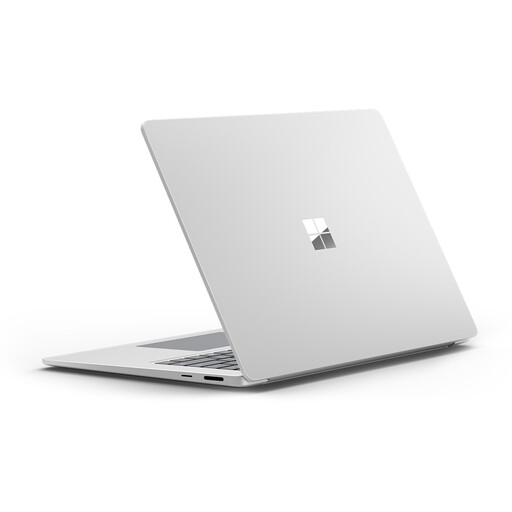
Why It Stands Out
The Microsoft Surface Laptop 7 is ideal for users who want a bigger, more immersive display alongside next-generation AI performance. The Snapdragon X Elite processor delivers impressive speed while staying cool and efficient, and Copilot+ features genuinely help streamline daily tasks. With its premium aluminium build, excellent audio and a spacious, high-resolution PixelSense touchscreen, it’s a great fit for professionals, students and creators alike. Features like Windows Studio Effects automatically enhance your appearance on video calls, making it a polished tool for remote work.
Pros
Who is it for? Users who value premium design, a superior touch-screen experience and seamless integration with the Windows ecosystem. It's an excellent choice for mobile professionals and students who need a reliable and stylish AI laptop.
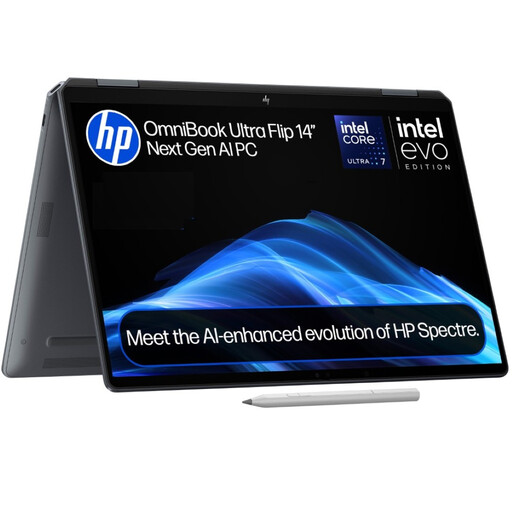
Why It Stands Out
This versatile 2-in-1 laptop combines the power of a Copilot+ PC with the flexibility of a tablet. Its 360-degree hinge allows you to switch between laptop, tent, stand and tablet modes effortlessly. The centrepiece is the breathtaking 14-inch 3K OLED touch display, which delivers true-to-life colours and deep blacks, making it perfect for content creation and media consumption. Powered by an Intel Core Ultra 7 processor with an integrated AI Boost NPU, it offers a responsive and intelligent experience in an incredibly lightweight package.
Pros
Who is it for? Content creators, artists and anyone who needs a versatile device that doesn't compromise on display quality or performance. Its lightweight design and flexible form factor make it ideal for those who work in different environments.
The models above represent some of the most compelling Copilot+ PCs available today. However, the world of high-performance laptops is vast. If you are a content creator or professional with specific workflow needs, you may want to explore a wider range of options.
Discover more powerful and specialised machines in our curated collection of creator laptops.
1. What is the main difference between a regular laptop and a Copilot+ PC? The key difference is the inclusion of a powerful Neural Processing Unit (NPU) with at least 40 TOPS performance. This dedicated hardware allows a Copilot+ PC to run complex AI tasks directly on the device, leading to faster performance for features like live captions, creative tools in art programs and advanced Windows Studio Effects, all while preserving battery life.
2. Can I run my existing Windows applications on a Copilot+ PC? Yes. Copilot+ PCs running on ARM-based processors, like the Snapdragon X Elite, use a powerful compatibility layer called Prism to run traditional x86/x64 applications. While most applications will run smoothly, performance can vary. An increasing number of applications are being released as native ARM64 versions, which offer the best performance and efficiency on these new devices.
3. Do I really need a Copilot+ PC? It depends on your workflow. If you are a content creator, developer or a professional who heavily multitasks and uses AI-powered tools, a Copilot+ PC can offer a significant boost in productivity and efficiency. For general use like web browsing and document editing, a traditional laptop is still very capable. However, as AI becomes more integrated into operating systems and applications, the benefits of having a dedicated NPU will become increasingly apparent.