What matters when choosing storage?
Decide how you will access current files, then choose a separate copy you can restore if the working folder or account becomes unavailable.
| Priority |
What to check |
Your needs |
| Access across devices |
Check which devices can use the account, whether sync has completed, and whether files must also be available offline. Microsoft and Google say changes to synced files can appear across locations. |
I edit assignments on more than one device and want the current working file available without carrying a drive between them. |
| Independent recovery |
Keep a copy separate from the synced working folder. Check the backup schedule and practise restoring a file. The National Cyber Security Centre warns that ransomware has affected connected USB and network backup drives. |
If I delete a folder or lose access to my main device, I need a copy I can still restore. |
| Portable transfers |
Check the drive’s capacity, connector, computer port and cable. Samsung says the T7 Shield’s stated maximum speed requires a USB 3.2 Gen 2 host and cable with UASP enabled. |
Large project folders travel with me between study locations, so the drive needs to work with the devices I actually use. |
| Routine local backups |
Check that the drive has room for the folders and older copies you intend to retain, and that its backup software works with your computer. Seagate describes hourly, daily, weekly and monthly scheduling for its Backup Plus portable line. |
I would rather schedule copies of coursework than rely on remembering to transfer each changed file by hand. |
| Shared home storage |
For NAS, plan who will manage accounts, updates and backup jobs, as well as a separate destination. Synology says Hyper Backup can run manually or on a schedule to local, remote and public-cloud destinations. |
Several people or devices at home need shared local storage, and someone can maintain it. |
| Privacy and permissions |
Check university-approved services, course instructions and who can open shared files. The Information Commissioner’s Office notes that cloud files sit on servers controlled by the provider. |
My work includes participant, placement or other identifiable information, so I need to know where it may be stored and who may access it. |
| Temporary hand-off |
Check that both devices accept the USB stick and follow any university rules for removable media. Keep the working file and an independent backup elsewhere. |
I only need to move a copy for printing or presenting, not make the stick my sole coursework archive. |
Portable drives on Joybuy
These external hard drives and portable SSDs are options for keeping a local copy of coursework. Choose one alongside your plan for accessing active files and keeping a backup separate from them.
 No image available
Western Digital My Passport 2TB portable hard drive, black
A portable local copy for coursework folders when you want a hard drive to take between study locations. Check that your computer and intended backup setup work with the drive before relying on it for scheduled copies; keep a backup disconnected when it is not in use.
View on Joybuy
 No image available
Samsung MU-PE1T0S 1TB portable SSD, black
A portable 1TB copy for files carried between study locations. Its stated connection is USB Type-C with USB 3.2 Gen 2; check your device port and cable before relying on the maximum transfer speeds Samsung quotes for the T7 Shield.
View on Joybuy
 No image available
Samsung Portable SSD T7 1TB, blue
A 1TB portable copy for study files that move with you. The title specifies USB Type-C and USB 3.2 Gen 2; check the intended computer’s port and cable. The listing says this T7 is not waterproof or dustproof, so protect it from liquid and excessive moisture.
View on Joybuy
 No image available
DigiEra LPS2000M-3 1TB magnetic portable SSD, pink
A 1TB USB-C portable copy for coursework files. The title states USB 3.2 Gen 2x2 and read speeds of up to 2000 MB/s; check whether your host supports that interface. If you need the magnetic attachment or direct recording feature, check your exact iPhone model and the intended function.
View on Joybuy
 No image available
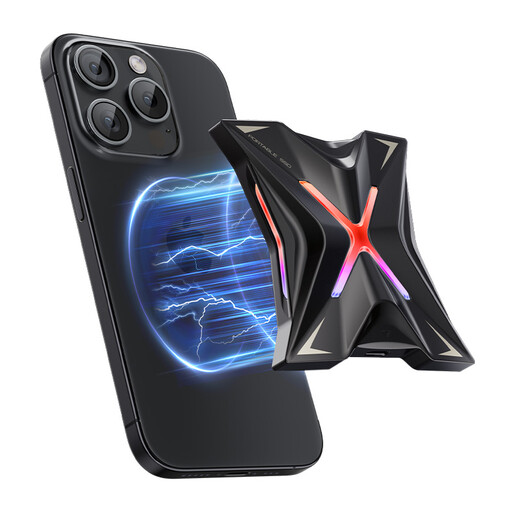
MOVESPEED YSPSRX20M-1TTG 1TB magnetic portable SSD
A 1TB portable local copy with a stated USB 3.2 Gen 2x2 interface and read speeds of up to 2060 MB/s. Check your device’s connection before relying on that figure. For the magnetic attachment or direct-recording feature, confirm compatibility with your exact phone and intended use.
View on Joybuy
Common questions
Is cloud sync the same as a backup?
No. Microsoft and Google say changes and deletions can be reflected across synced files and locations. Use sync to access current coursework, but keep a distinct copy you can restore; the National Cyber Security Centre also warns that connected backup locations can be affected during ransomware incidents.
Should I choose a portable SSD or hard drive for coursework?
Consider an SSD if you frequently carry and transfer large files, checking that your host and cable support the interface behind any stated speed. Consider a portable hard drive for routine local backups, checking its capacity and backup-software compatibility. Neither drive should be the only copy of important coursework.
Can I put university coursework in my personal cloud account?
Check your university’s storage and sharing rules first, especially for participant, placement or other identifiable information. The Information Commissioner’s Office says cloud files are stored on provider-controlled servers; a service that works for personal notes is not automatically an approved place for course data.
Does UK GDPR require every coursework file to be encrypted?
No blanket encryption requirement follows from that rule: the Information Commissioner’s Office says UK GDPR does not specifically require encryption of all personal information. If coursework contains personal information, follow your university’s instructions for the particular files and storage device, and ask its relevant contact when the permitted approach is unclear.
Is a home NAS enough on its own?
No. A NAS can provide shared local storage, and Synology documents backup jobs to local, remote and public-cloud destinations, but a NAS at home is not itself an off-site copy. Plan another backup destination and test that you can restore your coursework.


