What matters when choosing?
Start by deciding where an independent, recoverable copy will live. Then choose local storage by the size of your files, the devices you use and whether anyone can maintain a household storage system.
| Concern |
What to check |
Who this matters to |
| Recovering work before a deadline |
Check whether you have a separate copy rather than just a synced folder, and whether earlier versions remain recoverable. |
If I accidentally delete or overwrite a nearly finished assignment, I need another copy I can actually retrieve. Around 36% of consumers put independent recovery first. |
| Repeated copies of large files |
Compare the complete project folder with the drive capacity; check the computer port and cable against the drive connection. |
When I regularly copy video or design projects, a workable transfer routine matters more than a headline speed I cannot use. For around 29% of consumers, copying large files is the primary concern. |
| Access across devices |
Check permitted cloud access and completed sync, then confirm that a removable copy connects to the computers you use. |
I need current coursework on both my own device and a university computer without mistaking a cloud-only file for a local backup. Cross-device access comes first for around 21% of consumers. |
| Household-managed storage |
Check who will administer the network-attached storage, its usable capacity and version settings, and how the device itself will be backed up. |
If several household devices need a shared destination, I need someone to maintain it as well as space for the files. Around 14% of consumers prioritise household-managed storage. |
Joybuy products for local copies
These portable SSDs and hard drives are options for separate local copies of coursework and project files. The USB stick is suited to a transfer or supplementary copy; the network-attached storage device is a household route that needs setup and administration. None replaces a second copy in another location.
 No image available
Samsung Portable SSD T7 4 TB, grey
Consider this portable SSD for recurring local copies of large project folders, alongside a copy elsewhere.
4 TB; USB Type-C 3.2 Gen 2. Check the ports and cables on the computers you will use.
View on Joybuy
 No image available
Samsung MU-PE1T0S 1 TB, black
This portable SSD is an option for a local coursework copy if the complete folder fits and another copy is kept separately.
1 TB; USB Type-C 3.2 Gen 2. Check the host connection and cable for the transfer performance you need.
View on Joybuy
 No image available
Western Digital My Passport Ultra for Mac 5 TB, silver
Consider this portable hard drive for a project archive when transfer speed is not the main priority; retain another copy of important files.
5 TB. If you also use Windows or a managed university computer, confirm the exact drive's setup and compatibility before buying.
View on Joybuy
 No image available
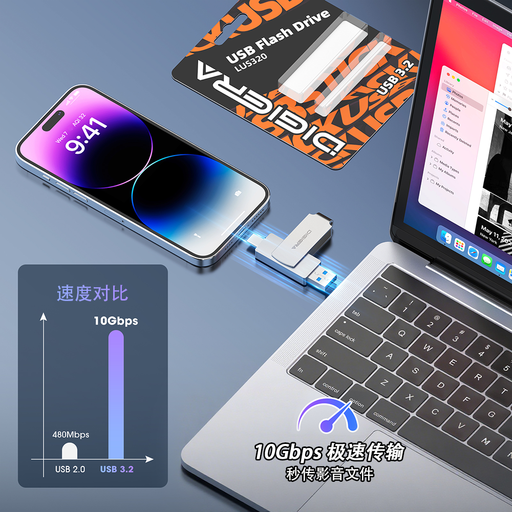
DigiEra LUS320 128 GB USB flash drive
Use this for a temporary transfer or supplementary copy between compatible devices, not as the only backup of your coursework.
128 GB; USB 3.2 with USB-A and USB Type-C connectors. Check that the files you need to carry fit.
View on Joybuy
 No image available
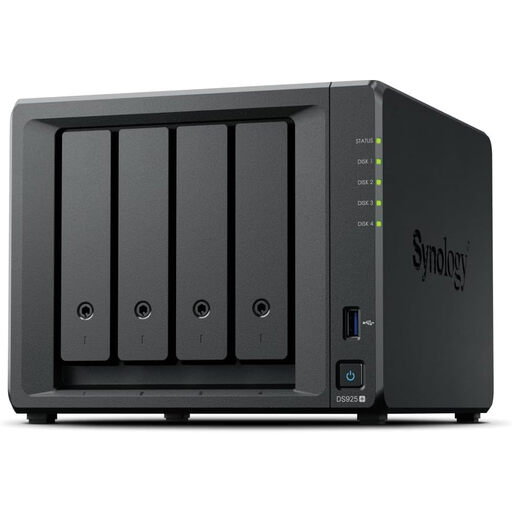
Synology DiskStation DS925+ 4-bay NAS
Consider this household network-storage route only if someone can set it up and administer it; plan a separate backup for the NAS itself.
Four drive bays. Confirm the package contents, required drives and compatibility with the backup and version-recovery workflow you intend to use.
View on Joybuy
Coursework backup questions
Is OneDrive synchronisation an independent backup?
No. Microsoft Support says additions, changes and deletions sync between a OneDrive folder and the website. For important coursework, check that syncing has finished, then maintain a separate copy or a suitable versioned backup.
Will my computer backup include cloud-only coursework files?
Not necessarily. Oxford University guidance explains that files held only in the cloud may be outside a locally running backup. Check that files you intend to back up from your computer are stored locally, or copy them to another protected location.
Can a USB stick be my only coursework backup?
It should not be. The University of Hertfordshire warns that USB flash drives are easy to lose and more prone to virus infection. Use one for a permitted transfer or supplementary copy and keep your work elsewhere too.
How should I handle sensitive coursework on a portable drive?
Check your university's requirements before copying sensitive or research-related files. For personal information stored on portable media, the Information Commissioner's Office identifies encryption as protection against unauthorised access, particularly if a device is lost or stolen.
What should I do with files in a university account before I leave?
Move important coursework to an appropriate independent location before your access ends. Oxford University guidance warns that files can be irretrievably deleted after a OneDrive account expires; check your own institution's access and storage rules in time to transfer them.


