What matters when choosing?
Measure the places you will label and decide how long the labels need to remain readable. Then choose a printer whose media and controls fit those tasks.
| Concern | What to check | Who this matters to |
|---|
| Durability and adhesion |
Match the specified label material and adhesive to the container surface and likely handling or exposure. |
I need labels on often-used drawers and jars to stay attached and legible. Around 42% of consumers put that durability need first. |
| Label-making workflow |
Check whether you can use the printer from a phone, its own keyboard or your computer, as preferred. |
If I regularly change supply names, I want a way to create labels that fits how I work. That workflow is the primary concern for around 33% of consumers. |
| Size and format |
Measure your narrowest tab and largest bin front, then check supported tape or roll dimensions. |
I label both compact containers and larger storage fronts, so the available space determines which format I can use. Around 25% of consumers prioritise that fit. |
Joybuy product choices
These choices span portable craft and home-office labellers and printers to consider for larger storage or inventory labels. Compare each model’s compatible media with the containers you plan to label.
 No image available
Phomemo D30 Portable Label Maker, 0.59-inch Label Width
For labels made as you reorganise craft supplies, this portable D30 is listed with a 0.59-inch label width. Confirm which media fit and whether their adhesive suits your containers.
View on Joybuy
 No image available
Brother QL-600B Address Label Printer
For desk-based filing or larger storage labels, consider whether the QL-600B’s compatible label formats fit your containers. Check the chosen stock’s adhesive and resistance to handling.
View on Joybuy
 No image available
Phomemo M110 Portable Label Maker with 1 Label Roll
For inventory-style craft labels or larger storage locations, this portable M110 includes one label roll. Check which replacement rolls fit and whether their dimensions and adhesive suit your storage.
View on Joybuy
 No image available
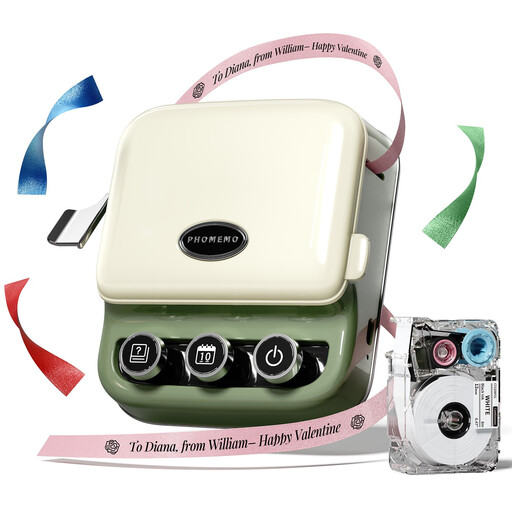
Phomemo P15 Bluetooth Ribbon Label Printer with Gift Box and 1 Label Refill
For mobile-device label design during home organisation, check whether the P15’s tape width and material fit your storage. Its bundle includes one label refill; ribbon tape for ribbon printing is sold separately.
View on Joybuy
Common questions
What label width works for craft drawers and containers?
Measure the usable label area on each type of container before choosing a width. Brother specifies tape up to 12 mm for the PT-P300BT, while DYMO specifies 6 mm, 9 mm and 12 mm D1 labels for the LabelManager 280; a large bin front may call for wider media. Check the printer’s compatible tape or roll family as well as its width.
Which label material should I use for long-term craft storage?
Choose the material by its stated resistance and your storage conditions, not simply by whether the printer uses heat. Brother describes laminated TZe tape as resistant to water and abrasion, while Joybuy’s label-printer guide notes that heat, sunlight, friction and some chemicals can affect direct-thermal labels. Check the exact label stock and adhesive, then test it on the intended surface.
Can I use any tape or roll in a label printer?
No; the media must be compatible with the exact printer model. For example, DYMO specifies D1 labels for the LabelManager 280. Check the model’s accepted cassette or roll type, dimensions and material before ordering replacements.
Should I check UKCA or CE information for a label printer?
Yes, ask the seller for product information relevant to the exact printer and the market where it is sold. The Department for Business and Trade’s Great Britain guidance, updated on 21 August 2026, says CE marking continues to be recognised alongside or in place of UKCA marking where the applicable requirements align. That guidance does not establish the status of an individual printer, and Northern Ireland follows different processes.
What should I do with an old label printer?
Use an electrical reuse or recycling route rather than putting a printer with a plug, battery or cable in general waste. Recycle Your Electricals identifies those items as suitable for electrical recycling; check the collection options available to you.


