Full-page craft-magazine readers
If photographs, charts and small labels need to stay visible together, screen area and a stable reading position may matter more to you than a compact device.


Choose a compact tablet if you usually hold it to read individual articles; choose a larger screen if full-page patterns and photographs matter more and you can support the device securely. Before buying either, check that your magazine app or downloaded files work on it. A display comfort setting is not a substitute for winding down without a screen before sleep.
If photographs, charts and small labels need to stay visible together, screen area and a stable reading position may matter more to you than a compact device.
If you usually hold the tablet while reading a few articles or patterns, a compact, lighter device may be easier to manage, provided you are comfortable zooming into dense pages.
If you want to circle instructions or sketch changes, check whether your magazine or PDF app accepts annotations, which stylus works with the tablet and whether that stylus is included.
Start with how you will position the tablet in bed, then decide how much page area you need. Check the exact magazine service before settling on a device or app ecosystem.
| Concern | What to check | Who this matters to |
|---|---|---|
| Full-page readability | Compare the screen’s physical size and resolution; view a representative issue at your intended reading size if possible. | I want to follow photographs, charts and small labels without repeatedly enlarging the page. Around 36% of consumers put full-page readability first. |
| Supported reading position | Check the tablet’s weight and whether your chosen stand or case holds it securely in your reading position. | Holding a device through a long reading session does not suit me, so stable support matters most. This is the primary need for around 29% of consumers. |
| Notes and saved issues | Confirm stylus compatibility and inclusion, plus your app’s annotation and offline-download options. | I want to mark pattern instructions or return to downloaded issues when needed. Around 21% of consumers chiefly prioritise that workflow. |
| Bedtime and app fit | Check the publisher’s supported app store and your intended reading time; confirm which accessories come with the configuration. | I need my magazine service to work, without letting screen reading displace my wind-down routine. For around 14% of consumers, those checks take priority. |
A larger display gives a magazine page more physical room, but it does not tell you whether holding the tablet in bed will be comfortable. Lenovo’s Tab Plus, for example, has a built-in kickstand intended for supported viewing.
Decide whether you will hold the tablet or set it on a stable support before comparing screen sizes and weights.
Amazon states that Google Play is not supported on Fire tablets. Access to a publisher’s Android app therefore cannot be assumed.
Check the exact app in the supported store and confirm how subscriptions, sign-in and offline issues work.
Samsung lists an S Pen with the Galaxy Tab S10 FE but no travel adapter. Apple specifies Pencil support for iPad mini without listing a Pencil in its box contents.
Check the contents of the exact configuration, including any stylus, charging equipment and support you plan to use.
Low-blue-light features may suit a viewing preference, but they do not establish that reading on a tablet immediately before sleep has no effect. The NHS advises trying to avoid phones, tablets and computers for an hour before bed.
If you intend to sleep soon after reading, consider moving the session earlier or switching to a non-screen option near bedtime.
The iPad mini is a compact option for readers whose magazine and annotation apps work on iPadOS.
The Galaxy Tab S10 FE is a larger Android option for readers who also want to mark up compatible files.
The Tab Plus line is relevant if you want a large Android display that can stand on a suitable stable surface.
The Fire Max 11 is an option to assess for large-screen reading if your magazine service works in Amazon’s app ecosystem.
These tablets offer different screen sizes and, in some configurations, pen accessories for reading or marking craft-magazine pages. Check your publisher’s app and how you will support the device in bed before choosing between them.
 No image available
Consider this if you want a 10.1-inch screen and the listed accessories for reading and marking pages. Check how a representative magazine page looks on its display and confirm the exact software configuration and app compatibility before buying.
 No image available
The included Focus Pen makes this configuration worth considering if you plan to annotate compatible magazine files. Confirm that your chosen app accepts pen input and check which case or stand would suit your reading position.
 No image available
This Wi-Fi tablet is an option for reading compatible digital issues. If marking patterns matters to you, confirm the pen configuration; also check its weight and a suitable support for longer sessions in bed.
 No image available
Its listed 12.7-inch display may appeal if you want more physical room for magazine layouts, while the included stylus is relevant to compatible annotation apps. Inspect small print at your usual viewing size and check how you would support the tablet in bed.
 No image available
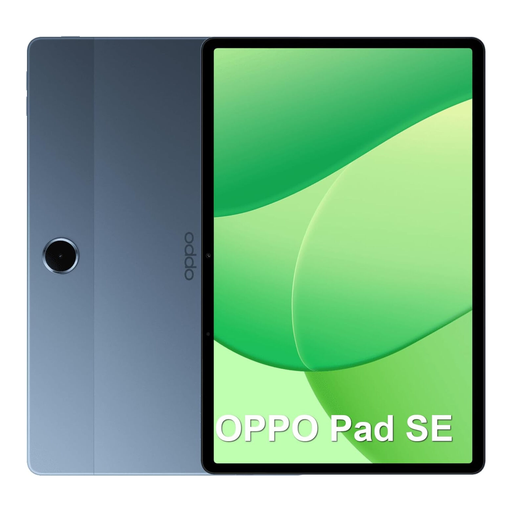
Consider this configuration for reading compatible magazine issues. Check its exact display configuration, your publisher’s app and whether its weight and a suitable stand meet your bedside needs.
A compact tablet suits reading individual articles while holding the device; a larger display gives full-page photographs and patterns more physical space. If you choose a larger tablet, work out how to support it securely rather than assuming you will want to hold it throughout a reading session.
No, not for reading alone. A stylus becomes relevant if your magazine or PDF app lets you mark instructions or sketch changes; check compatibility and inclusion for the exact tablet configuration.
Check the specific publisher’s Fire tablet support before buying. Amazon states that Google Play is not supported on Fire tablets, so availability of a magazine app through Google Play does not establish that it will work on Fire.
No. A display setting may suit your viewing preference, but the NHS advises trying to avoid phones, tablets and computers for an hour before bed. If you plan to sleep soon, consider reading earlier or choosing a non-screen activity near bedtime.