Choose a projector for dark-room cricket viewing by working out your screen size and available placement distance, then checking that the model accepts the picture format from your live-cricket source. Controlled lighting reduces the need to chase the highest advertised brightness, but the screen and picture mode still affect how much light you need. Conventional, short-throw and ultra-short-throw placement each suit a different room layout.
Who this setup suits
Consumers focused on live-match detail
If following the ball, fielding and score graphics matters most, check the exact projector’s resolution, accepted input formats and available picture modes alongside the quality of your cricket stream. A sport mode alone does not establish how well a model handles motion.
Consumers with good light control
If you can keep light off the screen, choose its size and surface before deciding how much projector brightness you need. A headline lumen rating on its own cannot tell you how the finished picture will look.
Consumers working around limited room depth
If seating or a walkway rules out a projector farther back, short-throw or ultra-short-throw placement may help. Measure the available position against the exact model’s requirements before choosing a screen.
What to check before buying
For cricket in a dark room, settle the screen position and projector placement together; then check picture formats and brightness for that setup. Throw distance is the main distinction between the three placement routes.
Conventional throw
Consider it when: You have a suitable shelf or mounting position farther from the screen and want to assess models with optical placement adjustments, such as the Epson EH-TW6250.
Allow for: The clear lens-to-screen distance the chosen model needs.
Short throw
Consider it when: Seating or room depth makes a farther-back projector position impractical.
Allow for: Careful measurement and alignment despite the shorter distance.
Ultra-short throw
Consider it when: The projector must stand close to the wall or screen, as with the Epson EH-LS650B.
Allow for: The screen position, surface and alignment needed for wall-side placement.
| Concern | What to check | Who this matters to |
|---|
| Live-match picture |
Check the exact model’s output resolution and accepted video formats against your source device and stream. Check which picture settings are available for that input. |
If the ball, fielding and score graphics are my priority, I want a picture format my source can actually supply, rather than a resolution claim in isolation; around 40% of consumers put live-match picture detail first. |
| Room fit |
Measure lens-to-screen distance and the intended image size, then check the model’s throw and alignment requirements. |
When seating or a walkway limits where I can put the projector, getting the intended image size without blocking the room matters most; roughly 40% of consumers prioritise room fit. |
| Dark-room image |
Match brightness to the screen size and surface, and limit light falling on the screen. Compare lumen figures only on a like-for-like basis. |
I can darken the room, so I would rather match the projector to my screen than choose by the largest brightness claim; about 20% of consumers make that dark-room match their primary concern. |
Buying pitfalls
-
Choosing by headline lumens alone
Rated output does not necessarily describe the light available in your chosen picture mode. ProjectorCentral’s dark-room guidance also depends on screen area, while light falling on the screen weakens perceived blacks.
Decide on the screen size and control direct light first. Compare brightness figures on the same measurement basis and assess them for that screen, rather than applying one lumen target to every setup.
-
Assuming short throw removes the need to measure
Shorter placement distance does not guarantee your chosen image size or a workable position. ViewSonic specifies a 100-inch image at 1.53 m for the X2-4K; that example is specific to that model.
Measure from the intended lens position to the screen plane, then check the exact model’s throw range, image offset and alignment requirements before committing to a position.
A different position may also call for a stand, mount or changes to the cable run.
-
Assuming built-in apps and speakers settle the source setup
A projector’s smart features and audio do not establish that your chosen live-cricket service, playback device and sound arrangement will work together.
Check service availability, the intended device’s connection and the audio route for the exact model before buying.
Your setup may still need an external playback device, cables or separate audio equipment.
-
Using a home subscription for a public screening
Home viewing and showing a sports channel to the public are different uses. GOV.UK states that showing a sports channel publicly requires a commercial or business subscription.
For a venue, club or public event, confirm the permissions and subscription required by each relevant service before arranging the screening.
Brands to consider
BenQ
The BenQ TK700 is a model to examine if its placement range and sport-oriented picture settings suit your cricket setup.
- BenQ’s UK specification lists 4K UHD, Sport mode, a 1.127–1.46 throw ratio and HDMI 2.0b inputs for the TK700.
- The TK700 uses a lamp and has a stated noise figure of 34 dBA typical or 28 dBA in Eco mode. Check placement, audible noise and current support for the exact unit.
Epson
Epson’s EH-TW6250 and EH-LS650B illustrate different installation choices, rather than interchangeable versions of one setup.
- Epson lists 1.6x zoom and lens shift for the conventional-throw EH-TW6250; its ultra-short-throw EH-LS650B is specified for an image up to 120 inches close to the wall.
- Check the room fit and current support terms for the particular model. Epson’s “4K PRO-UHD” designation should not be assumed to describe the same implementation as every other 4K label.
ViewSonic
The ViewSonic X2-4K is a short-throw example for rooms where a farther-back projector position is difficult.
- ViewSonic specifies a 0.69–0.83 throw ratio and a 100-inch image at 1.53 m for the X2-4K.
- Its brightness is stated in LED lumens. Do not compare that figure directly with an ANSI-lumen rating as though both used the same measurement basis.
Joybuy projectors for dark-room cricket viewing
These projector choices are relevant to a dark-room cricket setup where you can check screen size, placement and the live-stream source before buying. A listed resolution or brightness figure does not, by itself, establish motion performance or suitability for your particular screen.
 No image available
Magcubic HY350Max smart projector
Consider it for a compatible Full HD cricket source if you can confirm the image size at your intended placement distance.
The product name states native 1080p, 900 ANSI lumens, Android 14 and auto keystone correction. Its 8K support wording does not mean native 8K projection; check the exact input format and motion settings needed for your stream.
View on Joybuy
 No image available
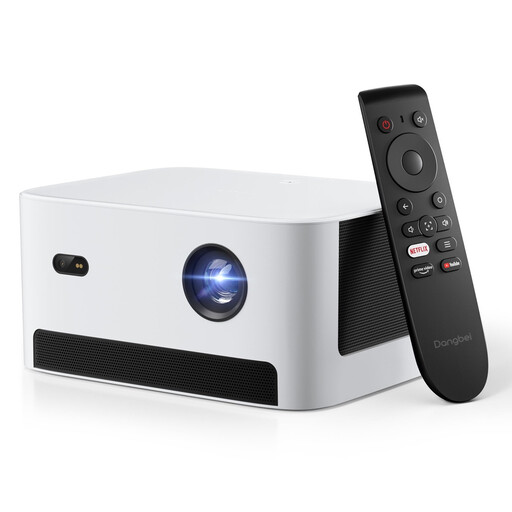
Dangbei Neo DLP Full HD projector
Consider it for a compatible 1080p cricket source if its placement and audio arrangement work in your room.
The product name lists 1080p Full HD, 540 ISO lumens, auto focus, keystone correction and Dolby Audio. Check the throw distance for your screen and the video formats accepted from your playback device.
View on Joybuy
 No image available
MAGCUBIC HY310 projector
Consider it only after checking that its output resolution and intended image size meet your cricket-viewing needs.
The product name lists 330 ANSI lumens and auto focus, but combines “4K” with “Native 1080P”. Confirm the exact native output resolution, supported source format and placement requirements for this variant.
View on Joybuy
 No image available
TCL C1 Grey smart projector
Consider it for a compatible Full HD stream if you want a projector you can reposition and can verify its fit with your screen.
The product name lists 1080p Full HD and 4K support; 4K support should not be read as native 4K output. Check the throw distance, source formats and picture settings before choosing its position.
View on Joybuy
 No image available
View XBJ A5Pro Grey projector with touch tablet
Consider it for a compatible 1080p cricket source if its screen size and placement work in your room.
The product name states native 1080p, 4K support, auto focus and keystone correction; 4K support is not native 4K output. Brightness is described as both 800 and 900 ANSI lumens in the product information, so confirm the rating for this exact variant before matching it to a screen.
View on Joybuy
Frequently asked questions
Can I ignore brightness if I watch cricket in a dark room?
No. A dark room reduces the light output you need, but screen size and surface still matter. ProjectorCentral gives 13–18 lumens per square foot as a dark-room home-theatre reference, not a universal target for every projector and screen.
Do I need a 4K projector for live cricket?
Not necessarily. Higher-resolution output is relevant when your source supplies a compatible higher-resolution stream and you want that detail on a large image. Check the source device, the projector’s actual output resolution and the room fit before treating a “4K supported” label as a reason to choose a model.
Do I need a TV Licence to watch live cricket through a projector in the UK?
A projector does not remove the TV Licence requirement for watching or recording a programme as it is broadcast. GOV.UK says the requirement applies when you watch or record live TV on a TV, computer or other device; check the rules for the service you intend to use.
Can I show a live cricket match at a public event using my home projector?
The projector can be used only if the screening has the necessary viewing permissions and subscriptions; a domestic subscription should not be assumed to cover a public event. GOV.UK states that showing a sports channel publicly requires a commercial or business subscription from the relevant service.


