
24/7 Customer Support

Free returns

Same-day & Next-day Delivery

Quality Guaranteed

Unlock Your Welcome Offers: FREE Delivery | Up to 80% OFF | Free 30-day JoyPlus trial
Download the APP
Curved gaming monitors can make a noticeable difference to immersion, visibility and desk space, but the headline specification is not always the most useful one. A monitor advertised as “0.5ms” may use a minimum measurement rather than a typical response time, while a 240Hz panel is of limited value if your graphics card cannot produce high frame rates.
For UK buyers, the most suitable display depends on your games, hardware, available desk space and whether the monitor will also handle work, streaming or content creation. This guide explains the key specifications, common buying traps and a selection of models available through Joybuy.
Response time figures can be listed as GtG minimum, MPRT or a manufacturer’s optimum setting. These measurements are not directly interchangeable. A 0.5ms GtG minimum and a 1ms MPRT specification do not necessarily indicate identical real-world behaviour.
Look for the measurement type, panel technology and refresh rate together. Rapid VA panels generally offer strong contrast, while OLED panels are specified with very low response times and deep black levels. Your graphics card, game settings and connection standard will also affect perceived motion clarity.
A 240Hz gaming monitor refreshes the image up to 240 times per second, but a game needs to be rendering at a similar frame rate to make full use of it. For many single-player games and console titles, 120Hz or 144Hz may be more practical.
Check the maximum refresh rate supported by each input. For example, the MSI MAG 27CQ6F reaches WQHD at 180Hz via DisplayPort and up to 144Hz via HDMI. Using the wrong cable or input can prevent the screen from operating at its advertised maximum.
A 34-inch curved monitor is wider than a conventional 27-inch 16:9 display, while a 49-inch ultrawide monitor with a 32:9 aspect ratio can require a deep, sturdy desk and careful positioning. Measure the desk width, depth and viewing distance before ordering.
Large curved panels may also need two people to move safely. If you plan to use a monitor arm, check its weight capacity and VESA dimensions rather than assuming any arm will be suitable.
For most PC gaming and multitasking, WQHD gaming monitors provide a useful balance between image detail and graphics performance. Standard WQHD is 2560 × 1440, while UWQHD is 3440 × 1440 on a 21:9 ultrawide monitor. Dual QHD, or 5120 × 1440, is used by some 49-inch displays.
A 27-inch WQHD screen offers a relatively compact format with higher pixel density than Full HD. A 34-inch UWQHD monitor provides more horizontal workspace for game interfaces, timelines and multiple applications. A 49-inch display can replace two screens, but it demands more desk space and greater GPU output.
A high refresh rate monitor can show motion more frequently, which is useful in racing games, shooters and esports. Select a refresh rate that matches your hardware and the games you play.
Adaptive Sync dynamically adjusts the monitor’s refresh rate to compatible GPU output. It can help reduce tearing and stuttering when frame rates fluctuate. Confirm compatibility with your graphics card and enable the feature in both the monitor menu and system settings where required.
VA panels typically provide higher native contrast than many IPS alternatives, making them suitable for darker game scenes and films. OLED and QD-OLED monitors can produce very deep blacks and strong contrast, alongside rapid pixel response. However, buyers should follow the manufacturer’s OLED care guidance, use suitable brightness levels and understand that static on-screen elements require consideration over long-term use.
HDR performance depends on more than an HDR label. Check brightness, contrast, colour gamut and the relevant DisplayHDR specification. A monitor with USB-C can also simplify a work setup, but check whether the port supports video, data and sufficient Power Delivery for your laptop.
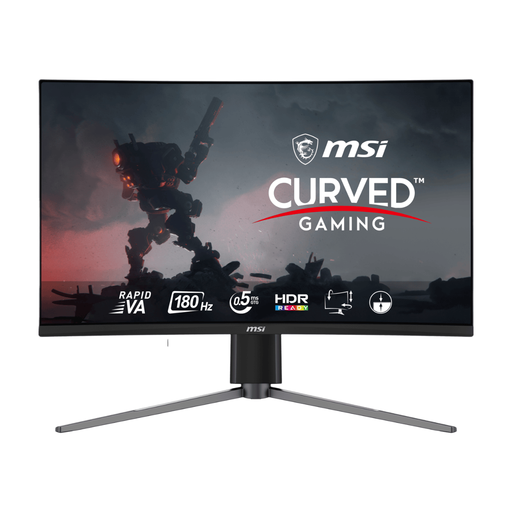
Why This Fits Their Persona: A manageable 27-inch format suits UK setups with a small footprint and first upgrades from Full HD, while WQHD adds image detail without the width of an ultrawide display.
The listing clearly separates DisplayPort and HDMI refresh rates: 180Hz through DP and 144Hz through HDMI, helping buyers choose the correct connection.
2560 × 1440 resolution, 1500R Rapid VA panel, Adaptive Sync and VESA mounting.
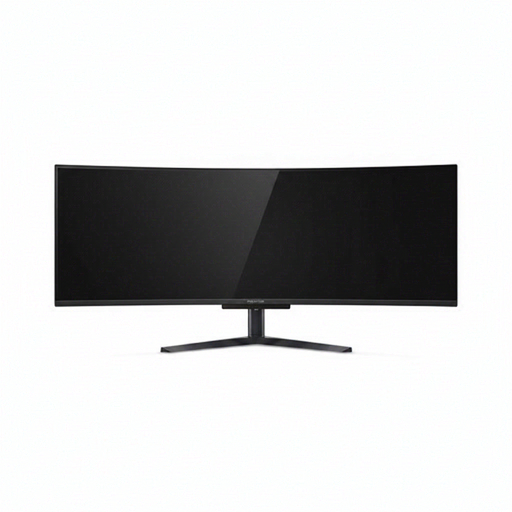
Why This Fits Their Persona: Its 32:9 canvas is suited to users wanting one display for immersive games, wide timelines and side-by-side applications.
The specifications state Dual QHD resolution, 240Hz support and the available HDMI 2.1, DisplayPort and USB-C connections rather than relying only on size claims.
5120 × 1440 QD-OLED panel, 240Hz refresh rate, 0.03ms listed response time and USB-C with 90W Power Delivery.
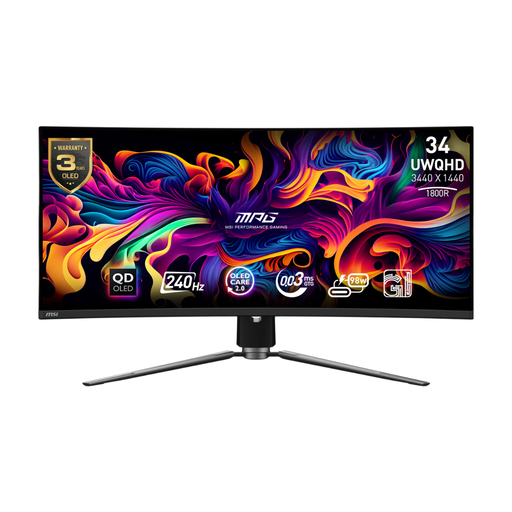
Why This Fits Their Persona: A 34-inch UWQHD format provides an immersive 21:9 view for fast games while remaining easier to accommodate than a 49-inch panel.
The QD-OLED care features, including OLED Care 2.0, make panel maintenance part of the buying decision rather than an overlooked detail.
3440 × 1440 resolution, 240Hz refresh rate, 0.03ms listed response time and USB-C with up to 98W Power Delivery.
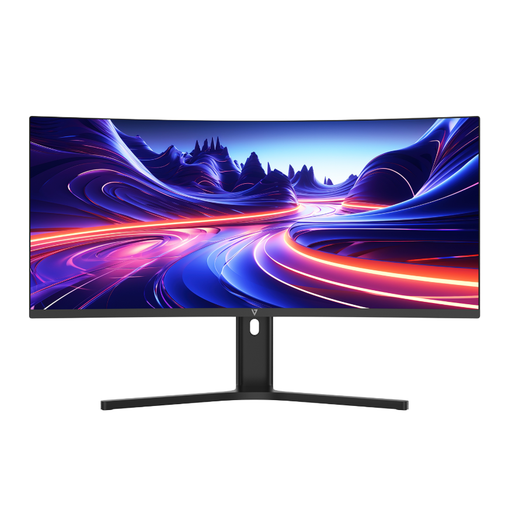
Why This Fits Their Persona: Professionals, streamers and laptop users can use its wide workspace, KVM-style workflow features and USB-C connection for daily multitasking.
It prioritises practical connectivity and ergonomics: USB-C provides 65W Power Delivery, while PBP and PIP support dual-device viewing.
3440 × 1440 resolution, height adjustment, built-in speakers and a 1500R VA panel.
We have compiled a complete, real-time list of products that fully satisfy these strict selection criteria and UK safety regulations.
They can be, provided the monitor has a compatible HDMI input and supports the console’s output settings. Ultrawide 21:9 and 32:9 screens may display console content with side borders because many consoles and games are designed around 16:9. Check the individual HDMI resolution and refresh-rate limits before purchase.
It can be useful for competitive PC gaming when your system consistently produces high frame rates. For slower-paced games, creative work or console gaming, a 120Hz to 180Hz display may provide a more appropriate balance between performance and cost. Resolution, panel quality and connectivity should be considered alongside refresh rate.
OLED displays should be used according to the manufacturer’s care guidance. Avoid leaving static images, taskbars or game interfaces on screen for extended periods, use built-in panel maintenance features where available and keep brightness at a comfortable level. Check the specific warranty and panel-care terms before buying.