Choose a custom-control controller for your platform and the kind of layout change you need: a conventional gamepad with remappable rear controls suits a different task from an adaptable system with external inputs. Before buying, check that the controls are reachable for you and that your intended connection, configuration software and games support the setup.
Who might need custom controls?
PS5 players needing a different physical layout
If moving commands to rear buttons is not enough, PlayStation’s Access controller offers configurable controls and ports for compatible external inputs. Check whether your games also require a DualSense or PS VR2 Sense controller.
Xbox or Windows players wanting remapped inputs
If a conventional gamepad works for you but some commands are awkward to reach, Xbox Accessories supports controller remapping and profiles on supported Xbox controllers. For Windows configuration, check the connection method as well as gameplay connectivity.
PC players seeking flexible bindings
If you primarily play on Windows or through Steam, you can consider a controller with extra inputs or bindings through Steam Input. Confirm support for the exact controller, connection mode and games you plan to use.
What should you check before buying?
Start with platform and setup compatibility, then decide whether you need reachable controls on a handheld gamepad or a more adaptable physical arrangement. Compare the complete setup you would use, not just the number of extra buttons.
| Concern |
What to check |
Who this matters to |
| Platform and configuration |
Confirm support for your console or PC, the mapping software and the connection used to configure the controller. |
I need to set up remapping on my own platform, not merely connect a controller for play. Around 31% of consumers would put platform and configuration compatibility first. |
| Reachable extra controls |
Check the rear-button or paddle position, which commands can be mapped and whether you can save the layout you need. |
A familiar handheld shape suits me, but frequently used commands need to sit within reach of my fingers. Around 31% of consumers would make reachable remapped controls their primary concern. |
| Adaptable physical layout |
Check control placement and orientation, compatible external inputs and any requirement for a companion controller. |
Moving commands to the back of a standard gamepad would not give me the control arrangement I need. For around 23% of consumers, changing the physical layout would come first. |
| Cost of the complete setup |
Compare the controls you need with any required cable, adapter, external switch or second controller. |
I only need a small number of extra controls and want to avoid paying for features I would not use. Around 15% of consumers would prioritise the cost of gaining those controls. |
Common buying mistakes
-
Assuming Bluetooth supports every setup feature
Xbox Support says the Xbox Accessories app does not detect a controller for configuration over Bluetooth on Windows. A connection that works for play may therefore not work for remapping setup.
Check the configuration connection separately from gameplay connectivity before choosing a Windows setup.
Windows configuration may require a USB cable or a compatible Xbox Wireless Adapter.
-
Choosing rear buttons without considering their position
Extra buttons will not resolve a reach problem if their placement does not suit how you hold the controller.
Compare the button position with your usual grip and check the retailer’s returns terms before buying if you cannot assess the fit beforehand.
-
Treating an adaptable controller as a replacement for every PS5 input
PlayStation says a paired DualSense is needed when setting up the Access controller. It also says some games may require a DualSense or PS VR2 Sense controller for full play.
Check the required actions in your games against the proposed Access layout and any companion controller you would use.
Depending on the layout and games, you may also need compatible external switches or another controller.
-
Assuming PC remapping means console support
A controller’s custom mapping feature does not establish that the same model works on PS5 or Xbox. For example, 8BitDo lists the Ultimate 2C Wireless for Windows and Android.
Check the exact model’s stated platforms and connection modes rather than relying on its mapping feature list.
Relevant brands to consider
These brands illustrate different control and configuration approaches; the suitable choice depends on the particular model, platform and layout you need.
PlayStation
For PS5, DualSense Edge retains a handheld layout with configurable back buttons, while the Access controller offers a more adaptable arrangement and external-input ports.
- PlayStation lists two swappable sets of back buttons for DualSense Edge and four 3.5 mm expansion ports for Access.
- Access setup requires a paired DualSense; PlayStation says some games may also need a DualSense or PS VR2 Sense controller for full play.
Xbox
Xbox Accessories provides a configuration route for supported Xbox controllers on Xbox consoles and Windows PCs, including Elite Series 2 and Xbox Adaptive Controller.
- Xbox Support documents remapping and controller profiles for the Adaptive Controller; Elite Series 2 offers paddles and saved profiles.
- For configuration on Windows, Xbox Support says Bluetooth does not provide the required app connection; check USB or compatible Xbox Wireless Adapter use.
PowerA
PowerA lists its Advantage Wired Controller for Xbox Series X|S, Xbox One and Windows 10/11 as a wired option with two mappable extra buttons.
- PowerA states that the extra buttons can be programmed on the controller.
- Its wired format and stated platforms do not make it a PS5 or wireless option.
8BitDo
The Ultimate 2C Wireless is a Windows and Android option for consumers considering additional mapped controls.
- 8BitDo describes remappable L4 and R4 controls on the Ultimate 2C Wireless.
- Check the intended connection mode: its listed Windows modes are 2.4G and wired, while Bluetooth is listed for Android. Its platform listing does not establish PS5 or Xbox console support.
Valve
Steam Input offers PC players custom bindings across supported controllers and Steam use.
- Valve describes custom button bindings and community configurations for supported controllers.
- Steam Input support does not establish that every controller mode, game or console accepts the same bindings.
Joybuy controllers for customising a handheld layout
These handheld controllers are relevant if you want to change controls while keeping a gamepad format. Compare their stated platform and layout options with your intended games; a handheld design does not serve the same need as controls placed away from the controller body.
 No image available
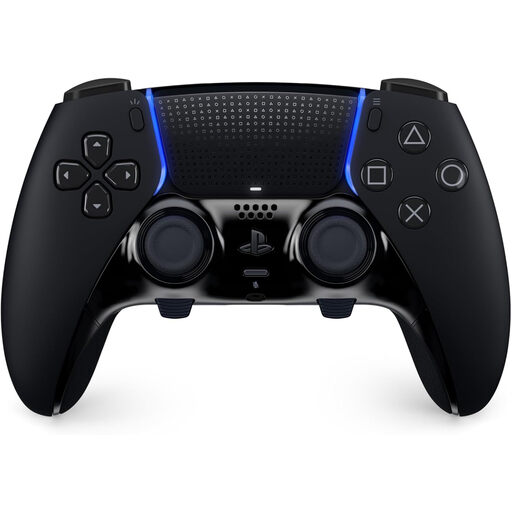
Sony DualSense Edge PS5 Wireless Controller – Midnight Black
Consider this if you play on PS5, prefer a handheld controller and want to move selected commands to back buttons.
PlayStation describes two swappable sets of configurable back buttons for DualSense Edge. Check whether their position suits your grip and whether your games’ required inputs fit the layout you plan to use.
View on Joybuy
 No image available
Turtle Beach Victrix Pro BFG Reloaded Wireless Modular PlayStation Controller – White
Consider this handheld option if changing the control arrangement interests you as well as changing button assignments.
Its product name identifies a modular PlayStation controller. Before buying, confirm that the available module layout suits your grip and that the mapping software works with your intended platform, connection and games.
View on Joybuy
Questions about setup and compatibility
Will a remappable controller work with every game on my console?
No controller-level remapping option guarantees every game’s required inputs. PlayStation says a DualSense or PS VR2 Sense controller may be needed to fully experience or play certain games with Access, so check the games you intend to play against the complete controller setup.
Can I configure an Xbox controller over Bluetooth on Windows?
Not through the Xbox Accessories app over Bluetooth: Xbox Support says the app will not detect the controller for Windows configuration that way. Check whether USB or a compatible Xbox Wireless Adapter works with the controller you intend to configure.
Do I need a DualSense to set up a PS5 Access controller?
Yes. PlayStation says the PS5 should be set up and paired with a DualSense wireless controller when connecting an Access controller; some games may also require a DualSense or PS VR2 Sense controller for full play.
Can Steam Input replace a controller compatibility check?
No. Valve describes Steam Input bindings for supported controllers, but you still need to confirm the controller’s platform and connection support and whether your intended game accepts the controls you require.


