PS5 players who want rear controls
If a frequently used action is awkward on a face button, a configurable rear button may give it another location. PlayStation documents back-button assignments and profile shortcuts for DualSense Edge on PS5.


Choose a controller that works with your console or computer first, then check how it lets you move the actions that are difficult to reach. Rear controls and saved profiles offer different ways to change a layout, but setup may require an app or a particular connection, and PC game compatibility still needs checking.
If a frequently used action is awkward on a face button, a configurable rear button may give it another location. PlayStation documents back-button assignments and profile shortcuts for DualSense Edge on PS5.
Players who change assignments between games may value paddles and controller-stored profiles. Xbox documents both for Elite Wireless Controller Series 2, with connection conditions for configuration on Windows.
For one or two actions, extra bumpers may be enough: 8BitDo documents mapping without software on Ultimate 2C Wireless. Players who need more assignable controls can examine the wired Razer Wolverine V3 Tournament Edition, provided its control positions suit their grip.
Start with the device and games you use, then decide which actions need new positions and how you want to configure them.
| Concern | What to check | Who this matters to |
|---|---|---|
| Device and game compatibility | Confirm your console or operating system, intended connection and each game’s controller support. | If I cannot use the controller with my main device and games, its extra buttons will not solve my layout problem. About 29% of consumers put device and game fit first. |
| Mapping and saved profiles | Check whether assignments use controller settings, an app or game settings, and whether profiles are stored on the controller. Xbox says most Accessories app features on Windows do not work over Bluetooth. | When I switch games, I want to retrieve my preferred assignments without rebuilding them each time. For about 36% of consumers, saving and changing layouts is the primary need. |
| Extra control positions | Name the actions you want to move, then compare the position of rear buttons, paddles or extra bumpers with your grip. | If several frequent actions are hard to reach, I need extra controls in positions I can actually use; a cable may also suit my playing position. Placing actions on extra controls comes first for about 21% of consumers. |
| Connection and battery routine | Check which wired or wireless mode works with your device, how mapping is set up and, for wireless use, the charging arrangement. | I only need to move one or two actions and would rather keep setup simple than manage another app; my wireless routine matters too. About 14% of consumers primarily want that straightforward setup. |
A controller may connect without exposing the configuration you want. Xbox says most Xbox Accessories features on Windows are unavailable over Bluetooth; PlayStation describes DualSense Edge PC use with compatible games and applications.
Check your device, operating system, connection method and intended games against the controller’s setup instructions before ordering.
Two conveniently placed controls can be more relevant to your actions than a larger set you cannot comfortably reach. PlayStation, 8BitDo and Razer document different extra-control arrangements on the models discussed here.
List the actions you would move, then compare the controls’ locations with the way you hold a controller.
8BitDo describes its Ultimate 2C Wireless battery-life figures as results from an ideal laboratory environment, not a guaranteed runtime for every connection mode and use pattern.
Check the mode you would use and whether charging fits your routine; consider a wired route if you would rather use a cable.
A wired alternative also needs a workable cable path between your playing position and the device.
Razer requires qualifying proof of purchase for a limited-warranty claim. Separately, the UK Consumer Rights Act 2015 requires supplied goods to be of satisfactory quality; a manufacturer warranty does not replace that statutory requirement.
Keep your order confirmation, receipt and product details, and contact the seller if a fault develops.
DualSense Edge is a PS5-focused option for moving actions to back buttons and switching between saved layouts.
Elite Wireless Controller Series 2 offers paddle assignments and controller-stored profiles for Xbox and Windows use.
Wolverine V3 Tournament Edition is a wired Xbox and PC controller for players considering several extra control positions.
Ultimate 2C Wireless offers two remappable extra bumpers for its documented Windows and Android uses.
These controllers offer Xbox or PlayStation layout options for players considering button reassignment. Check the exact device, game and setup method before choosing between them.
 No image available
Consider this for Xbox or Windows play when paddle assignments and several saved layouts matter to you. Xbox documents up to three custom profiles plus a default profile for Series 2. On Windows, check your configuration connection: most Xbox Accessories app features do not work over Bluetooth.
 No image available
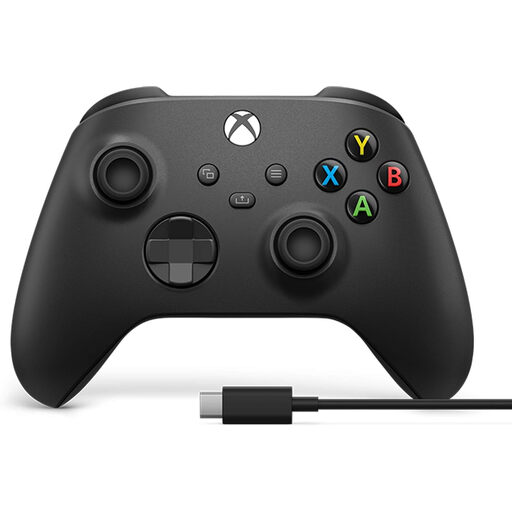
For Xbox Series X|S, Xbox One or Windows players whose main aim is button reassignment, check that the available Xbox Accessories mapping options cover the actions you need. This bundle includes a USB-C cable; if extra physical controls are essential, confirm the layout of this particular model before buying.
 No image available
This wireless modular controller is a PlayStation option to examine if you want to change button assignments. Confirm that its app-based setup works with your intended device and games, and check the position of any additional controls you plan to use.
Check each game rather than assuming it will. Controller-level assignments and a game’s own settings are different configuration paths, and PlayStation describes DualSense Edge PC use with compatible games and applications.
Not for every controller. Xbox Elite Wireless Controller Series 2 uses Xbox Accessories for configuration, and DualSense Edge profiles can be edited through PS5 settings or PlayStation Accessories on Windows. 8BitDo states that Ultimate 2C Wireless supports custom mapping without software.
Do not rely on Bluetooth for most Xbox Accessories app features on Windows. Xbox advises using USB or an Xbox Wireless Adapter for those configuration features.
Start with the particular game actions you want to move, then look for reachable positions for those actions. Two extra controls may cover a small set of recurring actions; if you need to relocate more, compare the layout of additional buttons or paddles before ordering.
Keep the listing, order confirmation and receipt so you can identify what was supplied and contact the seller. The UK Consumer Rights Act 2015 requires supplied goods to be of satisfactory quality; a manufacturer’s warranty is separate, and Razer requires qualifying proof of purchase for its limited-warranty claims.