PS5 players who use game-specific profiles
If you change button assignments, stick settings or trigger settings between games, DualSense Edge offers profiles and controller shortcuts for switching layouts, according to PlayStation Support.


Choose a controller you can configure and use on your main platform: DualSense Edge offers PS5-focused profiles, while Xbox Elite Wireless Controller Series 2 supports profiles on Xbox and Windows, though Windows configuration requires more than Bluetooth. If your priority is extra physical inputs or an adaptable layout, consider a compatible third-party controller or PlayStation Access respectively; check the exact model’s app, connection method and game support before buying.
If you change button assignments, stick settings or trigger settings between games, DualSense Edge offers profiles and controller shortcuts for switching layouts, according to PlayStation Support.
If you want actions within reach of paddles or back buttons, compare the physical inputs with the profile and configuration options available on your Xbox or Windows setup. Xbox documents these options for Elite Series 2; Razer documents extra inputs for its wired Wolverine V3 Tournament Edition.
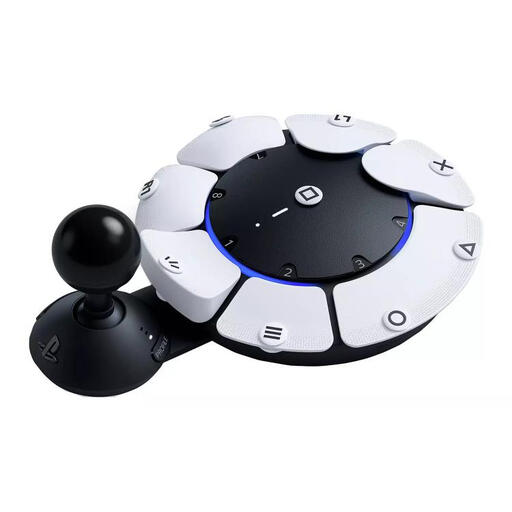
If the placement of controls or use of external switches matters more than conventional back buttons, PlayStation’s Access controller supports orientation changes, configurable profiles and external inputs on PS5.
Start with the platform on which you will play and configure the controller, then decide whether your primary need is new button assignments, more reachable inputs, PC flexibility or a different physical layout.
| Concern | What to check | Who this matters to |
|---|---|---|
| Platform profiles | Check the exact console or operating system, configuration app and method for saving and switching profiles. | If I change layouts between games, I need to know I can configure and recall them on my main platform. Around 36% of consumers put platform-native profiles first. |
| Extra physical inputs | Count the remappable paddles, rear buttons or extra bumpers on the exact model, and check which accessories are included. | When I want actions within reach while using the sticks, swapping the functions of existing face buttons is not enough. Extra physical inputs are the primary need for around 29% of consumers. |
| PC configuration | Check app support for the model and whether configuration or key features require USB or a compatible adapter. | If I move between PC games or devices, I need the intended software and connection method to support my layout. Around 21% of consumers prioritise PC configuration and connection flexibility. |
| Adaptable layout | Check orientation, external-input connections and how the complete setup will provide essential console controls. | If conventional button placement is difficult to use, I need a layout built around the controls I can reach. An adaptable physical setup comes first for around 14% of consumers. |
A controller may connect to a device without offering the configuration features you expect. Xbox Support says Windows configuration of Elite Series 2 needs USB or a compatible Xbox Wireless Adapter; PlayStation says DualSense Edge features outside PS5 vary by device, game and connection.
Check how you will both play and edit profiles on your exact platform. Bluetooth connectivity alone is not proof that the configuration app will work.
If you only want to exchange existing button functions, remapping may meet that need without additional physical controls. Paddles and back buttons address a different need: placing actions within reach while you hold the controller.
List the actions you want to move before deciding whether you need remapping, extra inputs or both.
PlayStation Support says the trigger-effect function does not work when DualSense Edge trigger-stop sliders are set to medium or shallow travel.
Choose shorter travel when that setting suits your game; keep long travel when trigger effects matter to you.
A warranty and remedies for faulty goods are separate. Citizens Advice states that warranties and guarantees add to legal rights rather than replace them.
Keep proof of purchase and contact the retailer about a fault, while also checking any applicable manufacturer warranty.
The Elite Wireless Controller Series 2 is an Xbox and Windows route for players who want paddles and saved control profiles.
DualSense Edge addresses PS5-focused gamepad customisation, while Access offers an adaptable physical layout and external inputs on PS5.
The Wolverine V3 Tournament Edition is a wired Xbox and PC option for players seeking several extra physical inputs.
The Ultimate 2 Wireless Controller is a configurable route centred on Windows and Android compatibility.
These controllers address different custom-control needs, from an adaptable PS5 layout to PlayStation modular controls, PC play and a mobile controller. Check each model’s configuration options for the platform and games you intend to use.
 No image available
Consider this for a PS5 setup where adaptable control placement or external inputs matter more than conventional back buttons.
PlayStation documents configurable Access profiles and 3.5 mm expansion ports. Plan how your complete setup will provide the PS5 controls you need; do not assume PC compatibility.
 No image available
Consider this White variant if a modular PlayStation controller appeals to you, but check that its control options fit the games you play.
Confirm the modules supplied with this variant and the configuration features available on your intended platform before relying on a particular layout.
 No image available
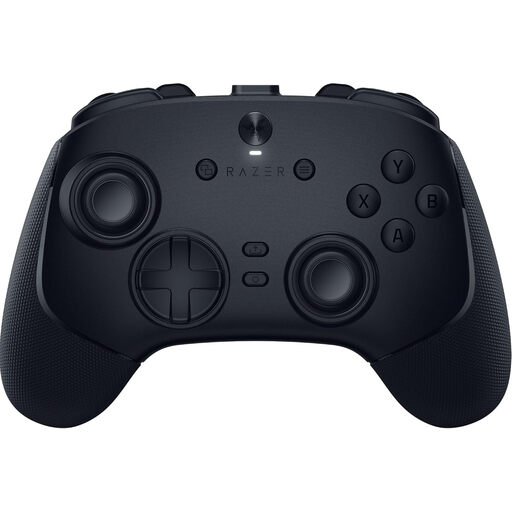
For PC play, consider this wireless model if its specific remapping options cover the actions you want to move.
Check the number of configurable inputs and the software and connection needed to set them up. Features documented for the different Wolverine V3 Tournament Edition should not be assumed for this Pro model.
 No image available
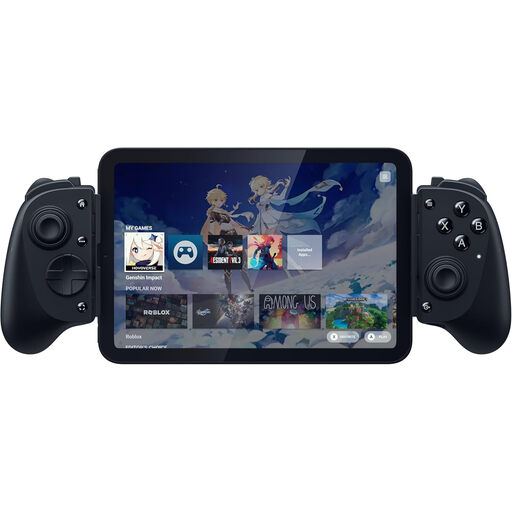
Consider this mobile controller if smartphone play is part of your setup; check its fit and controls for your device before buying.
If you also intend to use it directly with a PC, confirm the connection and whether remapping works as needed in your games. The product listing says the cable for direct PC use is sold separately.
No, not through the normal Xbox Accessories configuration process. Xbox Support says to use USB or a compatible Xbox Wireless Adapter on Windows; most app features are not supported over Bluetooth.
Yes. PlayStation Support says PlayStation Accessories on Windows can create and edit DualSense Edge profiles, which are saved to the controller. Availability of other features outside PS5 still depends on the device, game and connection.
No. PlayStation Support says the trigger-effect function does not work with the stops set to medium or shallow travel. Keep long travel if those effects matter in the games you play.
No. Citizens Advice states that warranties and guarantees add to legal rights rather than replace them. Keep proof of purchase and contact the retailer about the fault; check any manufacturer warranty separately.